
External skills
External skills let netclaw read skill directories owned by other AI tools: Claude Code, Open Code, or any directory on disk. Point netclaw at an existing directory and it scans those skills alongside its own. No copying required.
External skills use the SKILL.md format with description in the frontmatter and a markdown body. See Skills overview for the format and where external skills rank.
Add a source
Section titled “Add a source”To add Claude Code’s skills:
netclaw skill source add claude-code --well-known claude-codeFor any other directory, use --path:
netclaw skill source add team-skills --path /opt/skills/sharedAdding a source changes netclaw.json, so the daemon restarts itself in-process and picks up the new directory. You can also run netclaw config, open Skill Sources and choose + Add local folder to browse for one.
The directory has to exist. skill source add --path refuses a missing one with [FAIL] directory not found.
Well-known sources
Section titled “Well-known sources”An alias expands to a standard set of paths:
| Alias | Reads |
|---|---|
claude-code | ~/.claude/skills/, ~/.claude/commands/, and ~/.claude/plugins/marketplaces/*/skills/ for each marketplace folder that exists |
open-code | ~/.open-code/skills/ |
The claude-code alias reads marketplace folders in alphabetical order, so precedence stays stable. It works out the list of marketplace folders when the daemon starts. Install a new marketplace and you need to restart the daemon (any config change does it) before netclaw sees it. New skill files inside a folder netclaw already watches show up live.
The alias reads skills only. It doesn’t read Claude Code plugin commands, agents, hooks or MCP servers, and it skips ~/.claude/plugins/cache/. Flat .md files in ~/.claude/commands/ count as skills even without frontmatter. netclaw takes the name from the file name and the description from the first line.
Configuration
Section titled “Configuration”External sources live under ExternalSkills.Sources in netclaw.json:
{ "ExternalSkills": { "Sources": [ { "Name": "claude-code", "WellKnown": "claude-code", "Enabled": true, "AllowSymlinks": true }, { "Name": "team-skills", "Path": "/opt/skills/shared", "Enabled": true, "AllowSymlinks": false } ] }}| Field | Type | Default | Description |
|---|---|---|---|
Name | string | - | Unique identifier for the source |
Path | string | none | Absolute path to a skill directory. Set this or WellKnown, not both. |
WellKnown | string | none | Well-known alias. Set this or Path, not both. |
Enabled | bool | true | Whether the source is active |
AllowSymlinks | bool | false | Follow symlinks inside the directory. skill source add --well-known sets it to true. |
Manage sources from the CLI
Section titled “Manage sources from the CLI”netclaw skill source list # show configured sourcesnetclaw skill source disable team-skills # keep it in config, stop scanningnetclaw skill source enable team-skillsnetclaw skill source remove team-skills # config entry only, files stayThese commands edit netclaw.json and don’t need the daemon. A running daemon restarts itself when the file changes. Skill servers aren’t managed here. See Skill feeds.
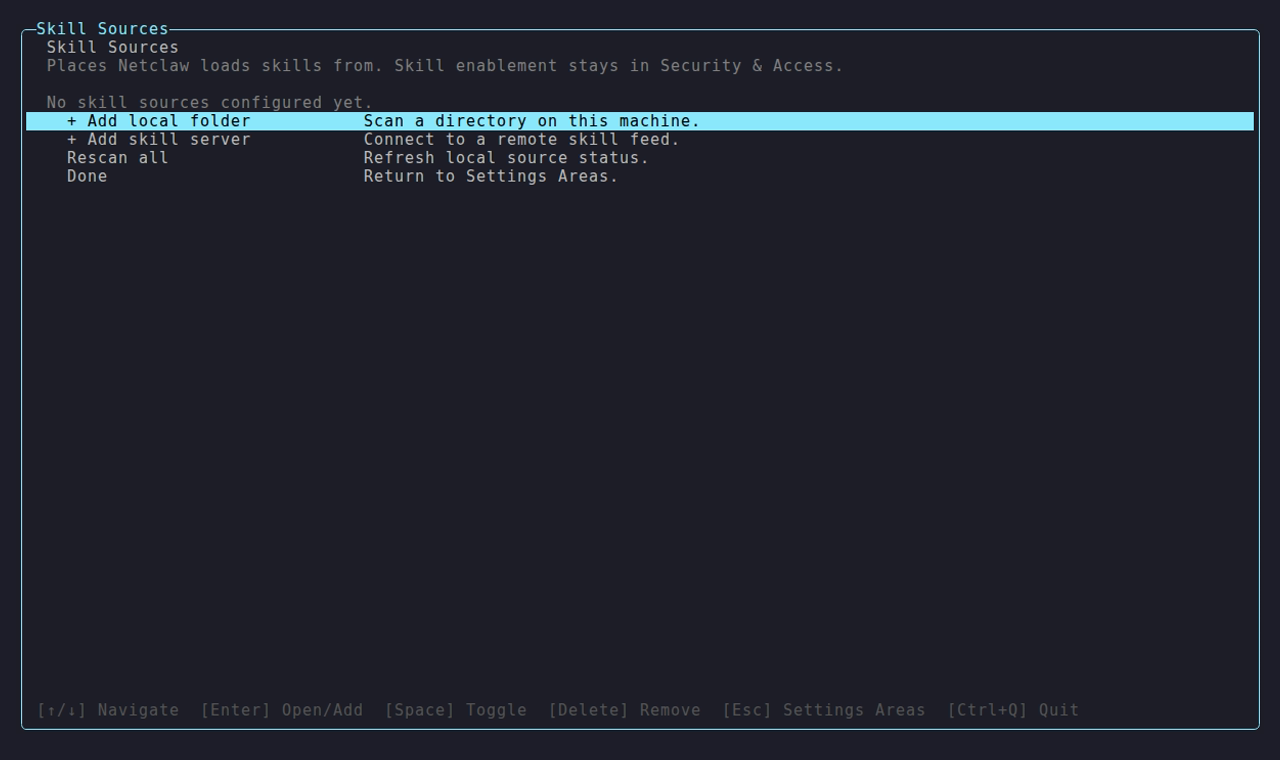
The Claude Code folder is the well-known source added with netclaw skill source add. In the Skill Sources screen, + Add local folder opens a directory picker (Ctrl+N makes a new folder) and + Add skill server connects a remote feed.
Precedence
Section titled “Precedence”system > native > server feeds > externalExternal sources always rank last. Within them, the order of the Sources array decides, so put the one you want to win first. A shadowed skill shows up as a DuplicateName issue in netclaw skill issues.
Live changes
Section titled “Live changes”The daemon watches every external path. When a *.md file changes, it rescans after a 500 ms pause, so several quick writes cause one rescan. A new skill file in an external directory is available to new sessions without a restart. A path that doesn’t exist at startup is logged and skipped.
Security
Section titled “Security”netclaw doesn’t scan external skills for prompt injection. Skill scanning is off for every tier, so point netclaw only at directories you trust.
- Symlinks are blocked unless the source sets
AllowSymlinks: true. Well-known aliases get it automatically because their standard paths often include symlinks. A custom path defaults tofalse. allowed-toolsis informational and grants nothing. Tool access follows the security model.- Frontmatter has to parse and include a
description. A skill without one is rejected withMissingDescription.
Validate a skill
Section titled “Validate a skill”netclaw skill validate /opt/skills/shared/deploy/SKILL.mdnetclaw skill issuesvalidate applies the native rules: the frontmatter name must match the directory name, and symlinks aren’t followed. A skill that the daemon loads happily from an external source can still fail validate for either reason. netclaw skill issues scans the native and external sources and lists everything it rejected or shadowed.
Troubleshooting
Section titled “Troubleshooting”A source shows 0 skills
Section titled “A source shows 0 skills”- Symptom:
netclaw skill listshows nothing from the source. - Cause: The directory holds no
SKILL.mddirectories or.mdfiles with adescription, or the source is disabled. - Fix: Run
netclaw skill source list, thennetclaw skill issues. Missingdescriptionis the usual cause.
Symlink blocked
Section titled “Symlink blocked”- Symptom:
netclaw skill issuesor the daemon log reports a blocked symlink. - Cause: The source has
AllowSymlinks: falseand the directory contains links. - Fix: Restructure the directory, or set
AllowSymlinks: trueif you trust where the links point.
Edits don’t show up
Section titled “Edits don’t show up”- Symptom: You changed a skill, but the agent still sees the old one.
- Cause: The daemon isn’t running, the source is disabled, or the session started before the change.
- Fix: Check
netclaw statusandnetclaw skill source list, then start a new session.
Related pages
Section titled “Related pages”- Skills overview: format, tiers and precedence
- Skill feeds: skills from a skill server
netclaw skill: the full command reference- Slash commands: run any skill with
/name
Resources
Section titled “Resources”- AgentSkills.io: the
SKILL.mdformat specification - Claude Code documentation: Claude Code setup and its skill and plugin folders
- FileSystemWatcher: the .NET file watcher netclaw uses
 Built by Petabridge