
Models
netclaw assigns models to three roles in the Models section of ~/.netclaw/config/netclaw.json: Main, Fallback, and Compaction. Only Main is required. Fallback and Compaction route to Main when unset. You need at least one provider configured first, and netclaw model edits all of this interactively.
Choosing a model
Section titled “Choosing a model”netclaw needs two things from a model: reliable tool calling and enough context for a large first turn. A fresh session with the default tools sent about 10,000 input tokens on its first message in our test runs, before you’ve typed anything of substance. The number moves with your enabled tools, skills, and memory, but plan for a context window of 32k at the least. The 4,096-token floor netclaw enforces is a sanity check, not a working minimum.
| Role | What it does | A sensible choice |
|---|---|---|
| Main | Every conversation turn and tool call | The best tool-calling model you can afford |
| Fallback | Takes over when Main fails (see Failover) | A different provider than Main, so one outage doesn’t take out both |
| Compaction | Summarizes context, titles sessions, extracts memories | A smaller, cheaper model. It never needs to be your best one |
A small setup that works: one capable model as Main, and nothing else. Add Compaction when you want to keep a big model free for conversations, and Fallback when you can’t tolerate downtime.
Roles that name the same provider and model share one definition, so an override set for one applies to both.
Tested with Qwen3.8 27B at Q4 on llama.cpp (131,072-token context): tool calls and image inspection worked end to end.
Minimal config
Section titled “Minimal config”{ "Models": { "Definitions": { "qwen-main": { "Provider": "local-ollama", "ModelId": "qwen3:30b" } }, "Roles": { "Main": "qwen-main" } }}Provider must match a key under Providers in the same file. The context window is detected from the provider.
Run netclaw model to open the Model Manager.
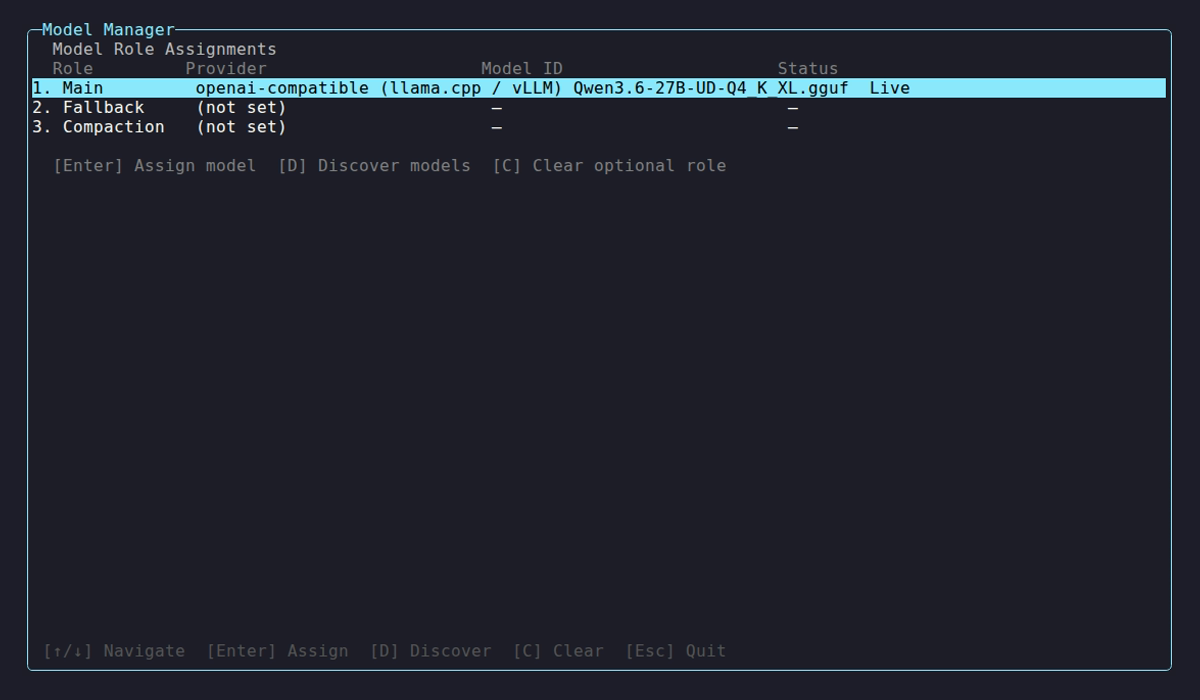
Enter assigns a model to the highlighted role, D discovers models from a provider, P edits the output limit and thinking level, and C clears the highlighted Fallback or Compaction. The Status column reads Manual for a model you set by hand. The role table also has Max out and Thinking columns, which show default until you set them.
Definitions and roles
Section titled “Definitions and roles”Models has two halves. Definitions describe models, and Roles name which definition fills each job:
{ "Models": { "Definitions": { "qwen-main": { "Provider": "remote-gpu", "ModelId": "qwen3:30b", "ContextWindow": 32768 }, "qwen-small": { "Provider": "remote-gpu", "ModelId": "qwen3:8b", "ContextWindow": 32768 } }, "Roles": { "Main": "qwen-main", "Fallback": "qwen-small", "Compaction": "qwen-small" } }}Point Main at a different definition and the old one keeps its overrides, so switching back restores exactly what you had. Fallback and Compaction share qwen-small here, and editing it moves both.
Definition names are yours. netclaw model set generates <provider>-<model-id> (with punctuation in the model ID turned into hyphens), but nothing depends on that shape. Names match case-insensitively and must be unique. Roles takes exactly Main, Fallback, and Compaction.
| Field | Type | Default | Description |
|---|---|---|---|
Provider | string | "local-ollama" | Key into the Providers dictionary |
ModelId | string | "qwen3:30b" | Model identifier as the provider API names it |
ContextWindow | int? | detected | Context window in tokens. Wins over the provider-reported value |
Provenance | enum? | null | Written by the CLI: Live, Defaults, or Manual. Don’t set it by hand |
InputModalities | string? | detected | Comma-separated flags: Text, Image, Audio, Video. Example: "Text, Image" |
OutputModalities | string? | detected | Same values. Example: "Text" |
MaxOutputTokens | int? | 32000, clamped | Output limit in tokens for every call. At least 1, and below ContextWindow when that is set |
Thinking | enum? | model default | Off, Low, Medium, High or Max. Which levels work depends on the provider and model, see Output limit and thinking level |
Modalities are one comma-separated string, not a JSON array. An omitted optional field means “detect it at runtime”. netclaw writes no placeholder for “cleared”.
Context window and modalities
Section titled “Context window and modalities”Precedence for the context window, highest first:
ContextWindowon the definition- The value the provider reports
- 32,768 tokens
Modalities follow the same order, ending at text-only. Runtime detection never writes back to your config (since 0.25.3), and netclaw model discover doesn’t rewrite a definition either. Overrides exist only because you set them.
Detection asks, in order: the Ollama /api/show endpoint (Ollama providers), the OpenAI-compatible /v1/models and llama.cpp /props endpoints (openai-compatible providers), the OpenRouter catalog, then Hugging Face. Results merge per field, and the first answer for a field wins. Each resolver gets 5 seconds. See Self-hosted providers for what each backend reports.
Check what netclaw decided:
netclaw statusmodel: demo-model (provider: lab, context: 131,072 tokens) input: Text, Image output: TextWhen detection gets it wrong, override it on the definition:
netclaw model set main remote-gpu qwen3-vl:32b --context-window 65536 --input-modalities "Text, Image"--clear-context-window and --clear-modalities hand a field back to detection. They don’t restore a value you cleared.
Wrong context window
Section titled “Wrong context window”| Symptom | Cause | Fix |
|---|---|---|
[compaction] 4 → 3 messages (keep=2, context=10297/8192 tokens) on every turn | ContextWindow is smaller than netclaw’s own first-turn prompt, so compaction fires constantly | Raise ContextWindow to what the server really serves, or clear it |
Context window exceeded after compaction in the error | ContextWindow is larger than the server’s real context (for llama.cpp, --ctx-size), so the server rejects the request | Lower ContextWindow to the server’s value |
config on disk not applied: Invalid model configuration: Models:Definitions:<name>:ContextWindow (2000) is below minimum (4096) in netclaw status, or a startup failure with the same message | Override below the 4,096 floor | Raise it. The floor applies to role-bound definitions only |
netclaw status and netclaw model discover disagree | They read different sources: status shows what the running daemon resolved, discover lists what the provider says | Trust status, and pin ContextWindow if the provider’s number is wrong |
A ContextWindow above what the provider reports logs a warning and netclaw uses your number anyway. If the number is too big, the provider rejects the oversized request.
Image attachments ignored
Section titled “Image attachments ignored”If the model can see images but netclaw status shows input: Text, detection found no modality data. The daemon log says so: resolved to text-only input; no modality data came from the provider or capability oracles. Set --input-modalities "Text, Image" as above. Images and other file types covers what happens next.
Output limit and thinking level
Section titled “Output limit and thinking level”A definition can carry an output limit and a thinking level. Set them with netclaw model set, or press P in the Model Manager:
netclaw model set main my-anthropic claude-opus-5-5 --max-output-tokens 64000 --thinking high--clear-max-output-tokens and --clear-thinking remove a setting. netclaw model list shows both in the Max out and Thinking columns.
- Default limit. With no
MaxOutputTokens, a hosted API gets 32000, capped to the model’s known maximum and clamped to the context window minus the estimated prompt and tool schemas. Anthropic replies used to stop at 1024 tokens and no longer do, so the cost per call can go up. - Self-hosted servers. The same clamp applies only when the window is known, from
ContextWindowor the server’s own probe. Otherwise netclaw sends no limit and the server decides. A self-hosted server must use theollamaoropenai-compatibletype. A hosted type such asdeepseekpointed at your own server is treated as hosted. - Thinking counts against the limit. A low limit with a high level can cut the reply short.
- Cut-off replies fail the turn. A reply that hits the limit with no tool call ends the turn with
The model reply was truncated. The partial text isn’t posted. - Levels are never rounded.
model setoffers only the levels the provider dialect can send and the model accepts, and rejects anything else with the list it would accept. DeepSeek has nomedium. Ollama and theReasoningEffortdialect have nomax. When the probe can’t tell what a model supports, onlyoffis offered, and a hosted API with the native dialect offers none. - One definition, one setting. Two roles that share a definition change together. Make a second definition of the same model for different settings per role.
An openai-compatible provider needs a thinking dialect before it can send a level. netclaw model set saves ReasoningEffort when it detects llama.cpp. For vLLM, SGLang or a proxy, set it by hand. Values are ChatTemplateKwargs, ReasoningEffort, DeepSeek and None:
{ "Providers": { "local": { "Type": "openai-compatible", "Endpoint": "http://llm.example.internal:8080/v1", "VendorOptions": { "ThinkingDialect": "ReasoningEffort" } } }, "Models": { "Definitions": { "main": { "Provider": "local", "ModelId": "qwen3:30b", "ContextWindow": 32768, "MaxOutputTokens": 4000, "Thinking": "High" } }, "Roles": { "Main": "main" } }}A hand-edited level the dialect can’t send fails startup and netclaw doctor, and doctor --fix doesn’t change it. So does any level but off on an Ollama provider with VendorOptions:DisableThinking set to true.
Failover
Section titled “Failover”With a Fallback configured, netclaw tries Main first, then Fallback, for every model call.
First comes retrying. A transient error is retried up to 3 times with exponential backoff (1 second base, 30 seconds max, plus or minus 25% jitter). Retried: network failures, HTTP 408, 429, and 5xx, and timeout exceptions.
Failover starts after that. Any error still standing, including a 400 or a 401 that retrying skips, moves the call to Fallback. The two cases that don’t fail over:
- A failure after the stream has produced real output (text or a tool call). Splicing two models’ output together would produce garbage. Keepalives and other updates with no content don’t count, so a failure before the first real output still retries and fails over, including on providers that speak the OpenAI Responses protocol.
- A session watchdog timeout, because the session cancels the call itself rather than the provider failing it.
| What you see | Meaning |
|---|---|
provider.failover alert (Warning) | Main failed, Fallback took the call |
provider.unreachable alert (Critical) | Every candidate failed. With no Fallback, Main’s failure alone raises this |
LLM provider unreachable in the daemon log | Same, one candidate |
Every role tries the Fallback model last when one is configured, Compaction and child agents included. A Compaction model that is the same as Main, or unset, simply reuses the Main list.
Slow models and timeouts
Section titled “Slow models and timeouts”Local models hit time limits before cloud ones do. These live under Session in netclaw.json, in seconds:
| Key | Default | Covers |
|---|---|---|
Session.PrefillTimeoutSeconds | 1800 | Waiting for the first token: queue wait plus prompt processing |
Session.FirstTokenTimeoutSeconds | 600 | The gap between streamed tokens once output has started. Sub-agent runs use it too |
Session.NoProgressTimeoutSeconds | 1200 | Total time without real output. Backend keepalives don’t reset it. A call that streams only thinking stops at three times this value |
Session.SidecarLlmTimeoutSeconds | 90 | Titles and memory extraction. Compaction gets twice this plus 5 seconds |
{ "Session": { "SidecarLlmTimeoutSeconds": 300, "NoProgressTimeoutSeconds": 2400 }}The 90-second sidecar budget is the usual first casualty: a slow GPU summarizing a long context hits Context compaction timed out. The session will continue. Raise SidecarLlmTimeoutSeconds. A turn that outlasts the main budgets fails with Session processing operation 'LlmCall' exceeded watchdog timeout of <n>s. Every key is in the configuration reference.
Usage and cost
Section titled “Usage and cost”netclaw stats shows token totals (in and out) since the daemon started, with turns and sessions. Add --days N for a daily table. Headless netclaw chat -p prints a [usage] line per reply. Hosted providers’ prices show in netclaw model discover where the provider publishes them.
netclaw has no token budgets, spend caps, or per-user quotas, and no dollar totals. Set limits at the provider: an OpenRouter key limit, or a spend cap in your Anthropic or OpenAI console. Session.MaxToolIterationsPerTurn is a legacy key and no longer limits a turn. A turn that keeps doing new work can run past 60 rounds. netclaw refuses a call that repeats the same work, and the watchdog timeouts above bound the rest.
Environment variables
Section titled “Environment variables”Override any field with NETCLAW_ variables. Double underscores separate path segments, following the .NET convention:
export NETCLAW_Models__Definitions__claude__Provider="openrouter"export NETCLAW_Models__Definitions__claude__ModelId="anthropic/claude-sonnet-4"export NETCLAW_Models__Roles__Main="claude"Environment variables beat netclaw.json, and Linux names are case-sensitive. A shell can’t export a name containing a hyphen, so use letters, digits, and underscores for definition names, or set the variable through docker run -e, Compose, or a systemd unit, which accept hyphens.
Two quirks of env-only setups. netclaw model list reads netclaw.json only, so an environment-only config shows No models configured. while the daemon runs fine, and netclaw status shows the live model. Without netclaw.json, netclaw doctor skips the checks that read the file, but its Chat Client check still evaluates the environment config, so it does see your model (what doctor skips). The CLI also refuses chat and status with daemon not configured when netclaw.json doesn’t exist, so create one containing {}.
Invalid config
Section titled “Invalid config”A bad Models or Providers section never takes down a running daemon. It keeps the configuration it already has, logs the reason, and netclaw status shows it:
overall: degradedconfig on disk not applied: Models:Roles:Main references unknown definition 'nope'. Defined: d. Fix the name, or run `netclaw model set main <provider> <model>`. The daemon is still running the previous configuration. No change from netclaw.json is applied until this is fixed.Fix the file and the daemon picks it up. netclaw doctor fails the Chat Client check with the same message. The trouble comes at the next start, which happens on a reboot, an upgrade, or docker restart. A daemon that starts on a bad file stops with a one-line error and exits.
| Condition | Result |
|---|---|
Main Provider or ModelId empty, or Main names a provider that isn’t in Providers | Daemon boots degraded, with the No valid model configuration detected. banner on every turn |
| Fallback or Compaction incomplete | Not applied: model 'Fallback' is configured but incomplete (Provider and ModelId are required). Startup fails |
ContextWindow below 4,096 on a role-bound definition | Not applied: ContextWindow (2000) is below minimum (4096). Startup fails |
| A role names a definition that doesn’t exist | Not applied: Models:Roles:Main references unknown definition 'x'. Defined: d. Startup fails |
A role-bound provider has an unknown Type | Not applied: Unknown provider type 'nosuch'. Supported: .... Startup fails |
| A role-bound provider has no credential | Not applied: Provider type 'anthropic' requires authentication. Configure ApiKey or OAuthAccessToken in secrets.json. Startup fails |
Definitions without Roles | Not applied: Models:Definitions is set but Models:Roles is missing or empty. Startup fails |
Inline roles mixed with Definitions/Roles | Not applied: pick one shape. Startup fails |
MaxOutputTokens not below ContextWindow, or a Thinking level the provider dialect can’t send | Not applied: Models:Definitions:main:MaxOutputTokens (40000) must be below the context window (32000). Startup fails |
| Two definition names differing only by case | The daemon keeps the running config and netclaw status shows config on disk not applied: Couldn't read netclaw.json: A duplicate key 'Models:Definitions:dup:Provider' was found. Every other command prints that line and exits 1 |
Unknown role name in Roles | netclaw doctor fails Config Schema. The daemon ignores the extra role |
Under the Docker image a startup failure repeats: the entrypoint restarts the daemon with a growing delay (up to 60 seconds), and docker logs shows the one-line error: ... message each time. The daemon log in ~/.netclaw/logs/ has the same text after Daemon startup stopped:. Unreferenced definitions and providers aren’t validated. netclaw model set doesn’t check that a model ID exists on the provider, so a typo fails on the first turn.
The unknown-definition case is easy to cause by renaming a definition and forgetting a role. netclaw model list and netclaw doctor both name the broken reference.
Applying changes
Section titled “Applying changes”The daemon restarts itself after a valid edit to netclaw.json. Changes from NETCLAW_Models__* variables or secrets.json need a manual restart: netclaw daemon stop then netclaw daemon start on a host, systemctl --user restart netclaw under systemd, or docker restart <container>.
netclaw model list # reads the config filenetclaw status # what the running daemon is usingRelated pages
Section titled “Related pages”netclaw model- assign, discover, and clear models- Managed providers - OpenRouter, Anthropic, OpenAI, Copilot, Venice.ai, DeepSeek
- Self-hosted providers - Ollama, llama.cpp, vLLM
- Migrating model configuration - from inline roles to definitions and roles
- Configuration reference - every
Sessionkey and default
Resources
Section titled “Resources”- Ollama model library - browse models for local inference
- OpenRouter model catalog - compare models and prices across providers
- llama.cpp server docs - context size and slot flags
- .NET environment variable configuration - the double-underscore convention
 Built by Petabridge