
Run netclaw with Mattermost on Docker Compose
This guide gets you a private assistant: netclaw in a hardened container, Mattermost Team Edition and Postgres beside it, one human account, one bot account and one private channel. Nobody else can register, and nothing but Mattermost’s web UI is reachable from your host. Everything runs from a small sample you can copy and change.
What you get
Section titled “What you get”netclaw dials out to Mattermost and to your model endpoint. Nothing dials in to netclaw: it publishes no ports, and its daemon listens on loopback inside its own container. The only port on your host is Mattermost’s, bound to 127.0.0.1.
Because nothing can reach the daemon, approvals for risky tool calls arrive as lettered text replies in the thread, not as buttons. Button approvals need the Mattermost server to call back into the daemon, which means a non-local exposure mode. This stack stays in the default local mode.
Before you begin
Section titled “Before you begin”- Docker Engine 20.10 or newer with Compose v2 (
docker compose) bashandcurlon the host for the two helper scripts- An OpenAI-compatible inference endpoint the container can reach, such as llama.cpp, vLLM or Ollama. Use an address the container can route to, with or without a
/v1suffix.localhostinside the container is the container itself. - Outbound HTTPS from the netclaw container. It downloads its embedding models on first start.
Get the files
Section titled “Get the files”Copy the examples/mattermost-compose/ directory from the website repository:
| File | Purpose |
|---|---|
compose.yaml | The three services, shown below |
.env.example | Passwords and the inference endpoint |
provision.sh | Creates the Mattermost accounts, team, channel and bot token |
configure-netclaw.sh | Wires netclaw to the provider and the bot, and stores the token |
The compose file is the sample’s compose.yaml, byte for byte:
# netclaw + Mattermost (Team Edition) + Postgres on one private network.# Only Mattermost's web UI is published, and only on the host's loopback.
services:  postgres:    image: postgres:17.11-alpine    restart: unless-stopped    environment:      POSTGRES_DB: mattermost      POSTGRES_USER: mattermost      POSTGRES_PASSWORD: ${POSTGRES_PASSWORD:?Set POSTGRES_PASSWORD in .env}    volumes:      - postgres-data:/var/lib/postgresql/data    healthcheck:      test: ["CMD-SHELL", "pg_isready -U mattermost -d mattermost"]      interval: 5s      timeout: 5s      retries: 12    networks: [chat]
  mattermost:    image: mattermost/mattermost-team-edition:11.11.1    restart: unless-stopped    depends_on:      postgres:        condition: service_healthy    environment:      MM_SQLSETTINGS_DRIVERNAME: postgres      MM_SQLSETTINGS_DATASOURCE: postgres://mattermost:${POSTGRES_PASSWORD}@postgres:5432/mattermost?sslmode=disable&connect_timeout=10      MM_SERVICESETTINGS_SITEURL: ${MATTERMOST_SITE_URL:-http://localhost:8065}      # Bots and personal access tokens are off by default. netclaw needs both.      MM_SERVICESETTINGS_ENABLEBOTACCOUNTCREATION: "true"      MM_SERVICESETTINGS_ENABLEUSERACCESSTOKENS: "true"      # Nobody can self-register. Accounts come from provision.sh or an admin.      MM_TEAMSETTINGS_ENABLEOPENSERVER: "false"      # Local mode: lets the healthcheck use mmctl over a container-internal socket.      MM_SERVICESETTINGS_ENABLELOCALMODE: "true"    ports:      - "127.0.0.1:8065:8065" # host loopback only    volumes:      - mattermost-config:/mattermost/config      - mattermost-data:/mattermost/data      - mattermost-plugins:/mattermost/plugins    security_opt:      - no-new-privileges:true    healthcheck:      # The image has no shell or curl, so use mmctl.      test: ["CMD", "/mattermost/bin/mmctl", "--local", "system", "status"]      interval: 10s      timeout: 5s      retries: 18      start_period: 30s    networks: [chat]
  netclaw:    image: ghcr.io/netclaw-dev/netclaw:0.28.2    restart: unless-stopped    depends_on:      mattermost:        condition: service_healthy    # No ports: the daemon stays in the default `local` exposure mode (loopback).    # You drive it with `docker compose exec`, and Mattermost never calls it.    environment:      # The daemon is a single-file .NET binary that unpacks itself on start.      # The root filesystem is read-only, so unpack into a small exec tmpfs.      DOTNET_BUNDLE_EXTRACT_BASE_DIR: /var/netclaw-bundle      # Mattermost. The bot token is NOT here. It goes in netclaw's vault.      NETCLAW_Mattermost__Enabled: "true"      NETCLAW_Mattermost__ServerUrl: http://mattermost:8065      NETCLAW_Mattermost__MentionOnly: "true"      NETCLAW_Mattermost__AllowDirectMessages: "true"      # Allow-lists live here and only here. Env entries merge with netclaw.json      # lists by position, so never set the same list in both places.      # Blank until provision.sh writes the IDs to .env.      NETCLAW_Mattermost__AllowedChannelIds__0: ${MM_CHANNEL_ID:-}      NETCLAW_Mattermost__AllowedUserIds__0: ${MM_USER_ID:-}    volumes:      - netclaw-home:/home/netclaw/.netclaw    # Hardening    user: "1654:1654" # start as the netclaw user, so the entrypoint never needs root    read_only: true # root filesystem is immutable    tmpfs:      - /tmp:rw,noexec,nosuid,size=64m # scratch space only      - /var/netclaw-bundle:rw,exec,nosuid,size=128m,uid=1654,gid=1654 # the unpacked daemon (43 MB), rebuilt on every start    cap_drop: [ALL] # no Linux capabilities    security_opt:      - no-new-privileges:true # no setuid escalation    pids_limit: 256 # fork-bomb ceiling    networks: [chat]
volumes:  postgres-data:  mattermost-config:  mattermost-data:  mattermost-plugins:  netclaw-home:
networks:  chat:
Two settings in the netclaw service exist only because of the hardening flags:
user: "1654:1654"starts the container as thenetclawuser. The image’s entrypoint normally starts as root to fix volume ownership, and with every capability dropped, root can’t enter/home/netclaw. The named volume is already owned by that UID, so nothing needs fixing.DOTNET_BUNDLE_EXTRACT_BASE_DIRplus the/var/netclaw-bundletmpfs give the daemon somewhere to unpack its native libraries. With a read-only root filesystem and no override, the daemon exits at once withDefault extraction directory [/home/netclaw] either doesn't exist or is not accessible for read/write. The tmpfs needsexecbecause the libraries are loaded from it, so thenoexec/tmpmount won’t do. It holds only the 43 MB unpack, which is rebuilt on every start, so nothing executable lives in the data volume and nothing you’d want to keep lives in RAM.
1. Set your passwords and endpoint
Section titled “1. Set your passwords and endpoint”cp .env.example .envchmod 600 .envEdit .env. POSTGRES_PASSWORD should be a long random string with no spaces or $, because configure-netclaw.sh reads the file as shell. Point INFERENCE_BASE_URL and INFERENCE_MODEL_ID at your endpoint, for example http://llm.example.internal:8080. Only configure-netclaw.sh reads those two. The file holds the database password, which is why it’s mode 600. Anyone who can run docker inspect on the Mattermost container can read that password too, because the server takes it as an environment variable.
2. Start the stack
Section titled “2. Start the stack”docker compose up -d --waitCompose prints a line per container state change. The final lines look like this (abridged):
Container mattermost-compose-postgres-1 Healthy Container mattermost-compose-mattermost-1 Healthy Container mattermost-compose-netclaw-1 HealthyOn a warm machine this takes under a minute. netclaw reports healthy even though Mattermost has no bot yet. Its log says so, and that error clears in step 3:
[ERR] Netclaw.Channels.Mattermost.MattermostChannel: Mattermost channel could not connect and will stay offline ... Mattermost is enabled but no bot token is configured.3. Provision Mattermost
Section titled “3. Provision Mattermost”./provision.shWaiting for Mattermost at http://localhost:8065 ...
Done. Open http://localhost:8065 and sign in:
admin admin / 9ec47e0c4858ab0cbccff2ee member alice / ed1bb927c2ace6328f9b66cb (the only user netclaw will answer)
These passwords are not stored anywhere. Save them now.Channel ID and user ID were appended to .env. The bot token is in .bot-token.The script creates an admin, a team named home, a private channel named assistant, a member named alice, and a bot named netclaw with an access token. It adds all three to the team and the channel. It appends MM_CHANNEL_ID and MM_USER_ID to .env, and writes the bot token to .bot-token (mode 600, git-ignored). Run it once. It refuses to run again while .bot-token exists.
Registration is already closed (MM_TEAMSETTINGS_ENABLEOPENSERVER is false), so alice’s account exists only because the script created it.
4. Configure netclaw
Section titled “4. Configure netclaw”./configure-netclaw.shThe output is abridged. The status block also has telemetry, input, output, update and disabled-channel lines.
Added provider 'main' (openai-compatible)OpenAI-compatible (llama.cpp / vLLM / DwarfStar ds4) runs locally. Authentication is optional: pass --api-key to send a Bearer token.
Set main model to main//models/your-model.ggufSet Mattermost.BotToken (encrypted). Container mattermost-compose-netclaw-1 Restarting...overall: healthyversion: 0.28.2 (commit 7419d84, built 2026-10-29T00:10:12Z)daemon: PID 9, uptime 0m 5s, endpoint http://127.0.0.1:5199persistence: Sqlitememory: sqlite (healthy)model: your-model.gguf (provider: main, context: 131,072 tokens)connectors:- mattermost: healthy (enabled)- tui: healthy (enabled)
The script does four things:
- Recreates the netclaw container so it picks up the IDs from
.env. - Runs
netclaw provider addandnetclaw model setto register your endpoint. This also createsnetclaw.json, which the CLI needs beforenetclaw statuswill answer. - Writes the Personal security posture to
netclaw.json, the same keysnetclaw initwrites for one operator, and sets theassistantchannel’s audience topersonal. The agent can then request shell commands there, and each one still needs your approval. Writing these to the file, not to environment variables, is what keepsnetclaw doctorgreen. - Stores the bot token in netclaw’s encrypted vault with
netclaw secrets set, over stdin so it never lands in a process list, then restarts the container. A secrets change doesn’t restart the daemon by itself.
If mattermost isn’t healthy, see Troubleshooting.
Verify it works
Section titled “Verify it works”Open http://localhost:8065, sign in as alice with the password from step 3, and open the assistant channel. Mention the bot:
@netclaw reply with a one-sentence greeting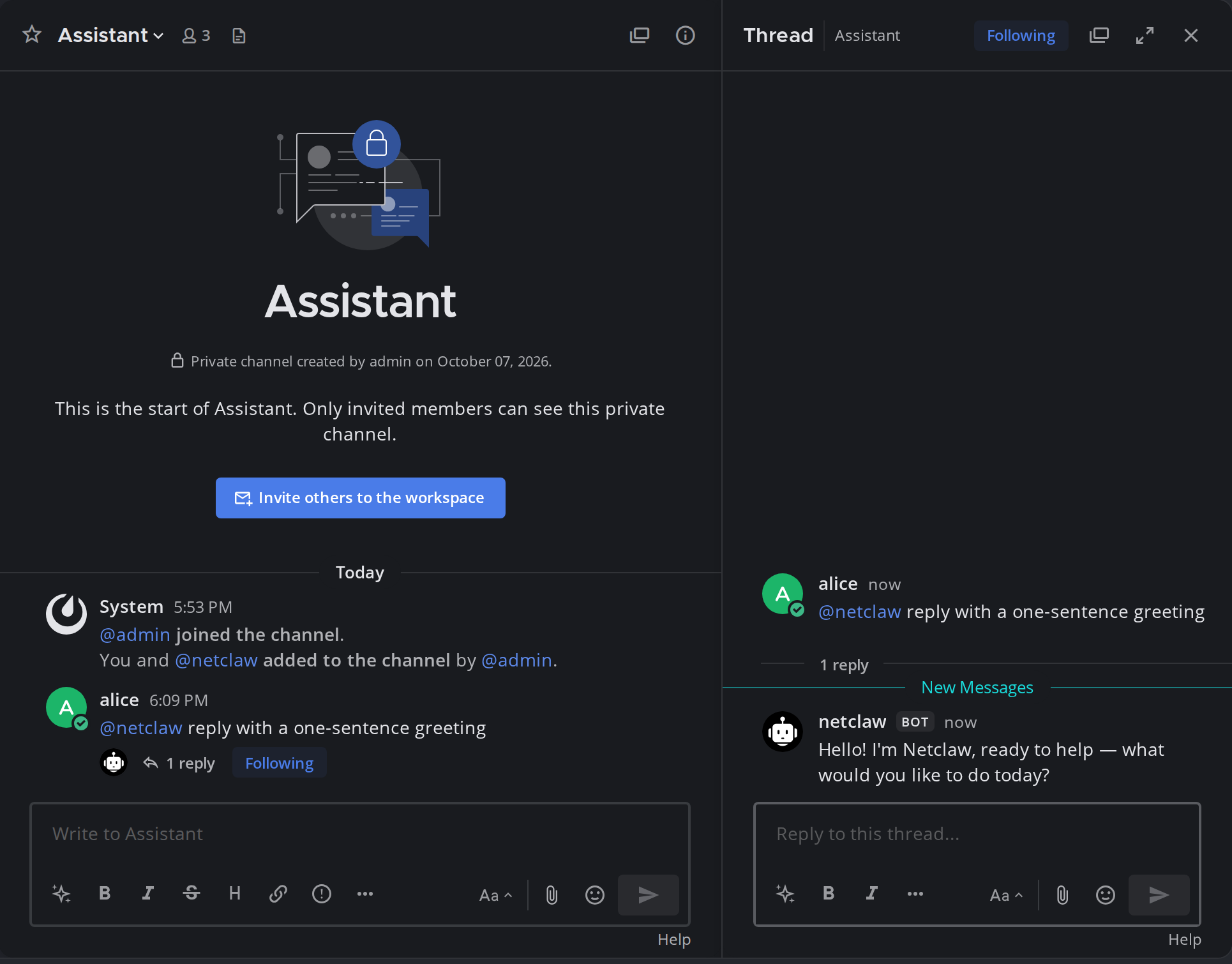
The channel view shows alice’s post with its reply count, and the thread panel shows the bot’s answer carrying the BOT badge.
The bot answers in a thread within a few seconds (longer on a cold model). A real run:
alice: @netclaw reply with a one-sentence greetingnetclaw: Hi! 👋 How can I help you today?Then check the other behaviors:
| Test | What to do | What you should see |
|---|---|---|
| Approval | In a thread, ask @netclaw use the shell to run: touch /tmp/approval-test. | A Tool approval required post with options A to E (five, since /tmp isn’t a Git repository). Reply A and the post updates to Tool approval resolved with Decision: Once (by @<your user ID>). |
| Direct message | Open a DM with netclaw and write without a mention. | A reply. DMs are allowed and MentionRequiredInDm defaults to off. |
| Stranger | Create another user, add them to the channel and mention the bot. | No reply. The daemon log has event_dropped ... reason=user_not_allowed. |
| Persistence | docker compose down, then docker compose up -d --wait. | netclaw status still shows mattermost: healthy. No reconfiguration and no token re-entry. |
The approval prompt looks like this:
:lock: Tool approval requiredTool: shell_executeAction: touch /tmp/approval-test
Reusable grants cover the command words shown above within the selected scope.A one-word program grant covers that program word only. It does not cover subcommands.Pattern: touch
Reply with:A) OnceB) This chatC) Always hereD) Always anywhereE) Deny
That’s the five-option form, which is what touch in /tmp produces. A command run inside a Git repository adds This repository as D, so the picture below, captured for a push in a repository, has six choices from A to F.
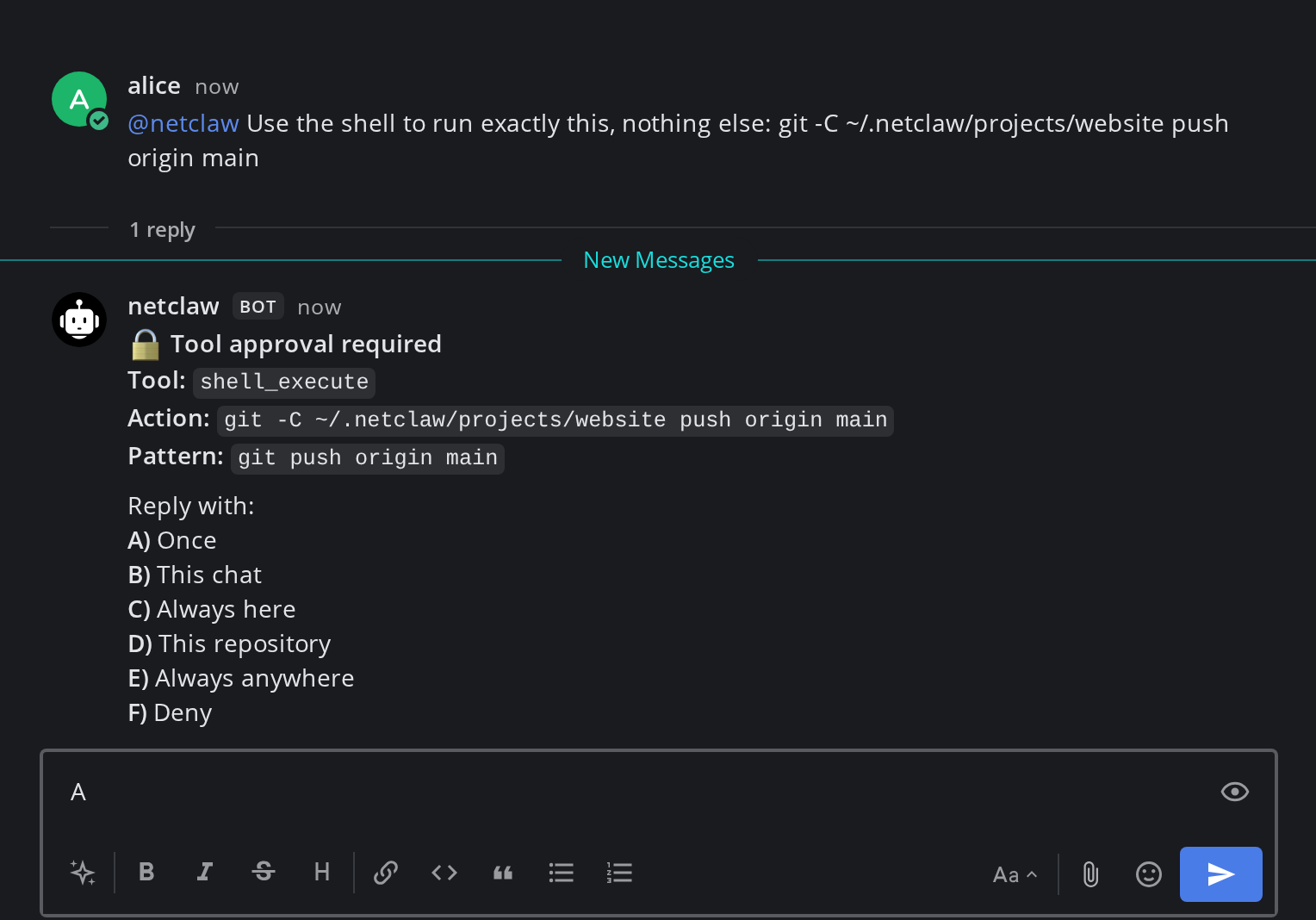
The reply box already holds A, the answer that runs the call once.
After you reply, the post is edited into the resolved form.
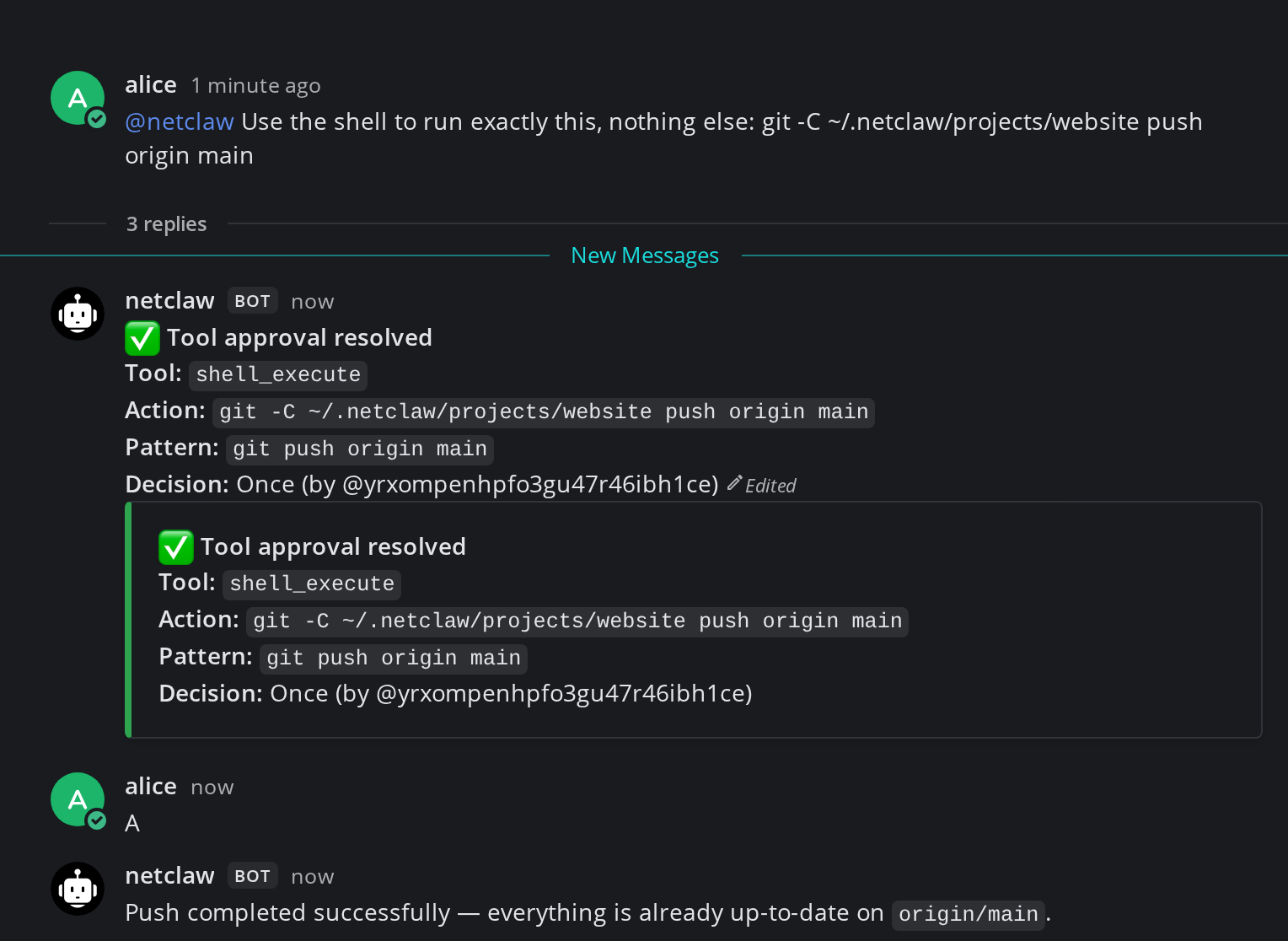
The product prints your Mattermost user ID in the decision line, not your username, so a raw 26-character ID is what you’ll see there. Mattermost also shows the resolved summary a second time in a quoted block.
Only the user whose request triggered the prompt can answer it. The choices are explained in How tool approvals work.
Read the daemon log from the volume. docker logs shows almost nothing because the daemon writes to files:
docker compose exec netclaw sh -c 'tail -f ~/.netclaw/logs/daemon-*.log'docker compose logs netclaw shows one harmless warning at startup, Failed to persist telemetry device ID; using an in-memory identifier, and the container’s restarts count stays at 0. The daemon log also records warnings about ephemeral DataProtection keys on every start. Those are expected in a read-only container.
Access control
Section titled “Access control”The stack is default-deny in three places:
| Layer | Setting | In this stack |
|---|---|---|
| Who can register | MM_TEAMSETTINGS_ENABLEOPENSERVER | false. Accounts exist only if an admin creates them. |
| Which channels netclaw reads | AllowedChannelIds | The one assistant channel. Any other channel gets channel_not_allowed. |
| Who netclaw answers | AllowedUserIds | alice only, in the channel and in DMs. Everyone else gets user_not_allowed. |
MentionOnly is on, so in the channel netclaw answers only messages that mention it. After it has joined a thread, replies in that thread don’t need a mention. To change that, set MentionRequiredInThreadByChannel for the channel ID, as covered in Mattermost.
The audience is per channel, not per person. Every user you add to AllowedUserIds gets the same personal powers in assistant, including shell requests, so only add people you’d hand that to.
Add another person
Section titled “Add another person”Create the account with mmctl inside the Mattermost container, add them to the team and channel, and read their ID:
docker compose exec mattermost /mattermost/bin/mmctl --local user create \docker compose exec mattermost /mattermost/bin/mmctl --local team users add home bobdocker compose exec mattermost /mattermost/bin/mmctl --local channel users add home:assistant bobdocker compose exec mattermost /mattermost/bin/mmctl --local user listInline passwords land in shell history, so this uses a random one. Reset it later with mmctl --local user change-password bob. user list prints <id>: <username> (<email>). Add the ID to the netclaw service as the next index, then apply it:
NETCLAW_Mattermost__AllowedUserIds__0: ${MM_USER_ID:-} NETCLAW_Mattermost__AllowedUserIds__1: abdwjgu7oprgifgj6td8j7s4rydocker compose up -d --wait netclawFor a second, separate assistant, run another copy of the sample under a different project name (docker compose -p second ...) with its own bot. That keeps each assistant’s memory, secrets and approvals apart.
Set allow-lists in one place
Section titled “Set allow-lists in one place”Every list setting has two homes: the NETCLAW_* variables in the compose file and netclaw.json. .NET merges them by position, not by replacing one with the other. We tested the failure modes on 0.28.2:
| Setup | Result |
|---|---|
AllowedChannelIds__0 blank in the compose file, ["<id>"] in netclaw.json | The blank entry overwrites position 0. The channel is denied (channel_not_allowed). |
AllowedChannelIds__0 blank, ["<other>", "<id>"] in netclaw.json | Position 1 survives and <id> still works, by accident. |
A NETCLAW_Tools__... list variable that is empty, plus the same list in netclaw.json | The daemon aborts at startup with Configuration key 'Tools.WebFetch.HttpAllowList' has list items and also a value, and the container restart-loops. |
The safe way is one source per list. This sample keeps the Mattermost allow-lists in the compose file and nothing about them in netclaw.json. Don’t use netclaw config → Channels to edit this stack’s channels, because its save writes AllowedChannelIds and AllowedUserIds into netclaw.json. If you want the TUI, move the lists into the file and delete the NETCLAW_Mattermost__Allowed* lines.
Back up and upgrade
Section titled “Back up and upgrade”All netclaw state is in the netclaw-home volume: identity, config, the encrypted secrets.json and the keys/ that decrypt it, sessions and the SQLite database. Mattermost keeps its data in Postgres and the mattermost-data volume. Back up all four volumes together. Back up, restore and move netclaw covers the netclaw side.
docker compose down keeps your data. docker compose down -v deletes every volume, bot token included.
To upgrade netclaw, change the pinned tag in the netclaw service, back up the volume first because state migrations only go forward, then run docker compose up -d --wait netclaw. Upgrade netclaw has the details. Bump mattermost and postgres the same way, one at a time. A Postgres major-version bump needs a dump and restore, so read Postgres’s upgrade notes first.
Put Mattermost behind TLS
Section titled “Put Mattermost behind TLS”The sample serves plain HTTP on 127.0.0.1, which is fine on one machine. To reach Mattermost from other devices, put a reverse proxy in front of the mattermost service, make it forward WebSocket upgrades, and set MATTERMOST_SITE_URL in .env to the public https:// address. Follow Mattermost’s NGINX proxy guide or the equivalent for your proxy. netclaw keeps talking to http://mattermost:8065 over the private network, so its configuration doesn’t change.
Troubleshooting
Section titled “Troubleshooting”netclaw restarts with cannot create directory '/home/netclaw'
Section titled “netclaw restarts with cannot create directory '/home/netclaw'”Symptom: the container is unhealthy and its log repeats mkdir: cannot create directory '/home/netclaw': Permission denied.
Cause: cap_drop: [ALL] without user: "1654:1654". The image starts as root, and root without capabilities can’t enter the netclaw user’s home.
Fix: keep the user: line from the sample.
netclaw exits with Default extraction directory ... doesn't exist
Section titled “netclaw exits with Default extraction directory ... doesn't exist”Symptom: Failure processing application bundle and exit code 159, repeating with growing delays.
Cause: read-only root filesystem and no DOTNET_BUNDLE_EXTRACT_BASE_DIR.
Fix: set it to a writable path on an exec mount, as the sample does with its /var/netclaw-bundle tmpfs.
mattermost: disconnected in netclaw status
Section titled “mattermost: disconnected in netclaw status”Symptom: Mattermost is enabled but no bot token is configured, or Mattermost rejected the bot token (HTTP 401).
Cause: the token isn’t stored yet, or it’s wrong. A fatal connect error like this one keeps the channel offline until you fix it and restart.
Fix: store the token again and restart. The daemon doesn’t watch secrets.json.
docker compose exec -T netclaw sh -c 'netclaw secrets set Mattermost.BotToken "$(cat)"' < .bot-tokendocker compose restart netclawMattermost connects, then reconnects in a loop
Section titled “Mattermost connects, then reconnects in a loop”Symptom: the log shows Connected to Mattermost WebSocket, then Gateway requested clean reconnect: Mattermost gateway reconnected outside a clean startup cycle, then Disconnected from Mattermost WebSocket: Closed by client, with the delay growing each time.
Cause: a startup race in older releases (netclaw#1517, reported on 0.24.2 and 0.26.0-beta.4). Startup now waits for the WebSocket OnConnected event, which shipped in 0.26.0-beta.5.
Fix: pin 0.27.1 or newer. If the loop continues on a current release, check that ServerUrl is the address netclaw can reach (http://mattermost:8065 here), and that any proxy you added between the two forwards WebSocket upgrades.
The bot is connected but never answers
Section titled “The bot is connected but never answers”Symptom: netclaw status shows recv rising and routed at 0.
Cause and fix: read the reason in the daemon log.
| Log reason | Meaning | Fix |
|---|---|---|
channel_not_allowed | The channel isn’t in AllowedChannelIds, or MM_CHANNEL_ID was empty when the container started. | Check docker compose exec netclaw printenv NETCLAW_Mattermost__AllowedChannelIds__0. If it’s blank, fix .env and run docker compose up -d --wait netclaw. |
user_not_allowed | The sender isn’t in AllowedUserIds. | Add their ID as the next index. |
ChannelMentionRequired | No @netclaw in a channel message. | Mention the bot. |
ThreadMentionRequired | MentionRequiredInThreadByChannel is on for the channel. | Mention the bot in thread replies. |
No log line at all means the bot isn’t in the channel. provision.sh adds it, but a channel you create later needs /invite @netclaw.
Replies are slow or fail
Section titled “Replies are slow or fail”Symptom: the bot sees your message but replies late or not at all, and netclaw status shows a degraded model.
Cause: the container can’t reach INFERENCE_BASE_URL. localhost there is the container itself.
Fix: use an address the container can route to, then rerun netclaw provider remove main and ./configure-netclaw.sh. Or edit the provider in docker compose exec -it netclaw netclaw provider.
The compose file fails with required variable POSTGRES_PASSWORD is missing
Section titled “The compose file fails with required variable POSTGRES_PASSWORD is missing”Cause: there’s no .env next to compose.yaml.
Fix: cp .env.example .env and fill it in.
Not tested here
Section titled “Not tested here”The reverse-proxy and TLS section follows Mattermost’s documentation, and wasn’t run. Button approvals weren’t tested because they need a non-local exposure mode.
Related pages
Section titled “Related pages”- Mattermost - bot setup, every config field and the full behavior reference
- How tool approvals work - what each approval choice grants
- Docker deployment - running the image without Compose
- Exposure modes - what it takes to make the daemon reachable
- Channel troubleshooting - symptoms across Slack, Discord and Mattermost
Resources
Section titled “Resources”- Mattermost: Docker install guide - the upstream container deployment
- Mattermost: bot accounts - how bot tokens work
- mmctl command reference - the admin CLI used above
- Docker Compose file reference -
read_only,cap_dropandtmpfssemantics
 Built by Petabridge