
netclaw doctor
netclaw doctor runs 24 checks against your config files, secrets, saved grants, crash logs, memory state and connectivity. It catches what netclaw status can’t: broken JSON schemas, unencrypted secrets, a Slack token that stopped working, a missing PATH for the shell tool. It doesn’t need a running daemon, though a few checks use one when it’s there.
netclaw doctor [options]Options
Section titled “Options”| Flag | Description | Default |
|---|---|---|
--fix | Plan the safe automatic fixes, show a diff and apply them after you confirm | Off |
--dry-run | Show the planned fixes without writing. Implies --fix. | Off |
--yes, -y | Apply fixes without the confirmation prompt | Off |
--format <text|json> | Output format. --format=json also works. | text |
An unknown option prints [FAIL] doctor options: Unknown doctor option: --bogus with the help text and exits 1.
Output
Section titled “Output”netclaw doctor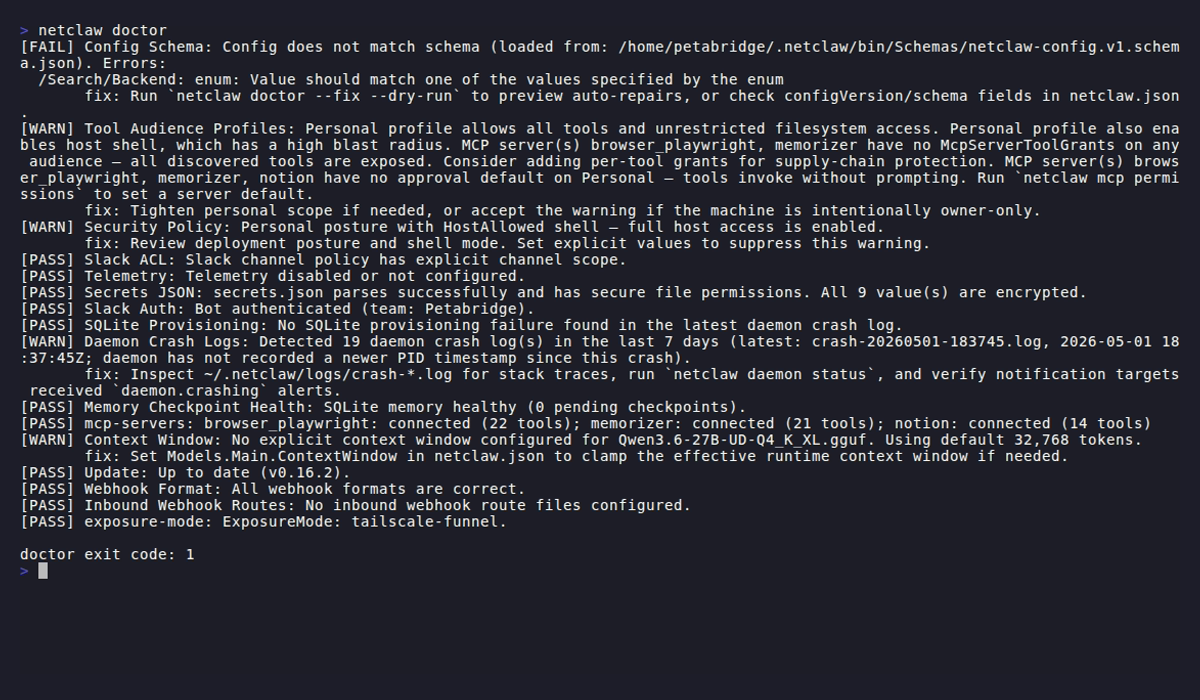
This is a healthy Personal install, so every check passes and the last line prints exit code 0. The Secrets JSON line passes here because the demo install stores one credential. Without a secrets.json, a fresh install shows one WARN for it, and a warning alone makes the exit code 2. The lines are long, so click the image to enlarge it.
Each check prints PASS, WARN or FAIL. A failure or warning adds a fix: line with the next step:
[PASS] Config Schema: Config matches schema v1.[PASS] Tool Audience Profiles: Public and Team tool restrictions remain scoped.[PASS] Tool approval grants: No stored grants.[PASS] Security Policy: Deployment posture: Personal, Shell: HostAllowed....[WARN] Secrets JSON: Secrets file not found at /home/netclaw/.netclaw/config/secrets.json.       fix: Create secrets.json if you need provider/slack credentials....[PASS] Systemd Unit PATH: No systemd user service installed (skipping).
doctor exit code: 2
Text output ends with doctor exit code: N.
With only environment variables
Section titled “With only environment variables”With no netclaw.json but NETCLAW_* variables set, doctor skips the checks that read the file. Five checks print PASS with a message like No netclaw.json; NETCLAW_ environment configuration detected, and the checks that need the base config print Skipped. A skip never counts toward the exit code. Chat Client is the exception: it evaluates the configuration the daemon would bind, environment variables included, so a missing provider or model still shows up.
The launcher script in the Docker image drops environment variable names that contain a hyphen before the CLI starts, so a name like NETCLAW_Models__Definitions__lab-main__Provider reaches the daemon but not netclaw doctor, and Chat Client fails. Use names without hyphens when you want doctor to see them.
When the config can’t be read
Section titled “When the config can’t be read”If netclaw.json or secrets.json is empty, cut off, or has a duplicate key, doctor reports one failure, runs only the checks that don’t read the config, and exits 1:
[FAIL] Config Load: Couldn't read netclaw.json: A duplicate key 'configVersion' was found.       fix: Fix the JSON in /home/netclaw/.netclaw/config/netclaw.json (a duplicate key, or a file that is empty or cut off), or restore it from a backup.[PASS] SQLite Provisioning: No recent daemon crash log indicates SQLite provisioning failure.[PASS] Image Processing: Native imaging library loaded; image egress normalization is available.[PASS] Systemd Unit PATH: No systemd user service installed (skipping).[WARN] Skipped checks: 21 check(s) skipped: the config could not be read.
doctor exit code: 1
--fix does nothing here and says why (Nothing was fixed. Couldn't read netclaw.json: ...). Repair the file by hand, then run doctor again. See Couldn't read netclaw.json.
Exit codes
Section titled “Exit codes”| Code | Meaning |
|---|---|
0 | Every check passed |
1 | One or more checks failed, or an option was wrong |
2 | Warnings only |
2 isn’t an error here, and it’s easy to hit: a missing secrets.json or an available update is a warning. Skipped checks never count.
netclaw doctor > /dev/null 2>&1case $? in 0) echo "clean" ;; 2) echo "warnings: review with 'netclaw doctor'" ;; *) echo "failures: run 'netclaw doctor --fix'" ;;esacThe checks
Section titled “The checks”Doctor runs the checks in this order. Config files live under ~/.netclaw/config/.
| # | Check | Warns or fails when |
|---|---|---|
| 1 | Config Schema | netclaw.json isn’t valid JSON, has a bad configVersion, or doesn’t match the schema. A missing configVersion warns. |
| 2 | Tool Audience Profiles | netclaw.json has no Tools section. Also fails when a Public or Team profile sets ToolsMode, McpServersMode or a file mode to All. Fails when a ToolOverrides or McpServerDefaults key contains a colon, such as file_write:control-plane. The key is ignored and --fix doesn’t touch it. Valid forms are tool_name, server/tool and server__tool. In 0.27.1 and earlier a colon key silently bound the tool to Auto. Warns when an override key has no value (null, {}, []) or can’t be a tool name, a profile’s WriteFiles is wider than its ReadFiles, the sessions directory sits under the OS temp directory, an MCP server has no grants or approval default, the Personal allowlist excludes an enabled MCP server, a Public or Team AllowedTools list lacks tool_output_read, shell_execute is set to Approval while ShellMode is Off, or Personal sets shell_execute to Auto. |
| 3 | Tool approval grants | A saved grant in tool-approvals.json is covered by another grant. Warns, and --fix removes the redundant ones. |
| 4 | Security Policy | There is no Security section (strict fallback defaults, Public posture, shell off), or DeploymentPosture is null with StrictDefaults off. Warns when the posture is unset and falls back to Public, when an implicit Personal posture allows host shell, or when Tools.ShellMode differs from Security.ShellExecutionMode. The daemon uses Tools.ShellMode. |
| 5 | Slack ACL | Slack is enabled with no channel allow-list and no default channel, so channel traffic is denied. Warns when DMs are on with no AllowedUserIds. |
| 6 | Telemetry | OTLP is on with no endpoint (warning) or an endpoint that isn’t an absolute URI (failure) |
| 7 | Secrets JSON | The file is missing or has unencrypted values (warning), mode wider than 600 (warning, with a chmod 600 fix), or won’t parse (failure) |
| 8 | OAuth Token Expiry | Never changes the exit code. Passes, and the message names each Providers.<name>.OAuthTokenExpiry key still in netclaw.json and says to run netclaw doctor --fix. |
| 9 | Slack Auth | The bot token is missing, or a live Slack API call rejects it. Needs network access. |
| 10 | SQLite Provisioning | The latest crash log shows the daemon couldn’t initialize SQLite |
| 11 | Image Processing | The native imaging library failed to load, so image attachments can’t be resized for the model |
| 12 | Daemon Crash Logs | There are crash logs in the last 7 days under ~/.netclaw/logs/ |
| 13 | Memory Checkpoint Health | The memory database can’t be opened, or it has a backlog of pending checkpoints |
| 14 | Memory Curation LLM | The curation model (the Main role) is failing or timing out in the last 14 days of logs |
| 15 | Memory Embeddings | The embedding model isn’t provisioned or fails its hash check, or some documents lack a current-model embedding |
| 16 | Memory Relevance Gate | The relevance model isn’t provisioned or fails its hash check, or the gate is on while embeddings are off |
| 17 | mcp-servers | MCP config is malformed, or live status shows an unreachable or auth-failed server. Falls back to offline probes with no daemon. |
| 18 | Chat Client | The provider or model is missing or invalid. A warning means the daemon will run the No-Op chat client and answer with a configuration banner. A failure (Invalid model configuration: model '<role>': ... Daemon startup will fail until this is resolved.) means the daemon won’t start. A hand-edited Thinking level the provider can’t send causes it, including a missing Providers:<name>:VendorOptions:ThinkingDialect on an openai-compatible provider. The fix line names netclaw model set <role> <provider> <model> --thinking <level> or --clear-thinking. A daemon that is already running refuses to reload the file and keeps its previous configuration, and netclaw status shows degraded. |
| 19 | Context Window | The model config is invalid (same Invalid model configuration: text as Chat Client), no context window can be resolved, or a pinned Models.Main.ContextWindow disagrees with the running daemon |
| 20 | Update | A newer version exists (warning). The check times out after 5 seconds and passes. |
| 21 | Webhook Format | A Slack outbound webhook uses the Generic format, which Slack rejects |
| 22 | Inbound Webhook Routes | Inbound webhooks are enabled with no valid route, or a route file under config/webhooks/ is invalid |
| 23 | exposure-mode | Daemon.ExposureMode is unknown, TrustedProxies has a bad entry, or paired devices exist but the local device token doesn’t match |
| 24 | Systemd Unit PATH | The systemd user unit doesn’t give the daemon’s shell tool a PATH that includes its install directory. Skipped off Linux or with no unit. |
Chat Client and Context Window don’t need a daemon, but Context Window reads the live value from one when it’s running. Without a context window in config, Context Window passes with Auto-detected N tokens, taking the value from the running daemon first and the provider second. It only warns when neither answers.
Reading a failure
Section titled “Reading a failure”Run the fix that the line names:
| Check | Typical fix |
|---|---|
| Config Schema | netclaw doctor --fix --dry-run to preview repairs, or correct the field it names |
| Secrets JSON | chmod 600 the file, or re-enter values with netclaw secrets set to encrypt them |
| Slack ACL | Set Slack:AllowedChannelIds or a default channel in netclaw config |
| Slack Auth | Check the bot token and scopes in your Slack app |
| Chat Client | Run netclaw init, or netclaw provider add then netclaw model set main ... |
| Memory Embeddings | Restart the daemon, or run netclaw memory backfill-embeddings |
| Daemon Crash Logs | Read ~/.netclaw/logs/crash-*.log and run netclaw daemon status |
| Systemd Unit PATH | Run netclaw doctor --fix, then systemctl --user restart netclaw |
Auto-fix
Section titled “Auto-fix”--fix plans every repair it can make, prints a diff per file and asks Apply these fixes? [y/N]: before writing. Run it with --dry-run to see the plan only. With nothing to repair it prints No safe autofixes available. After the repairs it prints Backed up the original to <path> for each backup it wrote and runs the checks again, so the output shows the result.
netclaw doctor --fix --dry-runPlanned fixes (dry-run):- /home/netclaw/.netclaw/config/netclaw.json Apply safe configuration autofixes (Removed disallowed property /Daemon/ObsoleteFlag). Original is backed up to /home/netclaw/.netclaw/config/netclaw.json.removed-keys.bak before the change. --- before +++ after ...--fix repairs these in netclaw.json:
- A missing
configVersion(inserts1) - Inline
Modelsroles migrated to named definitions - Public or Team
AllowedToolslists that are exact copies of a shipped default (deleted, so the audience follows the default) - Slack enabled with no channel allow-list and no default channel (inserts an empty
AllowedChannelIds) - Telemetry on with no OTLP endpoint (inserts
http://127.0.0.1:4317) - Slack webhooks using the Generic format (set to
Slack) - Retired
Providers.<name>.OAuthTokenExpirykeys, moved into the provider’s entry insecrets.json(the date is copied first, then the key is removed). A key whose value isn’t null or a date stays. - Schema mismatches: enum integers to strings, disallowed properties removed, missing required properties filled with schema defaults
--fix migrates inline Models roles to named definitions, but it never removes a key under Models, and it never removes a key that holds a credential (a token, password, API key, or a URL with a password or webhook secret in it). Those are reported by Config Schema and left for you to fix by hand, because a removal there could lose a value with no replacement.
It also touches two other files:
~/.netclaw/config/daemon.env, the PATH file for the systemd unit, gets itsPATHline replaced (or appended) from your current PATH when it’s missing or lacks the daemon’s install directory. Every other line, such as aNETCLAW_HOME=you added, stays as it is. Restart the daemon afterwards withsystemctl --user restart netclaw.~/.netclaw/config/tool-approvals.jsonloses grants that another saved grant already covers. The other grants stay.
A fix that deletes or rewrites your data copies the original file first. Every backup is written before the first file changes, so a failed backup (doctor exits 1) leaves everything as it was. Each backup name gets a number when an older one exists, and an older backup is never overwritten:
| Fix | Backup |
|---|---|
| Models migrated to named definitions | netclaw.json.legacy-models.bak, then .legacy-models.2.bak and so on |
| Copied default tool lists removed | netclaw.json.legacy-tool-defaults.bak, then .legacy-tool-defaults.2.bak and so on |
Retired OAuthTokenExpiry keys moved | netclaw.json.retired-oauth-expiry.bak, then .retired-oauth-expiry.2.bak and so on. secrets.json gets no backup. |
| Disallowed properties removed | netclaw.json.removed-keys.bak, then .removed-keys.2.bak and so on |
The rewritten file keeps the permissions of the original. A netclaw.json with comments or trailing commas isn’t changed at all: --fix prints Nothing was fixed. Couldn't read netclaw.json: it has comments or trailing commas... on stderr.
Other fixes write with no backup, so use --dry-run first on a config you care about. Unencrypted secrets, a rejected Slack token and missing external services need manual work, and the fix: lines say what to do.
After a failing or warning run without --fix, doctor adds a hint when a plan exists:
hint: Some issues may be auto-fixable. Run `netclaw doctor --fix --dry-run` to preview.JSON output
Section titled “JSON output”netclaw doctor --format json{ "exitCode": 2, "checks": [ { "name": "Secrets JSON", "severity": "warning", "message": "Secrets file not found at /home/netclaw/.netclaw/config/secrets.json.", "remediation": "Create secrets.json if you need provider/slack credentials." } ], "fix": { "requested": false, "dryRun": false, "changedFiles": 0, "files": [] }}With --format json, the Backed up the original to <path> line goes to stderr, so stdout holds only the JSON document. Without --yes, the Apply these fixes? [y/N]: prompt still writes to stdout, so add --yes when you pipe a JSON --fix run. Severities are lowercase: pass, warning and error. With --fix, fix.files lists each path and description.
netclaw doctor --format json | jq '[.checks[] | select(.severity == "error")]'netclaw doctor --format json | jq '[.checks[] | select(.severity == "warning")] | length'netclaw doctor --format json --dry-run | jq -e '.exitCode == 0'The last one works as a CI gate. --dry-run writes nothing, and the exit code still reflects the real checks.
Common workflows
Section titled “Common workflows”After init. Run netclaw doctor right after netclaw init. It checks things init’s health check skips: crash logs, memory state, webhook routes and saved grants.
Crash triage. When the daemon crashes or misbehaves, start with Daemon Crash Logs and SQLite Provisioning before you read raw logs.
After an upgrade. If an older release left copied default tool lists or a retired OAuthTokenExpiry key in netclaw.json, netclaw doctor --fix fixes them and keeps a backup. See Upgrade netclaw.
Related pages
Section titled “Related pages”netclaw status: live runtime health, which needs the daemonnetclaw init: the first-run wizard, followed by doctornetclaw mcp: manage the MCP servers that doctor validatesnetclaw secrets: encrypt the values doctor flagsnetclaw approvals: review the grants doctor reports
Resources
Section titled “Resources”- jq manual: filter
--format jsonoutput - Slack bot token types: if Slack Auth fails
- OpenTelemetry Collector docs: if Telemetry flags your OTLP endpoint
 Built by Petabridge