
netclaw model
Assign LLMs to roles: Main, Fallback, and Compaction. Run netclaw model for an interactive TUI, or use subcommands to script it.
You need at least one provider configured first. If you haven’t added one, see netclaw provider.
netclaw model # launch TUInetclaw model <subcommand> [options] # CLI modeModel roles
Section titled “Model roles”Three roles, and only Main is required:
| Role | Purpose | When unset |
|---|---|---|
| Main | Primary model for all interactions | Required, can’t be cleared |
| Fallback | Automatic failover for every role when its own model is unavailable (rate limits, network errors, provider outages), Compaction included | Falls back to Main |
| Compaction | Context summarization with a cheaper/faster model | Falls back to Main |
Role names are case-insensitive.
Compaction runs automatically when a session’s context approaches the model’s token limit.
Model Manager TUI
Section titled “Model Manager TUI”netclaw model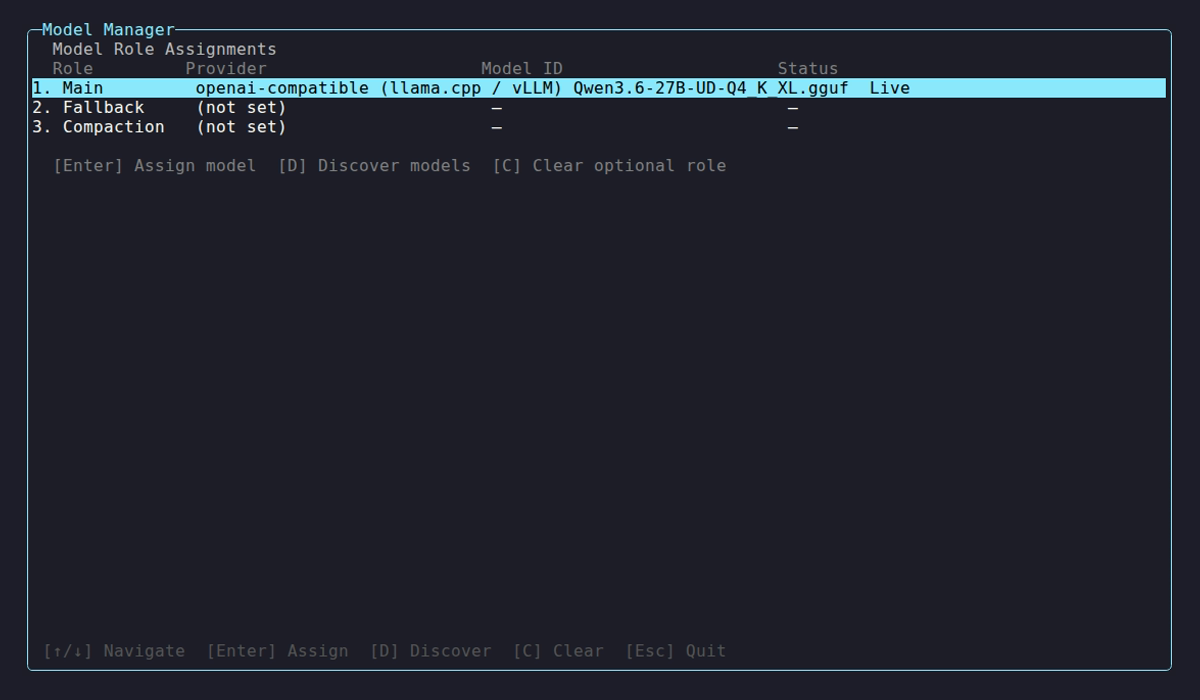
All three roles are assigned here, with Main on a different provider from the other two. The Provider column stops at 40 characters, so a long type label such as OpenAI-compatible is cut with an ellipsis.
The manager lists the three roles with the provider, model, output limit (Max out) and thinking level behind each one. An unset limit shows default 32000 and an unset level shows default. Select a role to reassign it, or use the hotkeys:
| Key | Action |
|---|---|
↑ / ↓ | Navigate roles |
Enter | Assign model to selected role |
D | Discover available models from a provider |
P | Edit the highlighted role’s output limit and thinking level |
C | Clear the highlighted optional role (Fallback or Compaction) at once |
Esc | Back (does nothing on the role overview) |
Ctrl+Q | Quit from any screen |
C on Main shows Cannot clear the main model role. and on an unset role Fallback role is not set.
P probes the provider for the model’s capability, then opens Model properties for the role’s definition:
- Max output tokens: a text box. Blank means the default, 32000.
- Thinking level:
default, thenofftomax.Tabswitches field and↑/↓picks a level. Levels the provider or model doesn’t offer are greyed with the reason beside them. Entersaves andEsccancels. A rejected value showsNot saved: <reason>.
When another role shares the definition, the panel says Also used by: <role> and the change applies to each of them. On a provider with no thinking dialect, only the output field is editable. See Output limit and thinking level.
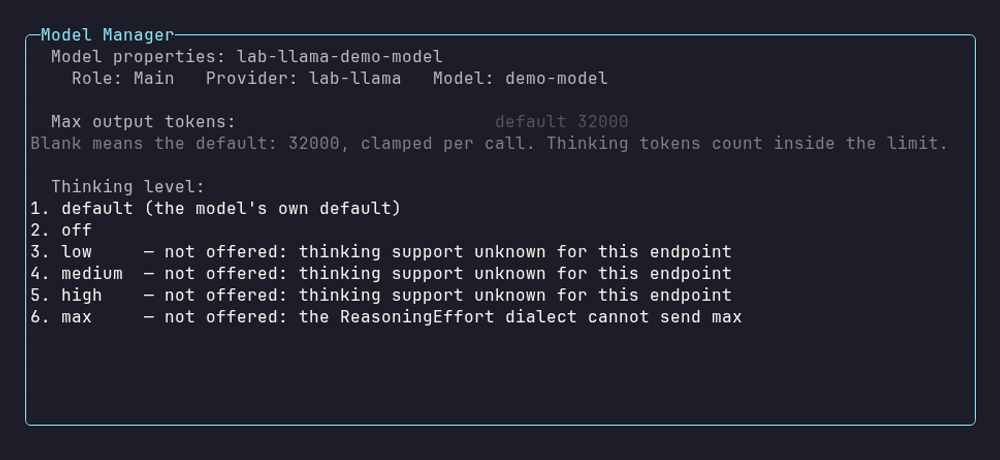
This endpoint doesn’t report thinking support, so only default and off are offered, and the ReasoningEffort dialect can’t send max at all.
Enter opens the assignment flow: pick a provider, discover its models, confirm. Discovery times out after 45 seconds and shows up to 30 results. If yours isn’t listed, pick “Enter model ID manually…” and type it in (e.g., qwen3:30b, llama3.2:latest).
Subcommands
Section titled “Subcommands”model list
Section titled “model list”netclaw model listRole Provider Model ID Context Window Max out ThinkingMain lab-llama demo-model (default) default 32000 defaultFallback (not set)Compaction (not set)Context window shows (default) unless you’ve set an explicit --context-window value, in which case it prints it, such as 65,536 tokens. Max out shows the definition’s --max-output-tokens with thousands separators (64,000), or default 32000 when unset. Thinking shows off, low, medium, high, max or default. The table resolves roles to their provider and model. It doesn’t show definition names or modality overrides, so read the config file for those.
This reads netclaw.json and applies any NETCLAW_Models__* variables set in your shell, the way the daemon does with its own environment. When one applies, a last line names it: Note: this shell's environment (NETCLAW_Models__Roles__Main) is applied. The daemon uses its own environment. It doesn’t query the running daemon. With no models configured, it prompts you to run model set or open the TUI.
If a role points at a definition that doesn’t exist, list names the bad reference and stops:
Error: Models:Roles:Main references unknown definition 'does-not-exist'. Defined: lab-llama-demo-model. Fix the name, or run `netclaw model set main <provider> <model>`.Fix the Models section in netclaw.json, then rerun `netclaw model list`.Open the config, compare Roles against Definitions, and make the names agree. This usually happens after you rename a definition and forget a role. netclaw doctor flags the same thing (it won’t auto-fix it). A running daemon ignores the bad edit and keeps its previous models, and netclaw status says config on disk not applied until you fix it. A daemon that restarts with the bad file stops at startup with the same one-line message.
model set
Section titled “model set”netclaw model set <role> <provider> <model-id> [options]| Flag | Description | Default |
|---|---|---|
--context-window <tokens> | Override context window size (positive integer) | Provider-detected |
--clear-context-window | Drop the override and go back to detection | |
--input-modalities <list> | Comma-separated Text, Image, Audio, Video | Detected |
--output-modalities <list> | Same values, for output | Detected |
--clear-modalities | Drop both modality overrides | |
--max-output-tokens <tokens> | Output limit for every call of this model (positive integer). Thinking tokens count inside it | 32000, clamped per call |
--clear-max-output-tokens | Drop the limit and go back to the default | |
--thinking <level> | off, low, medium, high or max | Model default |
--clear-thinking | Drop the level |
Use --context-window when a local model doesn’t report its window (discovery shows -), or to cap usage below the model’s actual maximum. Use the modality flags when detection gets a model’s capabilities wrong, such as an Ollama vision model reported as text-only.
netclaw model set main remote-gpu qwen3-vl:32b \ --context-window 65536 \ --input-modalities "Text, Image" \ --output-modalities "Text"Each flag and its --clear-* partner are mutually exclusive:
Error: --context-window and --clear-context-window cannot be combined.The same goes for --max-output-tokens with --clear-max-output-tokens and --thinking with --clear-thinking.
Modality names are case-insensitive and are stored canonicalized, so text,image lands on disk as "Text, Image". Only the four names are accepted. Anything else, including a raw integer, is rejected:
Error: invalid modalities '1'. Use a comma-separated list of: Text, Image, Audio, Video (or --clear-modalities to remove the override).Output limit and thinking level
Section titled “Output limit and thinking level”--max-output-tokens caps the reply for every call of the model, and thinking tokens count inside it. With no value, a hosted API gets 32000, capped to the model’s known maximum and clamped to its context window. Anthropic replies used to stop at 1024 tokens, so cost per call can rise on upgrade. A self-hosted server gets 32000 clamped to its context window only when the window is known, from ContextWindow or the server’s own probe. Otherwise netclaw sends no limit field.
--thinking sets one provider-neutral level, and netclaw maps it to the switch each provider has. A level the provider or model doesn’t offer is rejected, and the error lists the levels that are. netclaw never sends a nearby level instead.
netclaw model set main my-anthropic claude-opus-5-5 --max-output-tokens 64000 --thinking highset validates the whole definition before it saves and leaves netclaw.json unchanged on an error:
Error: Models:Definitions:lab-llama-demo-model:MaxOutputTokens (40000) must be below the context window (32768).Error: --max-output-tokens must be a positive integer.Error: invalid thinking level '3'. Use off, low, medium, high, or max (or --clear-thinking).A limit above the model’s probed maximum is rejected too (... is above the maximum output of this model (N tokens).).
An openai-compatible provider has no thinking dialect until you set one, so every level is rejected:
Error: Thinking level 'high' is not offered by provider 'lab-llama': no thinking dialect is set; set VendorOptions:ThinkingDialect on the provider to ChatTemplateKwargs, ReasoningEffort, DeepSeek, or None. Provider 'lab-llama' offers no thinking level. Set Providers:lab-llama:VendorOptions:ThinkingDialect to ChatTemplateKwargs, ReasoningEffort, DeepSeek, or None.When set detects a llama.cpp server, it saves ReasoningEffort itself and prints Detected thinking dialect ReasoningEffort; saved Providers:<name>:VendorOptions:ThinkingDialect. For any other server, set the dialect yourself on the provider:
"lab-llama": { "Type": "openai-compatible", "Endpoint": "http://llm.example.internal:8080/v1", "VendorOptions": { "ThinkingDialect": "ReasoningEffort" }}| Dialect | Levels it can send |
|---|---|
ReasoningEffort | off, low, medium, high |
DeepSeek | off, low, high, max |
ChatTemplateKwargs | off |
None | none |
A dialect only says which levels can be sent. The model must offer the level too. On an endpoint that doesn’t report thinking support, as most generic openai-compatible servers don’t, only off is accepted, and only with a dialect other than None:
Error: Thinking level 'high' is not offered by provider 'lab-llama': thinking support unknown for this endpoint. Provider 'lab-llama' offers off.Hand-edited values face the same rules. Four edits fail daemon startup and the netclaw doctor Chat Client check: a Thinking level the dialect can’t send, any level other than off on an Ollama provider with VendorOptions:DisableThinking: true, a MaxOutputTokens at or above ContextWindow, and a VendorOptions:ThinkingDialect value that isn’t a valid dialect. The first two end Daemon startup will fail until this is resolved. The other two say Invalid inference configuration or The daemon will not start with this configuration and tell you to fix the Models section or the provider values. A running daemon keeps its previous models until you fix it.
What set and clear actually touch
Section titled “What set and clear actually touch”set and the --clear-* flags edit the model definition, the stored facts about a given provider and model pair. Assigning a role only repoints a reference at a definition. The one exception is --thinking on a provider with no dialect, where set can also write the provider’s VendorOptions:ThinkingDialect. That’s the whole point: switch a role away from a model and back, and its overrides are still there.
netclaw model set main remote-gpu qwen3:30b --context-window 65536netclaw model set main remote-gpu qwen3:8b # 30b's definition is untouchednetclaw model set main remote-gpu qwen3:30b # still 65536Clearing removes the property outright rather than writing a sentinel, so a cleared value reads as “detect this at runtime”.
If another role uses the same definition, set says so and the change applies to each of them:
Note: definition 'lab-llama-demo-model' is also used by: Fallback. The change applies to each of them.Running set again on the model a role already uses keeps that role’s own definition. To give two roles different limits on one model, hand-edit a second definition under another name (for example sonnet-low and sonnet-high) and point the roles at them.
The role must be main, fallback or compaction. Anything else prints Error: Unknown role 'bogus'. Valid roles: main, fallback, compaction.
set accepts a context window below 4,096 tokens, but the daemon won’t. It ignores the edit, netclaw status reports config on disk not applied: ... ContextWindow (2000) is below minimum (4096), and netclaw doctor fails the Chat Client check. Set it back to 4,096 or more.
The provider must already exist in your config. If it doesn’t, the error lists your configured providers:
Error: Provider 'my-cloud' not found in configuration.Configured providers: lab-llamaShrinking Main’s context window prints a warning because existing sessions with longer histories may fail until compacted.
The daemon restarts itself after a valid edit to netclaw.json. After environment-variable changes, restart it yourself: netclaw daemon stop && netclaw daemon start (or docker restart netclaw in a container).
model discover
Section titled “model discover”netclaw model discover <provider>Discovery hits the provider’s API live, so it has to be reachable:
Discovering models from 'lab-llama' (openai-compatible) at http://llm.example.internal:8080...
Model ID                                 Context Window   Cost (in/out per 1M)demo-model                               131,072          -
1 model(s) found.
Cost shows - when the provider doesn’t report it, which is common with Ollama and OpenAI-compatible endpoints. An unknown provider prints Error: Provider '<name>' not found in configuration. and exits 1. An unreachable server prints Error: Connection failed: Connection refused (host:port) (or Name or service not known). A server with no /v1/models prints Error: The openai-compatible models API was not found at <url>/v1/models. The endpoint may end in /v1 or not, as Self-hosted providers explains.
model clear
Section titled “model clear”netclaw model clear <role>Clears Fallback or Compaction. Cannot clear Main:
Error: Cannot clear the main model role. Use `netclaw model set main` to change it instead.The role assignment goes away and the definition stays. Re-assign that model later and its overrides are still there.
Examples
Section titled “Examples”# Set main model on a remote Ollama servernetclaw model set main remote-gpu qwen3:30b --context-window 32768
# Add a smaller fallback model on the same providernetclaw model set fallback remote-gpu qwen3:8b
# Use a cloud model for compactionnetclaw model set compaction my-anthropic claude-sonnet-4
# Raise the output limit and think hardernetclaw model set main my-anthropic claude-opus-5-5 --max-output-tokens 64000 --thinking high
# Back to the defaults for bothnetclaw model set main my-anthropic claude-opus-5-5 --clear-max-output-tokens --clear-thinking
# Tell netclaw a local model can see images when detection says otherwisenetclaw model set main remote-gpu qwen3-vl:32b --input-modalities "Text, Image"
# Undo that override and let detection decide againnetclaw model set main remote-gpu qwen3-vl:32b --clear-modalities
# Drop a context-window cap you no longer neednetclaw model set main remote-gpu qwen3:30b --clear-context-window
# See what models an Ollama server has availablenetclaw model discover my-ollama
# Remove the fallback assignmentnetclaw model clear fallbackConfiguration
Section titled “Configuration”Assignments live in ~/.netclaw/config/netclaw.json under the Models key. Definitions hold the model facts and roles point at them by name:
{ "Models": { "Definitions": { "remote-gpu-qwen3-30b": { "Provider": "remote-gpu", "ModelId": "qwen3:30b", "Provenance": "Manual", "ContextWindow": 65536, "InputModalities": "Text, Image", "OutputModalities": "Text", "MaxOutputTokens": 16000, "Thinking": "Off" }, "remote-gpu-qwen3-8b": { "Provider": "remote-gpu", "ModelId": "qwen3:8b", "Provenance": "Manual" } }, "Roles": { "Main": "remote-gpu-qwen3-30b", "Fallback": "remote-gpu-qwen3-8b" } }}Thinking is stored PascalCase (Off, Low, Medium, High, Max). model set names new definitions after the provider and model (remote-gpu-qwen3-30b), but the names are yours. Hand-edit them to anything readable and point the roles at the new name. Definitions stick around after you switch a role away, which is what keeps their overrides intact.
Models configuration covers the fields in full. Older configs use an inline shape that netclaw still reads. See Migrating model configuration.
The daemon restarts itself after the config changes.
After you set your models, run netclaw status to confirm the daemon picked them up.
Exit codes
Section titled “Exit codes”0 on success, 1 on invalid arguments, unknown provider, or validation failure.
Related pages
Section titled “Related pages”netclaw provider: add providers before assigning models- Models configuration: the
Modelsshape these commands write - Migrating model configuration: converting an older inline
Modelssection netclaw status: confirm which model the daemon picked upnetclaw doctor: checks model config validity
Resources
Section titled “Resources”- Ollama context length FAQ: Ollama serves at its own
num_ctxand truncates past it regardless of--context-window, so set both - Ollama model library: browse models for local inference
- Anthropic models: Claude specs, pricing and context windows
- OpenRouter catalog: compare across providers
- OpenAI models: GPT specs, pricing and context windows
 Built by Petabridge