
Channel troubleshooting
When the bot is silent, two commands and one log tell you most of what you need:
netclaw status # live connector health and message counters (needs a running daemon)netclaw doctor # offline config and credential checksnetclaw status reports each connector as healthy, degraded, disconnected or disabled, with counters such as recv=2 routed=2 dropped=0 replied=2. Doctor checks Slack only (auth and ACL). For Discord and Mattermost, use status and the daemon log.
Where the logs are
Section titled “Where the logs are”The daemon writes ~/.netclaw/logs/daemon-YYYY-MM-DD.log. After 10 MiB it continues in daemon-YYYY-MM-DD.1.log, .2.log and so on, and the active file is the highest-numbered segment of the newest date. Crashes go to crash-*.log in the same directory.
| Where it runs | Read the log |
|---|---|
| Native | tail -f ~/.netclaw/logs/daemon-*.log |
| systemd user unit | journalctl --user -u netclaw -f, or the file above |
| Docker | docker exec <container> sh -c 'tail -f ~/.netclaw/logs/daemon-*.log'. docker logs shows only the entrypoint and a few startup warnings. |
Restart, when a section below tells you to:
| Where it runs | Restart |
|---|---|
| Native | netclaw daemon stop, then netclaw daemon start |
| systemd user unit | systemctl --user restart netclaw |
| Docker | docker restart <container> (netclaw daemon start does nothing under the image’s entrypoint) |
An edit to netclaw.json restarts the daemon on its own. Tokens in the vault and environment variables don’t, so restart after changing those.
Find your symptom
Section titled “Find your symptom”| What you’re seeing | Jump to |
|---|---|
disconnected or degraded in netclaw status | The bot won’t connect |
| It connects, then drops again and again | The connection keeps dropping |
| Connected, messages arrive, no reply | The bot is connected but silent |
| It answers some messages and not others | The bot answers only some messages |
| It stopped answering in a thread | The bot stopped answering in a thread |
| It works, then the reply never shows up | The reply never appears |
| Approval buttons or letters do nothing | Approvals don’t work |
| It answers its own messages | The bot talks to itself |
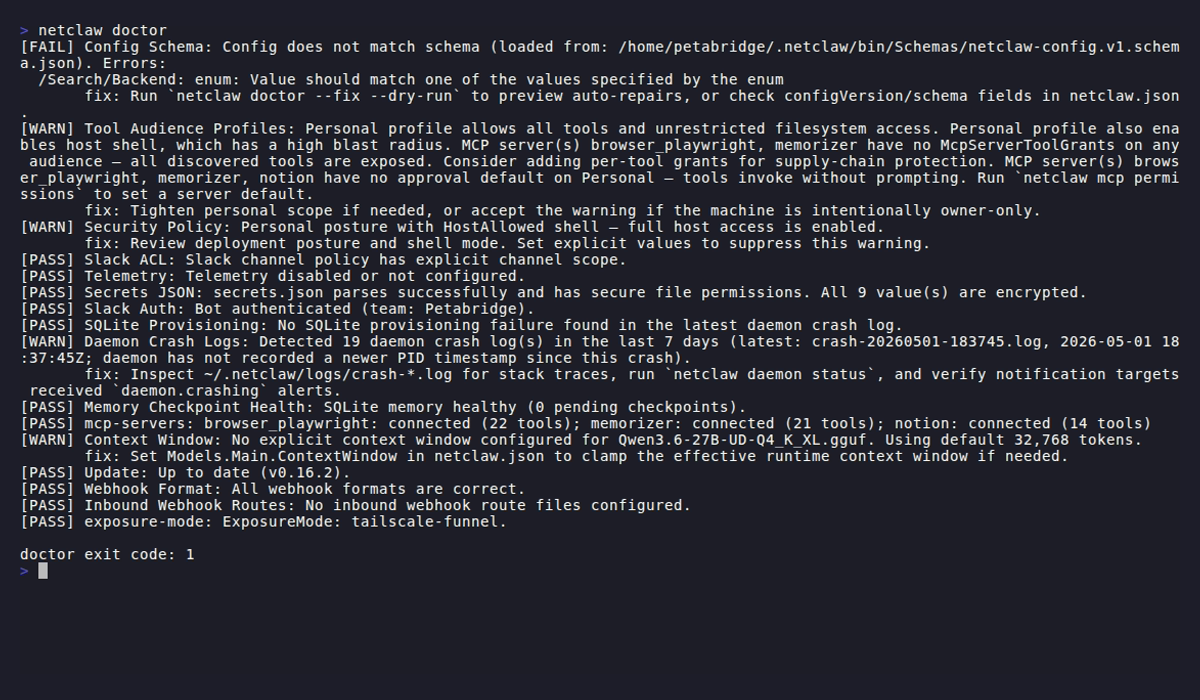
The Slack ACL and Slack Auth lines are the channel checks. Slack isn’t configured in this capture, so both pass trivially.
The bot won’t connect
Section titled “The bot won’t connect”A bad token or a missing setting is a fatal connect error. The channel stays offline until you fix the config and restart the daemon. The daemon and your other channels keep running. Network failures are different: those retry on their own.
Slack: invalid or expired bot token
Section titled “Slack: invalid or expired bot token”Symptom: netclaw status shows Slack as disconnected, and doctor’s Slack Auth check fails with one of these:
| Error | Meaning |
|---|---|
invalid_auth | The bot token is invalid. Check your app’s Bot User OAuth Token. |
token_revoked | The token was revoked. Generate a new one. |
token_expired | The token expired. Generate a new one. |
account_inactive | The bot account is deactivated. |
not_authed | No token was provided. |
missing_scope | The token lacks channels:read, which the startup check needs. Other missing scopes show up when a call needs them, as in The reply never appears. |
Fix: If you’re not sure which token is bad, replace both from the Slack app page, then restart:
netclaw secrets set Slack.BotToken xoxb-your-new-tokennetclaw secrets set Slack.AppToken xapp-your-new-tokenIf doctor says “Slack is enabled but no bot token found”, run netclaw config → Channels → Slack, or netclaw secrets set Slack.BotToken xoxb-....
Slack: Socket Mode is off
Section titled “Slack: Socket Mode is off”Symptom: the log says Slack channel currently supports Socket Mode only. Set Slack:SocketMode to true.
Cause: Slack.SocketMode is false. Only Socket Mode is supported.
Fix: remove the key or set it to true, and make sure the app has Socket Mode on and a valid xapp-... token with connections:write.
Discord: invalid token or no access
Section titled “Discord: invalid token or no access”Symptom: netclaw status shows Discord as disconnected and the log shows an authentication error at startup. Discord’s API returns HTTP 401 for a wrong or reset token. When the bot can’t see a resource, the log shows the Discord error as received.
Fix: reset the token in the Developer Portal, then:
netclaw secrets set Discord.BotToken your-new-tokenRestart. If the log shows a Discord access error instead of a 401, check that the bot was invited to the server.
Discord: startup waits, then disconnects
Section titled “Discord: startup waits, then disconnects”Symptom: the daemon starts slowly, and the log shows a 30-second timeout waiting for the gateway READY event.
Cause: the token is valid, but the bot isn’t in any server, so Discord has nothing to initialize.
Fix: invite the bot with an OAuth2 URL that has the bot scope. See Discord setup.
Mattermost: token or URL problems
Section titled “Mattermost: token or URL problems”Symptom: netclaw status shows Mattermost as disconnected with one of these reasons:
| Reason | Fix |
|---|---|
Mattermost is enabled but Mattermost:ServerUrl is not configured | Set Mattermost.ServerUrl. |
Mattermost is enabled but no bot token is configured | Run netclaw secrets set Mattermost.BotToken <token>. |
Mattermost rejected the bot token (HTTP 401) or Mattermost rejected the request as unauthorized | Issue a new token under Integrations > Bot Accounts and store it. |
Restart after storing a token. The daemon doesn’t watch the vault.
If you can’t create the bot or its token in the first place, two System Console settings are off by default: Enable bot account creation and Enable personal access tokens. See Mattermost setup.
The connection keeps dropping
Section titled “The connection keeps dropping”Slack Socket Mode drops
Section titled “Slack Socket Mode drops”Symptom: Slack goes disconnected, then recovers.
Cause and fix: since 0.27.0 a supervisor checks the connection every 5 seconds and reconnects with backoff up to 5 minutes, so a restart is no longer the first step. If it never recovers, check the Slack status page, your network, and that the xapp-... token is still valid.
Discord gateway drops
Section titled “Discord gateway drops”Symptom: Discord goes disconnected.
Fix: check Discord’s status page and your network, then confirm the token. Restart if it doesn’t come back.
Mattermost reconnect loop
Section titled “Mattermost reconnect loop”Symptom: the log repeats this, with the delay growing each time (netclaw#1517):
Connected to Mattermost WebSocket at ws://mattermost:8065/api/v4/websocketGateway requested clean reconnect: Mattermost gateway reconnected outside a clean startup cycle; forcing a clean reconnect.Disconnected from Mattermost WebSocket: Closed by clientCause: a startup race in older releases, reported on 0.24.2 and 0.26.0-beta.4. Startup now waits for the WebSocket OnConnected event, which shipped in 0.26.0-beta.5.
Fix: upgrade to 0.27.1 or newer. If it still loops, check that ServerUrl is an address netclaw can reach, and that any proxy between netclaw and Mattermost forwards WebSocket upgrades to /api/v4/websocket.
The bot is connected but silent
Section titled “The bot is connected but silent”Symptom: netclaw status shows recv rising and routed at 0. The log has one of these lines:
event_dropped event=... reason=channel_not_allowedevent_dropped event=... reason=user_not_allowedevent_filtered event=... reason=routing_policy_ignore ignoreReason=DmNotAllowed| Reason | Cause | Fix |
|---|---|---|
channel_not_allowed | The channel isn’t in AllowedChannelIds and isn’t the default channel. This is the number one setup mistake. | Add the channel ID, or set DefaultChannelId. |
user_not_allowed | AllowedUserIds is set and the sender isn’t in it. | Add the user’s ID, or clear the list. |
DmNotAllowed | AllowDirectMessages is false, the default. | Set it to true. |
{ "Slack": { "AllowedChannelIds": ["C0123456789"], "AllowedUserIds": ["U0123456789"], "AllowDirectMessages": true }}netclaw doctor catches an empty allow-list for Slack. To find IDs, see Slack, Discord or Mattermost.
If no event_dropped line appears at all, the event never reached netclaw. On Slack and Mattermost, invite the bot to the channel. On Discord, check the Message Content intent.
Everything stopped after upgrading from before 0.24.0
Section titled “Everything stopped after upgrading from before 0.24.0”Symptom: the channel is in AllowedChannelIds, but every message logs channel_not_allowed. It began after upgrading to 0.24.0 or later.
Cause: before 0.24.0, AllowedChannelIds accepted display names such as "general". Since 0.24.0, incoming channel IDs match stored IDs only.
Fix: re-enter the channels in netclaw config → Channels so they resolve to IDs. Or edit netclaw.json and swap each name for its canonical ID.
The allow-list is right but the bot is still silent in Docker or Compose
Section titled “The allow-list is right but the bot is still silent in Docker or Compose”Cause: an environment variable and netclaw.json both set the same list. .NET merges them by position, so a blank NETCLAW_Mattermost__AllowedChannelIds__0 overwrites the first channel in the file.
Fix: keep each list in one place, then check the value the container sees, for example docker exec <container> printenv NETCLAW_Mattermost__AllowedChannelIds__0.
The bot answers only some messages
Section titled “The bot answers only some messages”Symptom: the bot is healthy but ignores messages that don’t mention it. The log has:
event_filtered event=... reason=routing_policy_ignore ignoreReason=ChannelMentionRequiredCause: MentionOnly defaults to true, so in channels the bot answers only messages that @-mention it.
Fix: mention the bot, or turn the rule off for the channel type:
{ "Slack": { "MentionOnly": false }, "Discord": { "MentionOnly": false }, "Mattermost": { "MentionOnly": false }}MentionRequiredInDm separately controls whether DMs need a mention (default false). On Slack, a file upload follows the same rule, so an un-mentioned attachment in a channel is ignored.
The bot stopped answering in a thread
Section titled “The bot stopped answering in a thread”Symptom: the bot was answering in a thread, then went quiet. The log has:
event_filtered event=... reason=routing_policy_ignore ignoreReason=ThreadMentionRequiredCause: MentionRequiredInThreadByChannel is true for that channel, so thread replies need a mention. A channel you added through netclaw config as team or public starts with the rule on.
Fix: mention the bot in the reply. It then re-reads what it missed and answers with full context. To turn the rule off, press Space on the channel in netclaw config → Channels, or set the channel’s entry to false in netclaw.json.
If the thread is old, check the idle limit too. A thread is freed from memory when its session goes idle, after Session.IdleTimeout (one hour by default), and a later reply wakes it again. A restart backfills history.
The reply never appears
Section titled “The reply never appears”Slack: the post fails
Section titled “Slack: the post fails”Symptom: the log shows the message was processed, but nothing shows up in Slack, with one of these errors:
| Error | Meaning |
|---|---|
not_in_channel | The bot isn’t in the channel. Invite it with /invite @botname. |
channel_not_found | The channel ID is wrong or the channel was deleted. |
missing_scope | The token lacks a scope needed to post. |
no_permission | The bot can’t post in this channel. |
msg_too_long | The reply exceeded Slack’s size limit. |
invalid_blocks | Slack rejected the formatted payload. |
too_many_attachments | The reply has too many attachments. |
rate_limited | Slack throttled the call. netclaw retries. |
For permission errors, invite the bot and check the scopes under OAuth & Permissions in the Slack API dashboard. Reinstall the app after you change scopes.
Discord: the post fails
Section titled “Discord: the post fails”Symptom: the bot processes the message but no reply shows up.
Cause: usually the bot lacks Send Messages, Send Messages in Threads or Create Public Threads in that channel. The log has the HTTP status. A 429 is Discord rate limiting, and netclaw retries.
Fix: grant the permission in the channel’s settings.
Mattermost: the post fails
Section titled “Mattermost: the post fails”Symptom: the log shows a reply error after the message was processed.
Cause: the bot isn’t a member of the channel, or it lost access to it.
Fix: add the bot to the channel with /invite @netclaw. The channel’s reply_failed counter in netclaw status rises while this is broken.
Approvals don’t work
Section titled “Approvals don’t work”| Symptom | Cause | Fix |
|---|---|---|
| Lettered prompt, and your reply is ignored | You aren’t the user who triggered the request. The bot posts “Only the requesting user can approve this tool action.” | Have the original user reply, or ask again yourself. |
| Mattermost buttons never respond | CallbackUrl is set but the Mattermost server can’t reach the daemon. | Fix the route, or leave CallbackUrl unset if you don’t use sub-agents. See Mattermost. |
| Mattermost button says “no longer valid” | The daemon restarted. Button tokens live in memory. | Ask the agent to re-issue the prompt. |
A sub-agent’s call is denied with approval_prompt_unavailable, and its prompt shows “withdrawn … could not show it in this channel” | Mattermost has no CallbackUrl, and sub-agent prompts need buttons. | Set CallbackUrl. See Mattermost. |
| A typed letter is ignored and the bot says “N approval prompts are open. Use the buttons on the prompt you mean.” | Two or more prompts are open for you and one is from a sub-agent. A letter can’t pick one. | Click the buttons on the prompt you mean. |
| ”That approval prompt already has an answer” or “Approval response ignored: that approval prompt already has an answer.” | A second click or reply on a prompt that was already answered. | Nothing to fix. The first answer stands. |
| A prompt lost its buttons and shows a withdrawal reason | The task that asked was cancelled, ended or stopped, the daemon restarted, or the channel couldn’t show the prompt. Nothing ran. | Ask the agent to try again. |
| No prompt appears and the call doesn’t run | The channel couldn’t post the prompt. netclaw tells the model nobody saw it. | Fix the post error above, then ask again. |
The choices on each prompt are explained in How tool approvals work.
The bot talks to itself
Section titled “The bot talks to itself”Symptom: the bot answers its own messages in a loop. events.filtered{reason="bot_message"} and events.received are both high.
Cause: netclaw filters its own messages, so this is rare. It points to a failed bot-identity lookup at startup.
Fix: restart the daemon. If it comes back, look in the log around startup for an authentication error on the channel.
Turn on debug logging
Section titled “Turn on debug logging”Still stuck? Set the log level in ~/.netclaw/config/netclaw.json:
{ "Logging": { "LogLevel": { "Default": "Debug" }, "Console": { "Enabled": true } }}The daemon restarts on the edit. Reproduce the problem and read the daemon log. A healthy Slack message flow looks like this:
Routing Slack event {id} to conversation {channelId}(Debug)turn_routed event=... hasFiles=... textChars=...turn_received textChars=... fileCount=...turn_enqueued contentItems=...Posted Slack reply message
If step 1 never appears, the event was dropped before routing, so check the ACL reasons above. If step 1 appears but not step 2, the routing policy filtered it. If step 4 appears but not step 5, the reply couldn’t be posted, so check The reply never appears.
To see whether sessions are being written at all:
sqlite3 ~/.netclaw/netclaw.db \ "SELECT persistence_id, MAX(created), MAX(sequence_number) \ FROM journal GROUP BY persistence_id \ ORDER BY MAX(created) DESC LIMIT 10;"Read the metrics
Section titled “Read the metrics”If OpenTelemetry is on, channel metrics are faster than logs. They use the namespaces netclaw.channel.slack.*, netclaw.channel.discord.* and netclaw.channel.mattermost.*.
| Pattern | Metrics | Likely cause |
|---|---|---|
| Messages received, none routed | events.received > 0, events.routed = 0 | ACL is blocking everything |
| Messages routed, no replies | messages.enqueued > 0, replies.posted = 0 | Outbound delivery is failing |
| Many drops with one reason | events.dropped rising with reason=channel_not_allowed | Channel isn’t in the allow-list |
| Suspected loop | High events.filtered{reason="bot_message"} and high events.received | The bot-message filter is working, so look upstream |
Related pages
Section titled “Related pages”- Slack, Discord and Mattermost - setup and behavior for each channel
netclaw status- live connector health and countersnetclaw doctor- offline diagnosticsnetclaw secrets- replace a stored token- OpenTelemetry - the metrics reference
Resources
Section titled “Resources”- Slack API: token types - bot tokens and required scopes
- Slack: Socket Mode - how Socket Mode connections work
- Discord: getting started - bot setup and permissions
- Mattermost: bot accounts - tokens and permissions
- Slack Status and Discord Status - check for outages
 Built by Petabridge