
netclaw approvals
When you answer Always here, This repository or Always anywhere at an approval prompt, netclaw saves a grant to ~/.netclaw/config/tool-approvals.json. netclaw approvals lists those grants, revokes the ones you no longer want, and adds new ones before a prompt ever appears. Run it with no subcommand to open the interactive TUI.
This page is the reference for the command and the file. For how grants fit into the authorization model, see How tool approvals work. To stop prompts for a command or a tool, see Reduce or turn off approval prompts.
Grants belong to one audience (personal, team or public) and one tool. A personal grant doesn’t apply when a Team user triggers the same command. Don’t hand-edit the file. The CLI keeps entries valid.
netclaw approvals # open the TUInetclaw approvals list [options] # print grantsnetclaw approvals revoke <label> [options] # remove one grantnetclaw approvals revoke --tool <name> --all [--audience <name>]netclaw approvals trust-verb <phrase> [options] # add a global grantnetclaw approvals tui # open the TUI (explicit)netclaw approvals helpChanges take effect on the next approval check. The daemon doesn’t need a restart and doesn’t watch the file.
netclaw approvals listnetclaw approvals list --audience teamnetclaw approvals list --tool shell_execute --json| Flag | Description | Default |
|---|---|---|
--audience <name> | personal, team or public | all audiences |
--tool <name> | One tool: shell_execute, or server/tool for an MCP tool | all tools |
--json | Machine-readable output | off |
Human output groups grants by audience and tool, with the typed label you pass to revoke and how long ago each was added:
personal / shell_execute  PowerShell token-prefix "Get-ChildItem" anywhere   added just now  Bash token-prefix "gh" anywhere                    added just now  Bash token-prefix "git push" anywhere              added just now
team / shell_execute  Bash token-prefix "npm run" anywhere   added just now
With no grants it prints No persistent approvals. and exits 0.
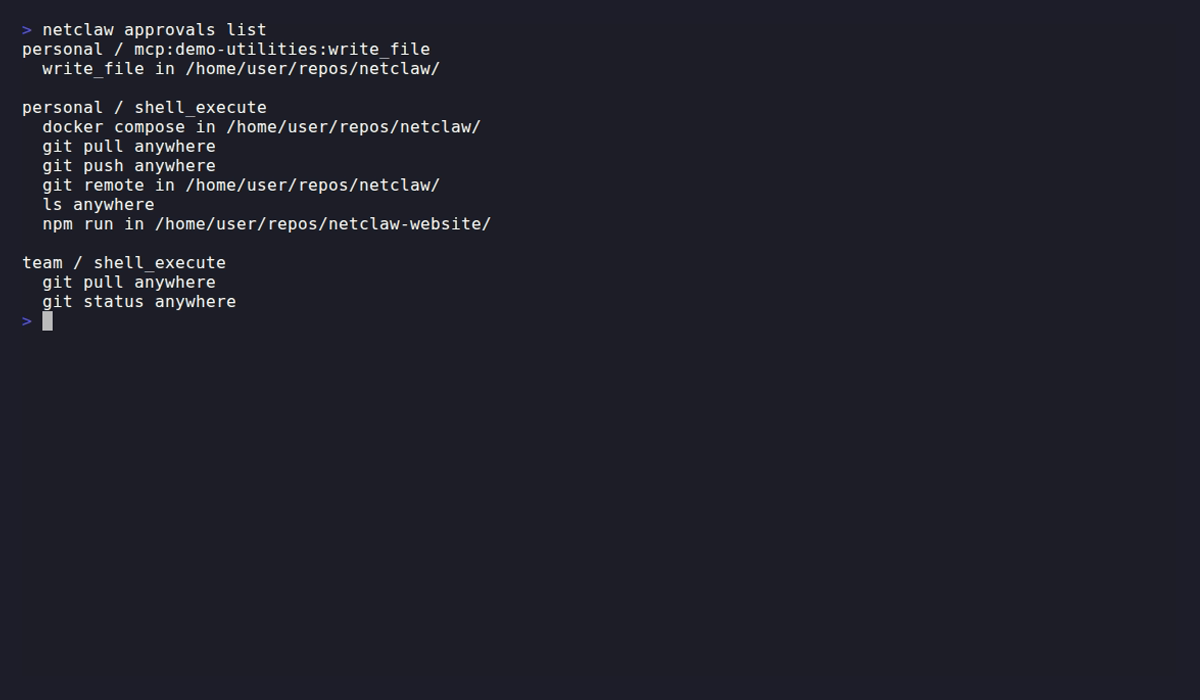
The scope is the end of each label. anywhere came from Always anywhere, in /home/netclaw/projects/website from Always here, and in repository ... from This repository, which names the repository’s .git. The MCP tool’s grant is an exact match.
--json output has an audiences root, then tool names, then entries. Shell entries carry shell, match, verbTokens, directory and createdAt. Entries for other tools carry verb instead of verbTokens:
# Directories you've granted shell access innetclaw approvals list --json \ | jq -r '.audiences.personal.shell_execute[] | select(.directory != null) | .directory'revoke
Section titled “revoke”Pass the exact label list prints. Quote it, because the phrase has quotes inside:
netclaw approvals revoke 'Bash token-prefix "git push" anywhere'netclaw approvals revoke 'Bash token-prefix "git push" anywhere' --audience teamWith no --audience and no --tool, revoke searches every audience and every tool for a matching label. It removes each match. Narrow it when the same label exists in more than one audience.
The older <phrase> anywhere and <phrase> in <directory> forms still work as a fallback, but only when exactly one entry matches. If more than one does, revoke stops with The old approval scope matches more than one typed phrase. and asks for the typed label.
To clear every grant for a tool:
netclaw approvals revoke --tool shell_execute --allnetclaw approvals revoke --tool shell_execute --all --audience teamnetclaw approvals revoke --tool demo-utilities/calculate --allWithout --audience, --all clears that tool in all three audiences. --all requires --tool.
| Flag | Description | Default |
|---|---|---|
--audience <name> | Limit to one audience | all audiences |
--tool <name> | Limit to one tool. Accepts server/tool or the model-facing server__tool | all tools |
--all | Remove every grant for --tool | off |
trust-verb
Section titled “trust-verb”Adds a global (“anywhere”) grant so a phrase never prompts, in any directory. Use it for scheduled or unattended work, or to pre-approve something you know you’ll want.
netclaw approvals trust-verb 'git push'netclaw approvals trust-verb 'npm run' --audience teamnetclaw approvals trust-verb 'Get-ChildItem' --shell powershellnetclaw approvals trust-verb demo-utilities/calculate --tool demo-utilities/calculate| Flag | Description | Default |
|---|---|---|
--audience <name> | Audience the grant belongs to | personal |
--tool <name> | Tool the grant belongs to | shell_execute |
--shell <bash|powershell> | Shell dialect of the phrase. Only valid for shell_execute | the native shell |
For shell, the phrase is a token prefix. Two or more words (git push) cover those words plus any later arguments, so git push origin main is covered and git pull isn’t. One word covers the program alone: gh doesn’t cover gh pr view, so grant gh pr if you want that family.
trust-verb accepts one complete static command. It rejects flags, arguments, redirects and assignments with The shell phrase must have no argument, flag, assignment, redirect, or control effect., and compound or unparseable phrases such as git push && rm x with The shell phrase must contain one complete static command. The phrase must also be in canonical spacing (git push is refused with The shell phrase must equal its canonical form: git push), and a program path must be absolute.
For a tool that isn’t shell, including every MCP tool, the grant matches exactly and the phrase must be the tool’s canonical name, as in the last example above. Any other phrase is refused with exit 1 and the command that would work:
Error: 'calculate' never matches a call to demo-utilities/calculate. Grants for this tool match only the phrase 'demo-utilities/calculate'.If the tool is named 'demo-utilities/calculate', run: netclaw approvals trust-verb demo-utilities/calculate --tool demo-utilities/calculate --audience personalA successful grant prints the label it saved, as in Trusted 'NonShell exact "demo-utilities/calculate" anywhere' for personal / demo-utilities/calculate.
Running it twice for the same phrase prints No changes: '...' is already trusted for personal / shell_execute. and exits 0. A grant a saved grant already covers isn’t saved twice either.
netclaw approvals with no subcommand opens the approvals manager. It lists grants and revokes them. It can’t add them, so use trust-verb for that.
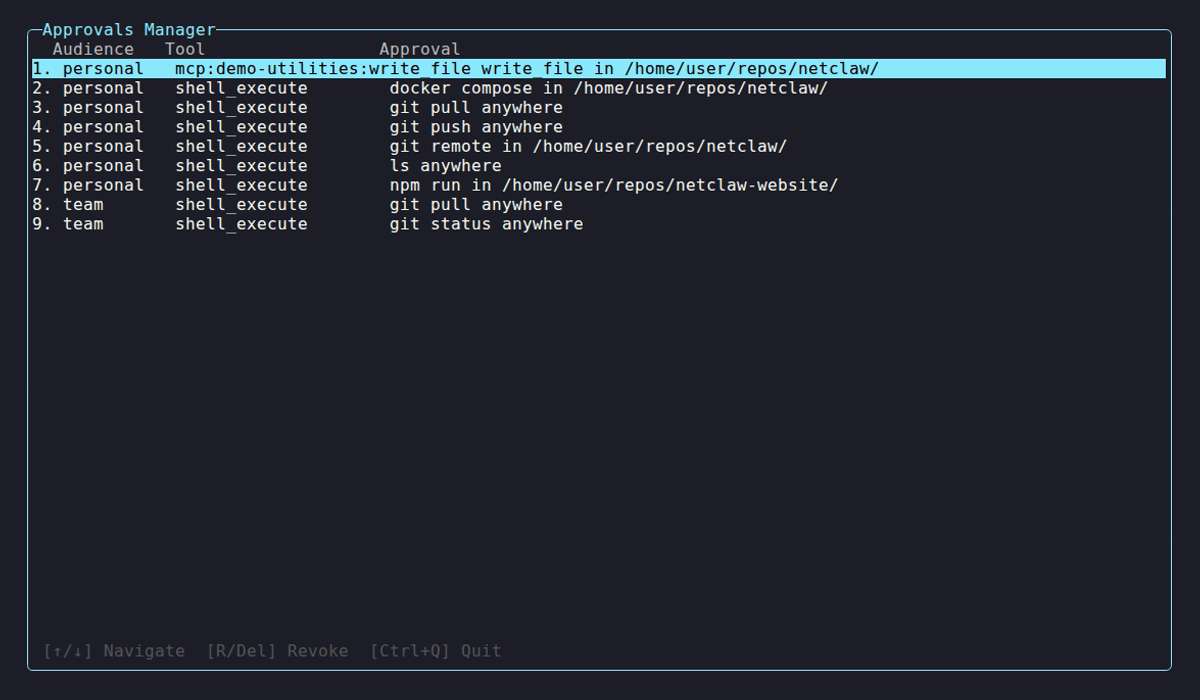
The same six grants as the list above, one per row, with the footer keys described below.
| Key | Action |
|---|---|
| Up / Down | Move between grants |
| R or Delete | Start revoking the highlighted grant |
| Enter | Start revoking the highlighted grant, or confirm in the dialog |
| Esc | Cancel the confirmation. It never quits |
| Ctrl+Q | Quit |
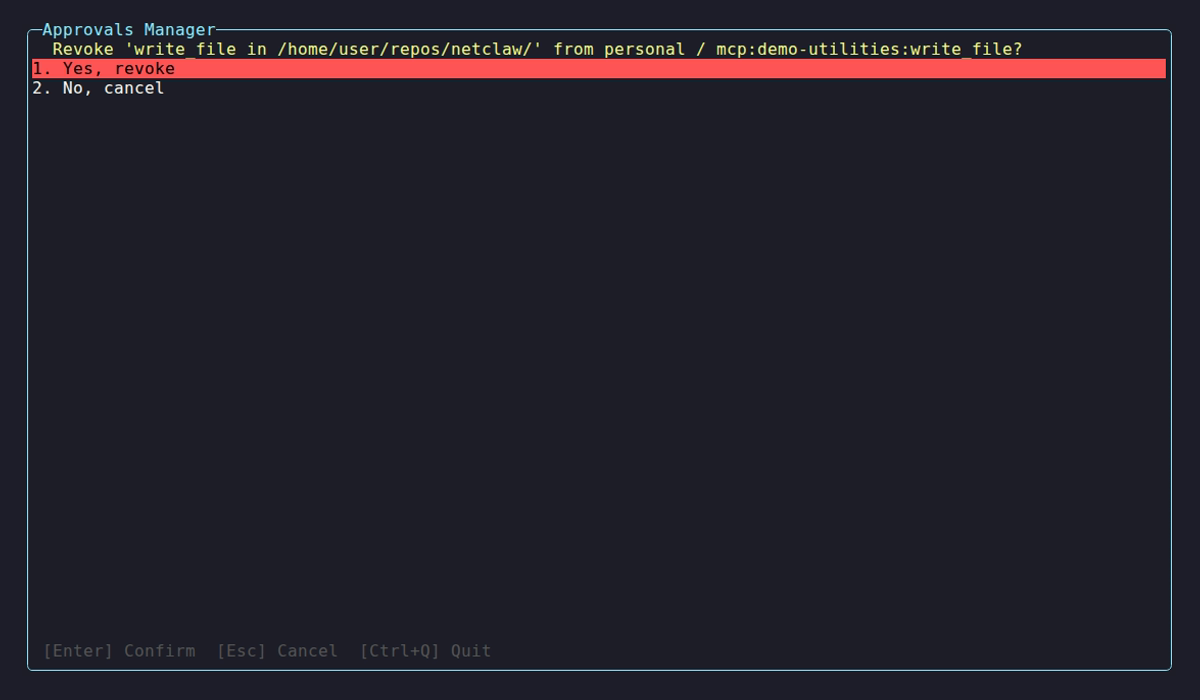
The dialog opens on Yes, revoke, so press Down first if you’re unsure. Esc backs out and nothing is removed.
The grant file
Section titled “The grant file”Grants live in ~/.netclaw/config/tool-approvals.json, schema version 3:
{ "version": 3, "audiences": { "personal": { "shell_execute": [ { "shell": "Bash", "match": "TokenPrefix", "verbTokens": ["git", "push"], "directory": null, "createdAt": "2026-10-07T15:24:16.7675256+00:00" } ] } }}Each entry is a shell, a match kind, the command words, and a scope: directory: null for “anywhere”, a path for a folder grant (that path and its children, see what Always here covers), or a Git repository for a repository grant. Entries for other tools have a verb and no shell. Entries can also carry an assignmentDigest when a grant is qualified by bounded shell variable assignments.
The label list prints follows the entry:
| Grant | Label |
|---|---|
| Anywhere | Bash token-prefix "git push" anywhere |
| Folder | Bash token-prefix "git push" in /home/me/src/app |
| Repository | Bash token-prefix "git push" in repository <repo> |
| Other tool | NonShell exact "demo-utilities/calculate" anywhere |
| Converted from version 2 | Bash legacy-exact "git push" anywhere |
On Linux and macOS, matching is case-sensitive, so git Push doesn’t match git push. On Windows it ignores case.
Upgrade and repair
Section titled “Upgrade and repair”- A version 2 file gets a byte-identical
tool-approvals.json.v2.bakand is converted. Old shell entries becomelegacy-exactgrants that follow the same coverage rule as new ones: two or more words cover later arguments, one word covers the program alone. While the backup exists,list,revoke,trust-verbandhelpprint aRecovery:notice. To roll back, stop the daemon, copy the backup over the active file and start the older daemon. - A version 1 file moves to
tool-approvals.json.v1.bakand an empty version 3 file replaces it. - A malformed or newer-version file is left untouched. Every subcommand exits 1 with
Error: The approval store is unavailable (InvalidData).or(UnsupportedVersion), and any tool call that needs a grant is denied withapproval_store_unavailable. Fix the JSON or restore a copy. A missing file is an empty store, so deleting the file is a way to start over if you don’t need the old grants.
netclaw doctor reports grants that another grant already covers, and netclaw doctor --fix removes them. It reports a folder grant whose directory no longer exists and leaves it alone.
Exit codes
Section titled “Exit codes”| Code | Meaning |
|---|---|
| 0 | Success, including list with nothing to show |
| 1 | User error, no matching grant for revoke, or an unavailable store |
An unknown subcommand, as in netclaw approvals bogus, prints the usage and exits 0.
Related pages
Section titled “Related pages”- How tool approvals work - modes, outcomes and what each prompt answer saves
- Reduce or turn off approval prompts - pre-approve with
trust-verbor set a tool toAuto netclaw mcp- per-server and per-tool MCP modesnetclaw doctor- flags redundant grants- Run reminders, webhooks and scripts unattended - why unattended runs need saved grants
Resources
Section titled “Resources”- jq manual - for filtering
list --json - Tool approval gates runbook - the product’s operator runbook, including the store repair steps
 Built by Petabridge