
Hardening
The security model covers what netclaw enforces by default. This page covers what you should do on top of that, especially if you run it for a team, expose it to the internet or leave it unattended. The sections are independent, so work through the ones that apply.
All configuration lives in ~/.netclaw/config/netclaw.json unless noted. Most keys fall back to built-in defaults when you omit them. The exception is Tools lists such as AllowedTools, file roots, GlobalReadRoots and WebFetch.HttpAllowList. Since 0.27.1 a configured list is the complete list and replaces the default, so write out every entry you want. A malformed list, such as a scalar where a list belongs, stops the daemon at startup with an error naming the key. HardDenyPatterns is the exception to the exception: it adds to the built-in deny list.
Isolate netclaw from your other credentials
Section titled “Isolate netclaw from your other credentials”Netclaw protects its own credential store and config. From 0.28.0 it also denies the agent’s tools a fixed list of credential folders (~/.ssh, ~/.aws, ~/.gnupg, ~/.kube, ~/.azure, ~/.config/gh, ~/.config/gcloud, ~/.docker/config.json, ~/.netrc, ~/.git-credentials). See credential locations. It doesn’t protect anything else your OS user can read, such as a project .env file, and approvals don’t change that. Before 0.28.0 the agent can read those credential folders too if netclaw runs as you. Giving netclaw its own OS user or container is still the most useful hardening step.
- A separate OS user. Create a user for netclaw and give it only the files it needs. This is the lightest option for a native or systemd install. See systemd deployment.
- A container. The image runs the daemon as the non-root
netclawuser, and the agent sees only what you mount. See Docker deployment.
Netclaw has no built-in kernel sandbox for shell commands yet. The work is tracked in netclaw-dev/netclaw#2343. The full boundary statement is in what netclaw doesn’t protect against.
File permissions
Section titled “File permissions”Credential values in secrets.json are encrypted, but the files are only as private as their permissions. Webhook route files hold HMAC secrets in plain JSON. Netclaw creates that directory as 755 and the route files as 644, and netclaw doctor doesn’t flag it, so run the chmod yourself:
# Encrypted secrets: only the daemon user should read thischmod 600 ~/.netclaw/config/secrets.json
# Webhook route files contain HMAC secretschmod 700 ~/.netclaw/config/webhooks/
# Encryption keys for secrets at restchmod 700 ~/.netclaw/keys/
netclaw doctor checks secrets.json permissions and flags unencrypted values. Run it after any manual config edit.
Shell access
Section titled “Shell access”Shell access is the biggest risk you control. Two modes work:
| Mode | Behavior |
|---|---|
Off | Shell is disabled. Every shell_execute call is denied with shell_disabled. |
HostAllowed | Shell runs on the host. Approvals are your guardrail. |
A third value, SandboxOnly, is accepted but has no backend yet. It denies shell entirely and shell_execute fails with shell_requires_sandbox_backend. Use Off for that effect.
To turn shell off, set both keys, the way netclaw init writes them:
{ "Security": { "ShellExecutionMode": "Off" }, "Tools": { "ShellMode": "Off" }}Tools.ShellMode takes precedence. Setting only the Security key can leave shell on if Tools.ShellMode says HostAllowed.
Team and Public postures have shell off by default, and shell is Personal-only whatever the posture. If you run Personal posture but don’t need shell, turn it off.
Custom hard-deny patterns
Section titled “Custom hard-deny patterns”The built-in hard-deny list blocks privilege escalation (sudo), rm -rf ~/, mkfs, fork bombs and commands that would stop the daemon or kill its process (pkill netclawd). Other kill commands prompt like any command. Add your own patterns for anything dangerous in your environment:
{ "Tools": { "HardDenyPatterns": [ "docker rm", "kubectl delete namespace", "terraform destroy" ] }}Patterns augment the defaults and never replace them. Netclaw splits compound commands (&&, ||, ;, |) and checks each part, so echo hello && docker rm foo still matches. You can keep patterns in an optional ~/.netclaw/config/hard-deny-overrides.json instead, which also adds to the defaults.
Review saved grants
Section titled “Review saved grants”Every “Always” answer at an approval prompt becomes a saved grant. Review them occasionally:
netclaw approvals listLook hardest at “anywhere” grants for programs that run arbitrary code, such as bash, python3 or node. A grant for one of those lets the agent run any code as your user, which defeats the point of approvals. Revoke it with netclaw approvals revoke. netclaw doctor reports grants that another grant already covers, and netclaw doctor --fix removes them. See netclaw approvals.
MCP tool permissions
Section titled “MCP tool permissions”netclaw mcp add seeds each audience differently:
| Audience | Server access | Tool grants | Approval default |
|---|---|---|---|
| Personal | All servers | All tools | Auto |
| Team | Must be in AllowedMcpServers | None until granted | Approval |
| Public | Must be in AllowedMcpServers | None until granted | Deny |
Personal gets every tool on a new server at Auto, so review that audience first. Audit grants per audience:
netclaw mcp permissions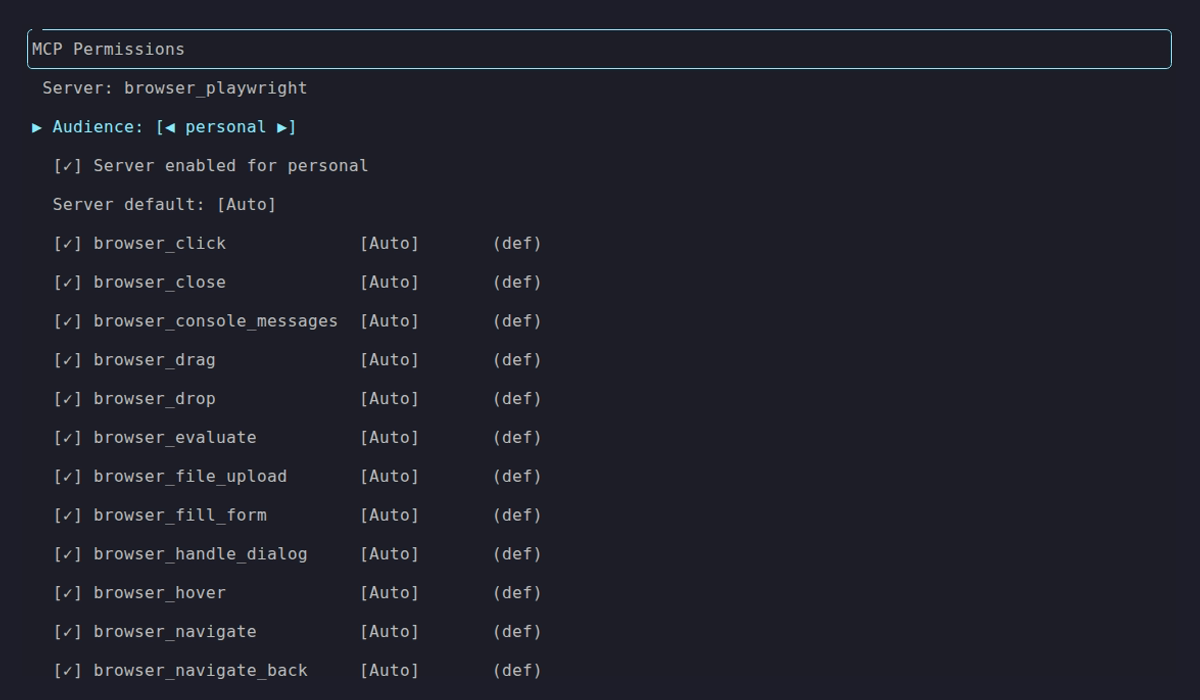
Personal with every tool granted. The footer’s [E] Disable turns the server off for this audience. Compare it with the locked-down Team and Public defaults:
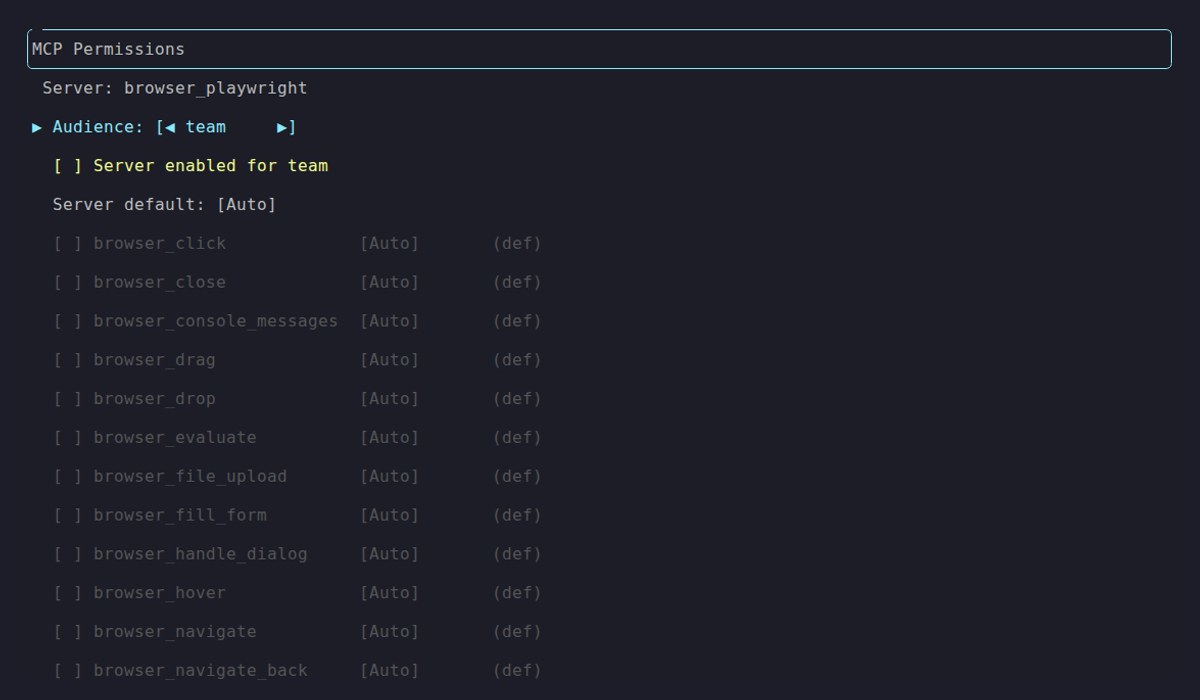
Team with the server disabled and nothing granted. Its footer reads [E] Enable all. Dim rows are tools that audience hasn’t been granted, and the *unsaved* marker is there on open (see netclaw mcp).
Grant each audience the minimum it needs. For destructive MCP tools (delete, drop, write), set Approval or Deny. Per-tool overrides keep the server on Auto while gating the dangerous ones:
{ "Tools": { "AudienceProfiles": { "Personal": { "ApprovalPolicy": { "ToolOverrides": { "notion/notion-delete-page": "Approval" } } } } }}MCP override keys use {serverName}/{toolName}. Keys are matched without regard to letter case. A key that contains a colon is ignored and netclaw doctor flags it. See netclaw mcp for the permissions TUI and MCP tool permissions for the full recipe.
Network exposure
Section titled “Network exposure”The daemon binds 127.0.0.1:5199 by default. Keep it that way unless you have a reason not to.
| Mode | Scope | Risk |
|---|---|---|
local | Loopback only | Minimal. Only local processes connect |
reverse-proxy | Whatever your proxy exposes | Medium to high. Depends on the final hop and trusted-proxy config |
tailscale-serve | Your tailnet | Low. Tailscale identity gates access |
tailscale-funnel | Public internet | High. Anyone can reach it through Tailscale Funnel |
cloudflare-tunnel | Public internet | High. Needs a Cloudflare Access policy |
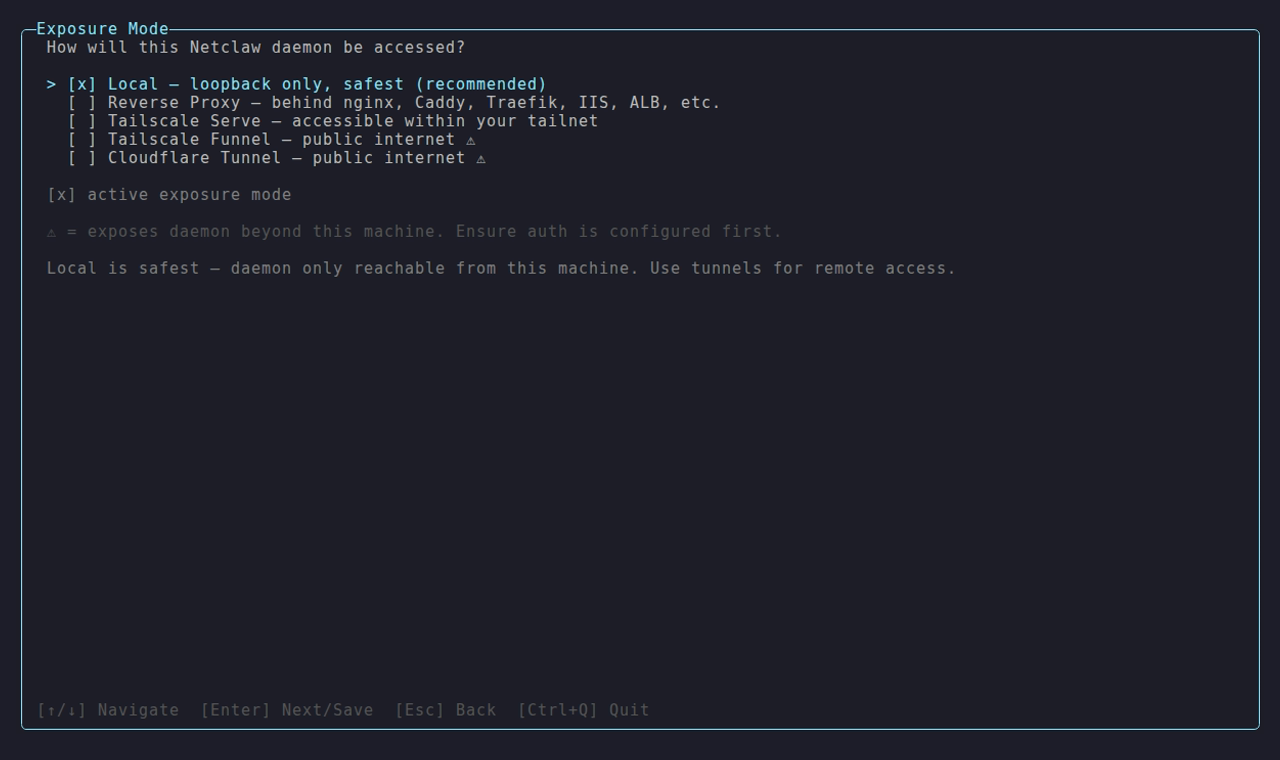
Local is the default and the only mode that never leaves the machine.
Set the mode in netclaw config under Security & Access, or in netclaw.json. Exposure modes covers each one.
For remote access, prefer tailscale-serve. Funnel is a different threat model. If you need a conventional reverse proxy, bind netclaw to a non-loopback internal IP and set Daemon.TrustedProxies. reverse-proxy mode rejects loopback final-hop proxying on purpose, and daemon-host CLI access then goes through paired-device auth rather than “loopback means trusted.”
For Docker, bind the published port to loopback:
docker run -p 127.0.0.1:5199:5199 ...Omitting 127.0.0.1 binds all interfaces, and any machine on your network can reach the daemon.
In local mode, a request from loopback is trusted as the operator only when its Host header is localhost or a loopback address such as 127.0.0.1 or [::1], and any Origin header matches that host. Anything else gets a 401 and a warning in the daemon log. A page in your browser can’t reach the daemon through DNS rebinding or a cross-site request. It also means a script that calls the daemon by another host name, or a web app on http://localhost:3000, is refused. Call from the app’s server process, or pair a device with netclaw daemon pair and send its bearer token. Paired devices and the tunnel and reverse-proxy modes aren’t affected.
The daemon restarts itself when you change the exposure mode in netclaw.json. If you set it through an environment variable, restart by hand: docker restart <container>, systemctl --user restart netclaw, or netclaw daemon stop && netclaw daemon start.
Channel access restrictions
Section titled “Channel access restrictions”Every chat channel gates access with the same four controls:
- Channel allowlist. Which channels netclaw answers in. No allowlist and no default channel denies all channel traffic.
- User allowlist. Which users get a response. Empty accepts everyone in the allowed channels.
- Direct messages. Off by default. Enable them only alongside a user allowlist.
- Per-channel audiences. Override the audience for one channel or for DMs.
Defaults are restrictive: MentionOnly: true, AllowDirectMessages: false and empty allowlists. The keys are identical across channels. Only the ID format and where you copy IDs from differ:
| Channel | Access control reference |
|---|---|
| Slack | Slack access control |
| Discord | Discord access control |
| Mattermost | Mattermost access control |
Webhooks have no channel or user allowlist. They authenticate with HMAC signatures instead. See netclaw webhooks. netclaw doctor runs a Slack ACL check that flags Slack enabled with no channel allowlist and no default channel, or DMs enabled without a user allowlist.
Approval prompts on Team and Public
Section titled “Approval prompts on Team and Public”A prompt waits until someone answers. No timer denies it, and on a chat channel the thread looks frozen while it waits. For Team and Public that’s the person in the channel, who may not be your operator. A sub-agent’s prompt has buttons only, and on Mattermost it needs a CallbackUrl or netclaw refuses the request. If nobody is watching, give each tool a mode that doesn’t wait: Deny for anything you don’t want exposed, Auto for what you do.
{ "Tools": { "AudienceProfiles": { "Team": { "ApprovalPolicy": { "ToolOverrides": { "web_fetch": "Deny", "file_write": "Auto" } } } } }}Unattended runs (reminders, webhooks, netclaw chat -p) can’t show a prompt and deny any call that would, with approval_required_unattended. Saved grants and Auto tools still run. For the model, see How tool approvals work. For recipes, see Reduce or turn off approval prompts.
Webhook security
Section titled “Webhook security”Each webhook route has its own HMAC secret, audience, body size limit and rate limit. These fields sit inside a route file, which also needs a prompt. To create a whole route from the CLI, use netclaw webhooks set:
{ "Verification": { "Kind": "Hmac", "HmacAlgorithm": "Sha256", "Secret": "whsec_...", "SignatureHeaderName": "X-Hub-Signature-256", "SignaturePrefix": "sha256=" }, "Audience": "Public", "MaxBodyBytes": 1048576, "RateLimitPerMinute": 10}Set the audience to the minimum the webhook needs. Most should run as Public, which has the fewest tools and a session-scoped filesystem. Use Team or Personal only if the webhook prompt requires those tools.
RateLimitPerMinute applies per route, not globally. Lower it from the default 30 if the source fires less often. GitHub sends roughly one webhook per event, so 10 a minute is plenty. Keep MaxBodyBytes at 1 MB or lower unless you know the payloads are larger.
Route files hold the secret in plaintext. Keep ~/.netclaw/config/webhooks/ at mode 700, as in File permissions. See netclaw webhooks for route setup.
Doctor checks
Section titled “Doctor checks”After changes, validate everything:
netclaw doctor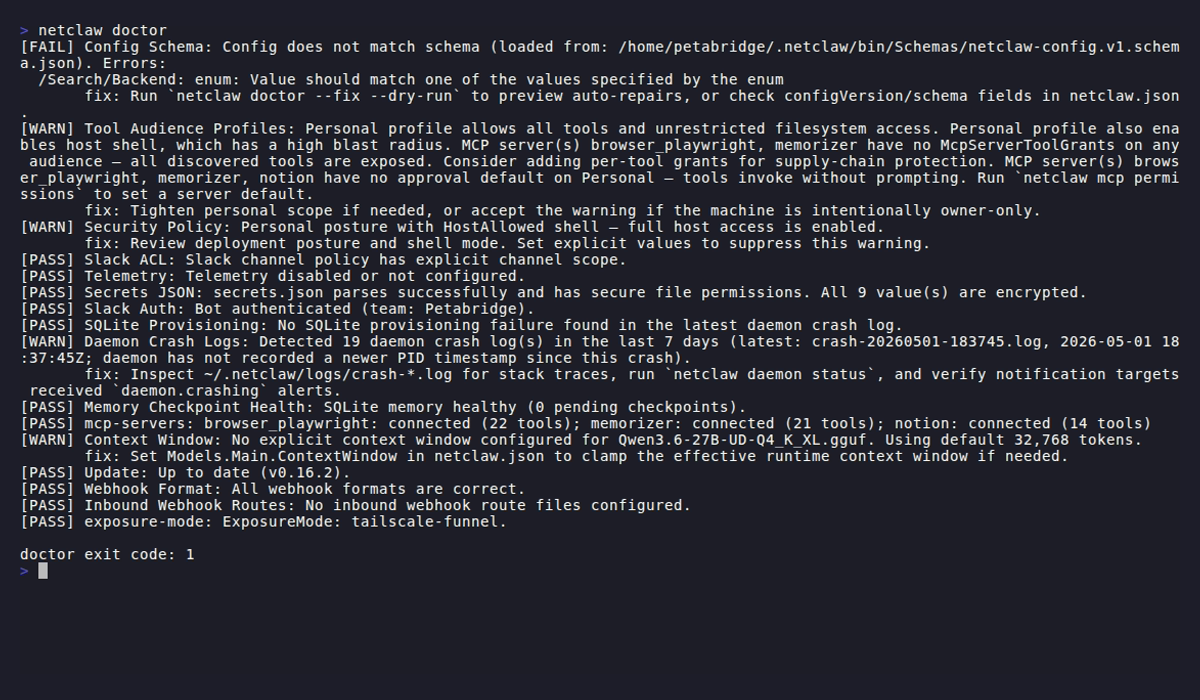
The Security Policy line near the top is the one to read first.
The checks that matter for security:
| Check | What it catches |
|---|---|
| Security Policy | A missing Security section or DeploymentPosture (Public posture, shell off), or an implied Personal posture |
| Secrets JSON | Wrong file permissions, unencrypted values |
| Slack ACL | No channel allowlist, DMs enabled without a user allowlist |
| Tool Audience Profiles | Overly permissive grants, copied default lists, Personal shell_execute on Auto with the host shell on, a profile that can write wider than it can read, and a ToolOverrides or McpServerDefaults key with a colon (an error you fix by hand) |
| Tool approval grants | Grants that another grant already covers |
| OAuth Token Expiry | A retired OAuthTokenExpiry key in netclaw.json. --fix moves it to secrets.json |
| exposure-mode | Internet-reachable exposure without a valid auth policy |
| Inbound Webhook Routes | Schema errors in route files |
Wire it into a pipeline:
netclaw doctor --format json | jq -e '.exitCode == 0'Security advisories
Section titled “Security advisories”These published advisories are fixed in 0.28.0 or later. On an older install, upgrade and then check the follow-up.
| Advisory | What to do |
|---|---|
| GHSA-85pr-m799-g776 | A ToolOverrides or McpServerDefaults key with a colon set the whole tool to Auto. Remove every such key. Netclaw now ignores them and netclaw doctor reports them |
| GHSA-mh95-h6p6-c9j3 | Through 0.27.1, the TUI commands (init, provider, model, reminder, mcp tools, approvals, config) wrote every keystroke to netclaw-<command>-trace.log in the temp directory. Delete those files and rotate any secret you typed on a shared machine |
| GHSA-fmjr-hw4g-337j | Through 0.27.1, a paired remote device could read provider OAuth tokens in the tunnel exposure modes. Tokens now need a local-control proof |
| GHSA-4638-4hj7-4w4m | Before 0.28.2, a configuration that couldn’t be read made the CLI fall back to the default daemon address. It now reports the problem and sends nothing |
Limitations
Section titled “Limitations”- Prompt injection detection is regex-based. It catches known patterns, but novel phrasings, Base64 encoding, synonym substitution and non-English attacks evade it. Treat it as a tripwire.
- Tool grants are per audience, not per channel.
ChannelAudienceschooses the audience for a channel, but two Slack channels with the same audience get the same tools. - Secret redaction catches known token formats and secret-named variables only, and skips
file_readand MCP results. For custom formats, use hard-deny patterns to block the command instead. - Approvals aren’t a sandbox. See Isolate netclaw from your other credentials.
Related pages
Section titled “Related pages”- Security model - audiences, the order of checks, protected paths
- How tool approvals work - modes, grants and prompts
netclaw doctor- configuration diagnosticsnetclaw webhooks- route management and HMAC verification- Secrets management - encrypted credential storage
Resources
Section titled “Resources”- OWASP LLM Top 10 - prompt injection, insecure output handling and other LLM attack vectors
- Tailscale ACLs - network access control for
tailscale-servedeployments - Cloudflare Access policies - IdP-based access control for
cloudflare-tunnel - GitHub webhook security - HMAC verification and secret rotation
 Built by Petabridge