
Exposure modes
Exposure mode controls how the daemon is reachable over the network. Most setups use local mode. You only need a non-local mode when something external needs to reach the daemon: GitHub webhooks, CI, a second machine, a reverse proxy, or another container.
Before you begin
Section titled “Before you begin”- Netclaw installed (see Installation if needed). Exposure mode is configured after install via
netclaw config, not duringnetclaw init. - For reverse proxy: a working proxy already configured, a non-loopback internal IP for the daemon, and the proxy source IP or CIDR ready for
TrustedProxies. - For Tailscale modes:
tailscaledinstalled and running. - For Cloudflare Tunnel:
cloudflaredinstalled and configured.
| Mode | Config value | Required process | Reachability | Risk |
|---|---|---|---|---|
| Local | local | None | Loopback only | Lowest |
| Reverse Proxy | reverse-proxy | Your reverse proxy | Whatever the proxy exposes | Medium |
| Tailscale Serve | tailscale-serve | tailscaled | Your Tailscale network (called a tailnet), HTTPS | Low |
| Tailscale Funnel | tailscale-funnel | tailscaled | Public internet via Tailscale | High |
| Cloudflare Tunnel | cloudflare-tunnel | cloudflared | Public internet via Cloudflare | High |
Configure the exposure mode via netclaw config - navigate to Security & Access → Exposure Mode - or set Daemon.ExposureMode directly in netclaw.json.
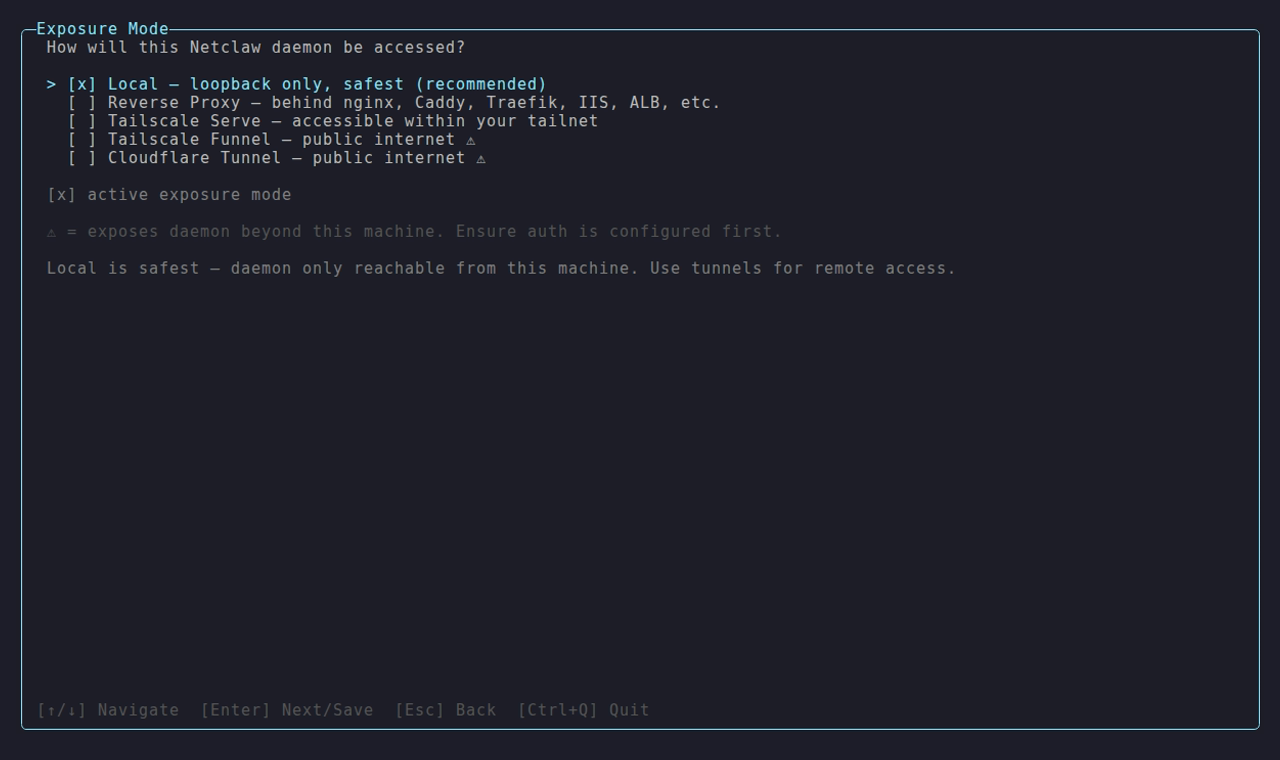
The Exposure Mode picker in netclaw config → Security & Access. The triangle marks the two modes that reach the public internet.
Options marked with a warning triangle expose the daemon to the public internet. Tailscale Serve is the recommended remote mode: tailnet-only access, no public exposure.
In local mode loopback is trusted only when the request looks local too. The Host header must be localhost or a loopback IP literal such as 127.0.0.1, and an Origin header, if there is one, must be http:// plus that same host. Anything else gets 401:
| Request | Result |
|---|---|
http://127.0.0.1:5199/api/health/status or http://localhost:5199/... | 200 |
Same call with Host: netclaw:5199, or any DNS name that resolves to loopback, host.docker.internal included | 401 |
A browser page on another local port, such as http://localhost:3000, calling the daemon | 401 (the Origin doesn’t match) |
A web app should call the daemon from its server process, or pair with netclaw daemon pair and send the device token. Anonymous routes (/api/health/ready, webhooks, the Mattermost callback) answer regardless.
Reverse Proxy
Section titled “Reverse Proxy”{ "Daemon": { "Host": "10.0.0.5", "ExposureMode": "reverse-proxy", "TrustedProxies": ["10.0.0.10"] }}Use this when nginx, Caddy, Traefik, HAProxy, or another reverse proxy is the public edge.
In this mode:
Daemon.Hostmust be a non-loopback address: an internal IP, or0.0.0.0to listen on every interface.127.0.0.1,::1andlocalhostare rejected inreverse-proxymode.TrustedProxiesmust list the proxy’s source IP or CIDR. Forwarded headers are only honored from those peers.
If the proxy runs on the same machine, the final hop into netclaw still needs to target a non-loopback address. A same-host reverse proxy is fine, but that hop can’t use loopback. The local CLI maps 0.0.0.0 back to 127.0.0.1 on its own.
In Docker the container’s address changes on every start, so bind 0.0.0.0 and trust the network that holds your proxy:
docker run -d --name netclaw --network proxy-net \ -e NETCLAW_Daemon__ExposureMode=reverse-proxy \ -e NETCLAW_Daemon__Host=0.0.0.0 \ -e NETCLAW_Daemon__TrustedProxies__0=172.16.0.0/12 \ ghcr.io/netclaw-dev/netclaw:0.28.2From another container on that network, /api/health/ready returns 200 with no credentials, and /api/health/status returns 401 without a device token.
Configuration
Section titled “Configuration”Set the mode via netclaw config → Security & Access → Exposure Mode, or directly edit the Daemon section of ~/.netclaw/config/netclaw.json.
Local (default)
Section titled “Local (default)”No Daemon section needed. The daemon binds to 127.0.0.1:5199 and is only reachable from the same machine.
{}Tailscale Serve
Section titled “Tailscale Serve”{ "Daemon": { "ExposureMode": "tailscale-serve" }}Tailscale Serve creates an HTTPS endpoint on your tailnet that proxies to the daemon’s local port. Only devices on your tailnet can reach it. Then run tailscale serve to proxy your tailnet hostname to 127.0.0.1:5199. The daemon refuses to start unless tailscaled is running or SkipTunnelProcessCheck is set.
Tailscale Funnel
Section titled “Tailscale Funnel”{ "Daemon": { "ExposureMode": "tailscale-funnel" }}Funnel extends Serve to the public internet. Anyone with the URL can reach the daemon, though netclaw’s device authentication still applies. Configure it with tailscale funnel. Only use Funnel when you need public internet access - Tailscale Serve covers everything else.
Cloudflare Tunnel
Section titled “Cloudflare Tunnel”{ "Daemon": { "ExposureMode": "cloudflare-tunnel" }}Routes traffic through Cloudflare’s network to the daemon. Set up cloudflared with a Cloudflare Tunnel pointed at 127.0.0.1:5199, and pair it with a Cloudflare Access policy to restrict who can connect.
If cloudflared runs outside the daemon’s process namespace, set Daemon.SkipTunnelProcessCheck to true so startup validation skips the local process probe without skipping the rest of the auth checks.
Full Daemon section
Section titled “Full Daemon section”| Field | Type | Default | Notes |
|---|---|---|---|
Host | string | 127.0.0.1 | IP address the daemon binds to |
Port | int | 5199 | TCP port |
ExposureMode | string | local | local, reverse-proxy, tailscale-serve, tailscale-funnel, or cloudflare-tunnel |
TrustedProxies | string[] | [] | Required in reverse-proxy; literal IPs or CIDRs only |
SkipTunnelProcessCheck | bool | false | Skip local tunnel process detection for sidecar or host-managed tunnel topologies |
{ "Daemon": { "Host": "127.0.0.1", "Port": 5199, "ExposureMode": "tailscale-serve" }}Case-insensitive - reverse-proxy, ReverseProxy, and REVERSE-PROXY all work, same as the tunnel modes.
Docker users: a published port doesn’t help in a tunnel mode, because the daemon still binds loopback inside the container. Run the tunnel agent in the same network namespace (Compose network_mode: "service:netclaw", or a sidecar in the same pod) and set Daemon.SkipTunnelProcessCheck to true, since the agent isn’t in the daemon’s process namespace. A container started this way reaches healthy and listens on 127.0.0.1:5199. The image’s health check runs netclaw daemon status, which follows Daemon.Port, so a custom port stays healthy. For a reverse proxy, use the 0.0.0.0 form above. See Run netclaw in Docker.
Environment variables
Section titled “Environment variables”Override any field with NETCLAW_Daemon__ prefixed env vars:
NETCLAW_Daemon__ExposureMode=reverse-proxyNETCLAW_Daemon__Host=10.0.0.5NETCLAW_Daemon__Port=5199NETCLAW_Daemon__TrustedProxies__0=10.0.0.10Double underscores separate path segments, following the .NET configuration convention.
Restarts
Section titled “Restarts”Editing Daemon.Host, Daemon.Port or Daemon.ExposureMode in netclaw.json restarts the daemon in-process like any other config change: it drains active sessions, rebinds and comes back. Restart it yourself only when the value comes from an environment variable or the unit file.
# systemdsystemctl --user restart netclaw
# Dockerdocker restart netclaw
Inbound webhooks
Section titled “Inbound webhooks”Inbound webhooks let external services like GitHub or CI trigger autonomous runs with an HTTP POST. Routes are served whenever Webhooks.Enabled is true, in every mode. In local mode only processes on the daemon host can reach /api/webhooks/<route>, so a service on the internet needs a tunnel or a reverse proxy in front of it.
Device pairing
Section titled “Device pairing”Non-local modes require at least one paired device or an alternative remote authentication scheme. Without one, the daemon refuses to start because remote clients have no way to authenticate.
On fresh setup-owned installs, netclaw automatically creates a one-time bootstrap path for the first non-local start. Before the first successful non-local daemon start, it seeds one local paired device and matching local client token when no paired devices already exist. That covers the init wizard, first Docker boot, and manual setups that still use the daemon’s local state directory.
After the first successful non-local start, that auto-seeding stops. Normal CLI use is paired-device auth from that point on.
If the daemon is already running and you need to add another device, pair from the daemon host:
netclaw daemon pairThe command prints a code. In a non-local mode the next line reads netclaw pair <https-address>: replace the placeholder with the HTTPS address your proxy or tunnel publishes.
Startup validation
Section titled “Startup validation”If the mode requires tailscaled or cloudflared and that process isn’t running, the daemon logs this to ~/.netclaw/logs/daemon-*.log. docker logs shows the same message as an exception, starting Unhandled exception. System.InvalidOperationException: and without the Daemon startup aborted: prefix or the Remediation: label, just before Aborted (core dumped) and a restart:
Daemon startup aborted: Tunnel prerequisite not met: ExposureMode='tailscale-serve' requires 'tailscaled' to be running unless Daemon.SkipTunnelProcessCheck=true is explicitly set for a sidecar or host-managed tunnel topology. Remediation: Start 'tailscaled' locally, or set Daemon.SkipTunnelProcessCheck=true only when the tunnel is intentionally managed outside the Netclaw process namespace.If no paired devices exist and no alternative auth scheme is configured:
Daemon startup aborted: No remote authentication available: ExposureMode='tailscale-serve' requires either at least one paired device or an alternative remote auth scheme. Remediation: Run 'netclaw daemon pair' to pair a device, or check your auth configuration before exposing the daemon remotely.Both are fatal. The daemon won’t start until you fix the underlying issue. Under systemd it restarts every five seconds. In Docker the entrypoint retries with a delay that grows to 60 seconds.
In reverse-proxy mode, startup also fails if the daemon is still bound to loopback or if TrustedProxies is empty or malformed.
Troubleshooting
Section titled “Troubleshooting”Start here: netclaw doctor
Section titled “Start here: netclaw doctor”Run netclaw doctor first. It has a dedicated exposure-mode check, and it’s one of several checks beyond config validity.
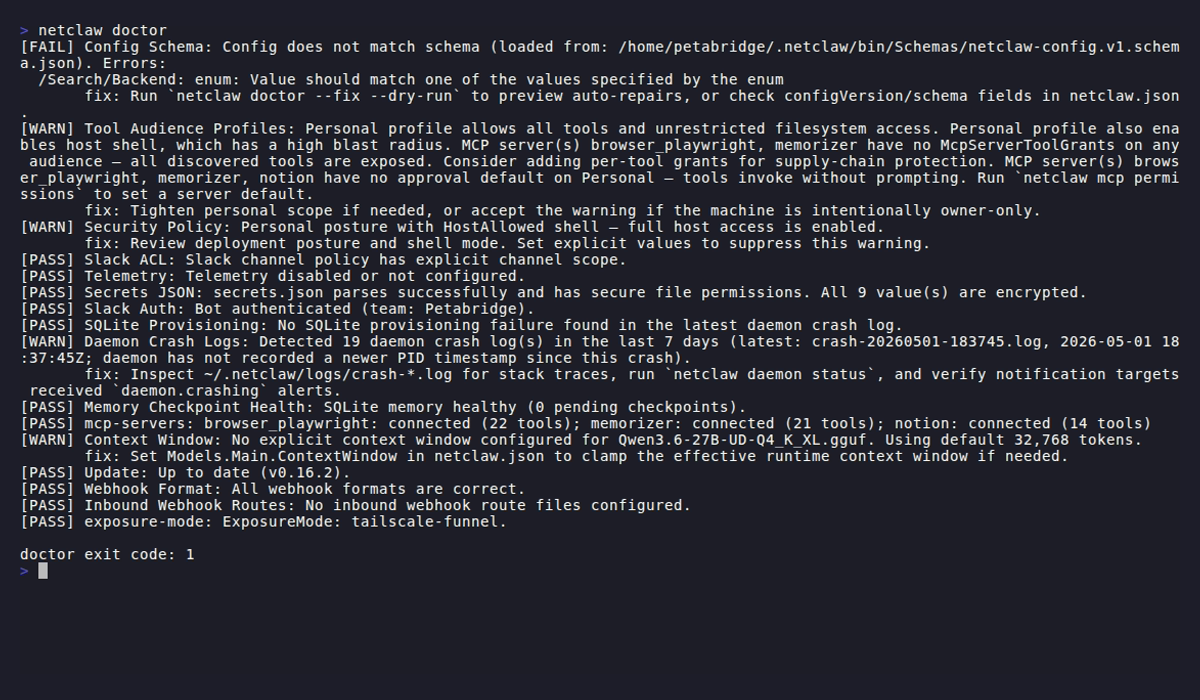
The exposure-mode line near the bottom reports local and the address it’s bound to.
Tunnel process not running
Section titled “Tunnel process not running”Symptom: Startup aborted with Tunnel prerequisite not met.
Start the required process first:
# Tailscale modessudo systemctl start tailscaled
# Cloudflare Tunnelsudo systemctl start cloudflared
Or switch to local mode if you don’t need remote access:
{ "Daemon": { "ExposureMode": "local" }}No paired devices
Section titled “No paired devices”Symptom: Startup aborted with No remote authentication available.
If this is a brand-new non-local install, check whether the daemon actually completed its first successful start. The one-shot bootstrap only happens before that first successful non-local startup.
If the daemon is already running, pair from the daemon host:
netclaw daemon pairIf the device store was lost after the first successful non-local start and the daemon will not start anymore, temporarily switch Daemon.ExposureMode to local or restore devices.json and secrets.json from backup. Then start the daemon, run netclaw daemon pair, and switch back.
You can also run netclaw init on an existing install - it shows an action menu with options to open the configuration editor, redo identity, or start over.
Reverse proxy bound to loopback
Section titled “Reverse proxy bound to loopback”Symptom: Startup aborted because Daemon.ExposureMode is reverse-proxy but Daemon.Host is 127.0.0.1, ::1 or localhost.
Bind netclaw to a non-loopback address and point the proxy at it instead of loopback:
{ "Daemon": { "Host": "10.0.0.5", "ExposureMode": "reverse-proxy", "TrustedProxies": ["10.0.0.10"] }}Non-loopback bind in local mode
Section titled “Non-loopback bind in local mode”Symptom: netclaw doctor fails the exposure-mode check with Invalid local topology: Daemon.Host '0.0.0.0' is not a loopback address. and exits 1. The daemon itself refuses to start in this combination.
Either bind to loopback:
{ "Daemon": { "Host": "127.0.0.1" }}Or switch to the exposure mode that reflects how the daemon is actually reachable:
{ "Daemon": { "Host": "127.0.0.1", "ExposureMode": "tailscale-serve" }}Related pages
Section titled “Related pages”- Run netclaw in Docker - the containerized daemon and how to reach it
- systemd service - bare-metal Linux service management
- Pairing remote devices - authenticate a second machine
- Webhooks - inbound webhook route configuration
netclaw doctor- built-in health check diagnostics
Resources
Section titled “Resources”- Tailscale Serve documentation - set up HTTPS endpoints on your tailnet
- Tailscale Funnel documentation - expose tailnet services to the public internet
- Cloudflare Tunnel documentation - route traffic through Cloudflare to your origin
- Cloudflare Access documentation - identity-aware access policies for tunneled services
- nginx reverse proxy guide - baseline reverse-proxy behavior and forwarding model
- Cloudflare Tunnel service docs - service startup and lifecycle details for cloudflared
- Tailscale download - install Tailscale on your platform
 Built by Petabridge