
netclaw sessions
Pick up where you left off. netclaw sessions opens a terminal UI of your recent sessions. Select one and press Enter to land back in the conversation. --once and --json print the same list to stdout for scripts.
It needs a running daemon. If it’s down, start it with netclaw daemon start (docker restart <container> in Docker), or run netclaw init, which starts it for you.
netclaw sessions [options]Options
Section titled “Options”| Flag | Description | Default |
|---|---|---|
--once | Print the list and exit, with no TUI | TUI |
--json | Print a JSON array. Implies --once. | Plain text |
Browse in the TUI
Section titled “Browse in the TUI”netclaw sessionsEach row shows the channel, the title, the turn count and the time since the last activity:
1. [headless] Untitled (2 turns, 1m ago)2. [headless] Untitled (1 turns, 3m ago)3. [tui] First Conversation Setting Up Netclaw Assistant (1 turns, 4m ago)The channel tag says where the session started: tui, headless, slack, discord and so on. Sessions without a title yet show as Untitled. The daemon returns 50 sessions at a time, newest first.
| Key | Action |
|---|---|
↑ / K | Move up |
↓ / J | Move down |
Enter | Resume the selected session in netclaw chat |
N | Start a new chat |
PgDn | Next page, older sessions |
PgUp | Previous page, newer sessions |
Ctrl+Q | Quit |
Esc does nothing here. The footer shows the range you’re on, such as Showing sessions 1-3, plus the [PgUp] and [PgDn] hints when another page exists. With no sessions, the screen says “No sessions found. Press Enter to start a new chat.”
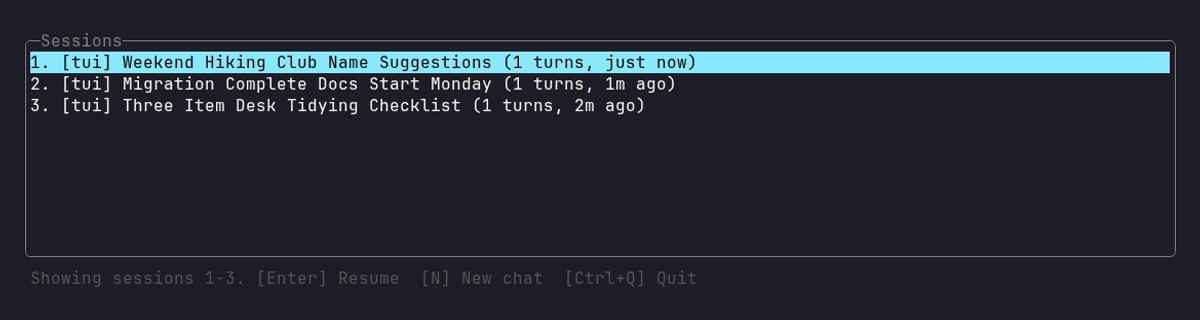
Each row shows where the session started, its generated title, its turn count and how long ago it was active, and the footer carries the range and the keys.
Resuming loads the session’s history into the chat as grayed-out context. Quitting the chat later doesn’t end the session. It stays alive in the daemon, and you can pick it up again from this list.
Plain text and JSON output
Section titled “Plain text and JSON output”Plain text
Section titled “Plain text”netclaw sessions --oncesignalr/467ea8513aa44ea2bc6c8b11a7d28565 Hello from the stub model. [active] turns=1 last=2026-10-14 03:33newsess (untitled) [active] turns=1 last=2026-10-14 03:32signalr/ef858dd055b7421fac18f4671d93facc (untitled) [active] turns=1 last=2026-10-14 03:32The first column is the session ID you pass to netclaw chat --resume. IDs that you named yourself are short. Daemon-assigned ones look like signalr/<guid>. Untitled sessions show (untitled).
Active means the session is held in memory and answers at once. Inactive means it was saved to disk after sitting idle, and resuming it replays the history first.
netclaw sessions --json[ { "PersistenceId": "session-newsess", "Channel": "headless", "Title": null, "Description": null, "Status": "active", "TurnCount": 1, "CreatedAt": 1791948733854, "LastActivity": 1791948733876, "LogPath": "/home/netclaw/.netclaw/sessions/newsess-1efa2451f878e7b3/logs/session.log", "LastInputTokens": 10, "SessionId": "newsess" }]The keys are PascalCase. netclaw chat -p --json and most other commands use camelCase, so check the case before you write a filter.
| Field | Type | Description |
|---|---|---|
SessionId | string | The ID to pass to netclaw chat --resume |
PersistenceId | string | The internal ID, which is session- plus the session ID |
Channel | string | Where the session started: tui, headless, reminder, slack, discord, mattermost |
Title | string or null | Generated after the first turns, null until then |
Description | string or null | Set only if something wrote one |
Status | string | active (in memory) or inactive (saved to disk) |
TurnCount | int | Completed turns |
CreatedAt | long | Creation time in Unix milliseconds |
LastActivity | long | Last activity in Unix milliseconds |
LogPath | string or null | The session’s log file |
LastInputTokens | long or null | Input tokens in the last recorded turn |
Examples
Section titled “Examples”These need jq.
Get the ID of the most recent session:
netclaw sessions --json | jq -r '.[0].SessionId'Resume it without opening the TUI picker:
netclaw chat --resume "$(netclaw sessions --json | jq -r '.[0].SessionId')"List sessions with more than one turn:
netclaw sessions --json | jq -r '.[] | select(.TurnCount > 1) | .SessionId'Sort by last activity, newest first:
netclaw sessions --json | jq -r 'sort_by(-.LastActivity) | .[0].SessionId'Print a table with readable timestamps:
netclaw sessions --json | jq -r '.[] | [.SessionId, .TurnCount, (.LastActivity/1000 | todate)] | @tsv'signalr/4d503455b7d64db483680132c831e3e1 1 2026-10-14T03:41:56Zsignalr/22f90bcd201845c7861cb5d212dcbc40 1 2026-10-14T03:38:42ZCount sessions by channel:
netclaw sessions --json | jq -r '.[].Channel' | sort | uniq -cDeleting sessions
Section titled “Deleting sessions”netclaw sessions is read-only. It can’t delete or archive a session, and netclaw has no command that does. The session list lives in ~/.netclaw/netclaw.db, and each session’s files live in its own directory.
Where sessions are stored
Section titled “Where sessions are stored”Since 0.27.0 a new session gets its own directory under ~/.netclaw/sessions/, named <session-id>-<hash> with slashes in the ID turned into underscores. The log is at logs/session.log inside it, and LogPath in the JSON points there. Sessions created before 0.27.0 keep their old paths. See Data directory layout.
Exit codes
Section titled “Exit codes”| Code | Meaning |
|---|---|
0 | The list printed (or the TUI closed) |
1 | The daemon was unreachable or the request failed |
In --once and --json mode a failure prints two lines and exits 1:
[FAIL] sessions: unable to reach daemon at http://127.0.0.1:5199: Connection refused (127.0.0.1:5199) fix: run `netclaw daemon start` and retry.In the TUI the same failure shows “Failed to connect to daemon. Is it running?”
Related pages
Section titled “Related pages”netclaw chat:--resume <id>jumps into a session, and-pscripts it- Scripting headless sessions: headless multi-turn patterns
netclaw status: check daemon health when sessions can’t connectnetclaw stats: token and session counts- Sessions: how a session is created, saved and recovered
Resources
Section titled “Resources”- jq manual: filter and transform
--jsonoutput - Akka.NET persistence: how session state survives daemon restarts
 Built by Petabridge