
netclaw config
netclaw config opens a menu-driven dashboard for every setting that netclaw init doesn’t ask about. Run it after init, and again whenever you add a channel, switch search backends or change who can reach the daemon. It’s safe to re-run. Each area saves on its own, and the daemon reloads when netclaw.json changes.
netclaw confignetclaw config retention [--logs-days <days>]netclaw config takes no options. netclaw config --help prints a short usage note, and any argument it doesn’t know prints usage and exits 1. With no netclaw.json both forms print “No configuration found. Run netclaw init first.”, exit 1 and open nothing. netclaw config retention is the scriptable form of the Data Retention screen.
| Key | Action |
|---|---|
↑ / ↓ | Move through rows |
Enter | Open the selected area, or apply the selected row |
Space | Toggle a row or save a field, where the footer says so |
← / → | Change a choice row such as Backend or File scope |
Delete | Remove the selected list entry (skill sources, outbound webhooks) |
Esc | Back out of an area to the dashboard. Does nothing on the dashboard itself. |
Ctrl+Q | Quit from anywhere |
The footer of each screen lists the keys that apply there.
The dashboard
Section titled “The dashboard”Run netclaw config and you land on the dashboard.
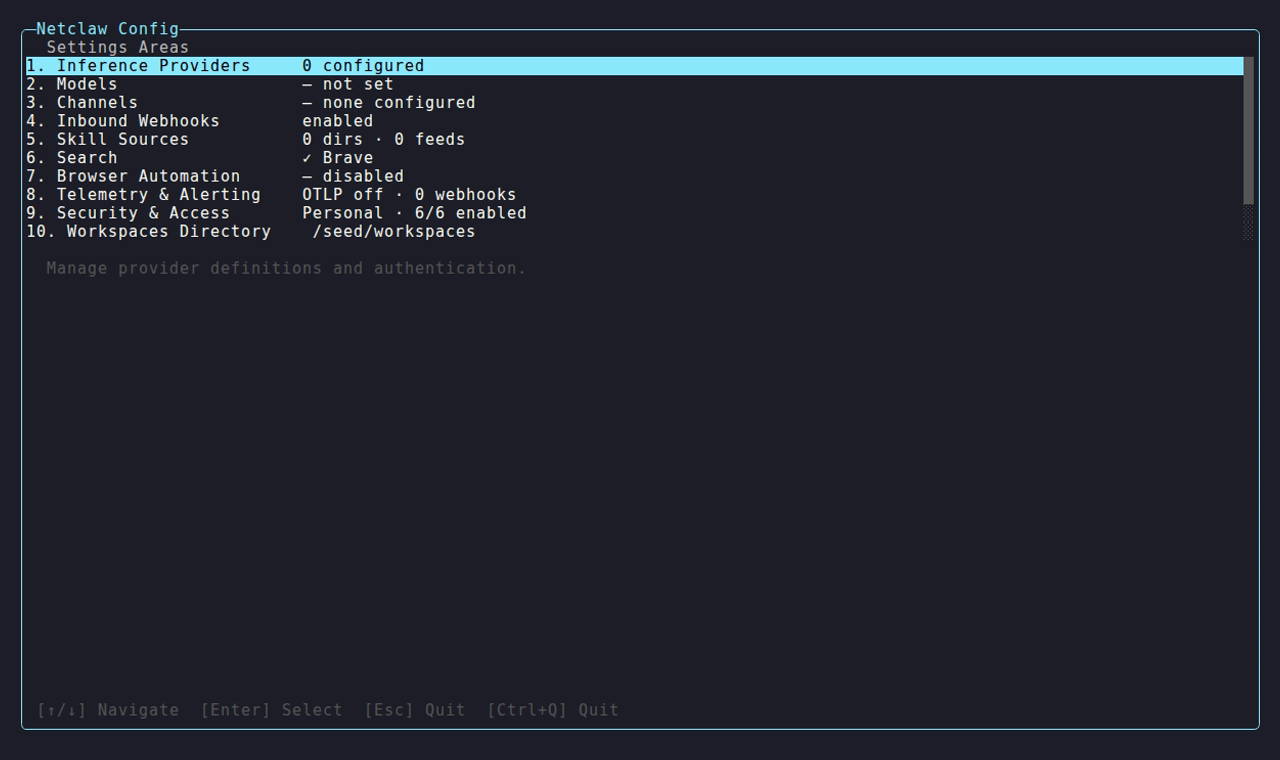
It’s the demo install the other status screenshots use. In a shorter terminal the list scrolls.
The dashboard lists thirteen rows, each with a live status summary:
| Row | Status shows | Edits |
|---|---|---|
| 1. Inference Providers | 1 configured | Opens the provider manager |
| 2. Models | The Main model ID, – not set, or – config error | Opens the model manager |
| 3. Channels | Slack · 2 channels, or – none configured | Slack, Discord and Mattermost adapters |
| 4. Inbound Webhooks | – disabled or enabled | Global webhook switch and execution timeout |
| 5. Skill Sources | 0 dirs · 0 feeds, or – config error | Local skill folders and skill servers |
| 6. Search | ✓ Brave, ✓ SearXNG, ✓ DuckDuckGo, or – disabled when Search.Enabled is false | Search backend and credentials |
| 7. Browser Automation | – disabled or enabled | The browser MCP profile |
| 8. Telemetry & Alerting | OTLP off · 0 webhooks | OTLP export and outbound alert webhooks |
| 9. Security & Access | Personal · 6/6 enabled | Posture, features, audience profiles, exposure mode |
| 10. Workspaces Directory | The directory path | Project discovery root |
| 11. Data Retention | logs 14d or logs forever | How long the daemon keeps log files |
| 12. Run Full Doctor | - | Exits the dashboard and runs netclaw doctor |
| 13. Quit | - | Exits |
Save behavior
Section titled “Save behavior”There’s no save step for the whole dashboard. An area writes netclaw.json (and secrets.json for tokens and keys) when you finish editing it, and the screen says so. The Channels screen reads “completed changes are already saved.” When netclaw.json changes, the running daemon drains its sessions and restarts itself. A change that only touches secrets.json or an environment variable needs a manual restart: netclaw daemon stop then netclaw daemon start, or docker restart <container>.
Three outcomes can happen when you apply an area:
- It saves. The status line goes green.
- A reachability or runtime probe fails. Examples are a SearXNG endpoint that doesn’t answer or a skill server that doesn’t respond. A dialog offers Retry validation, Back to edit or Save anyway. Save anyway writes the config so you can fix connectivity later.
- The input is invalid. A wrong type, an out-of-range value or an unresolved channel blocks the save, and there’s no override. Fix the field or remove the entry.
Channels
Section titled “Channels”Channels are configured here, not in init. Each adapter is enabled on its own, takes its credentials, and keeps its own allow-list.
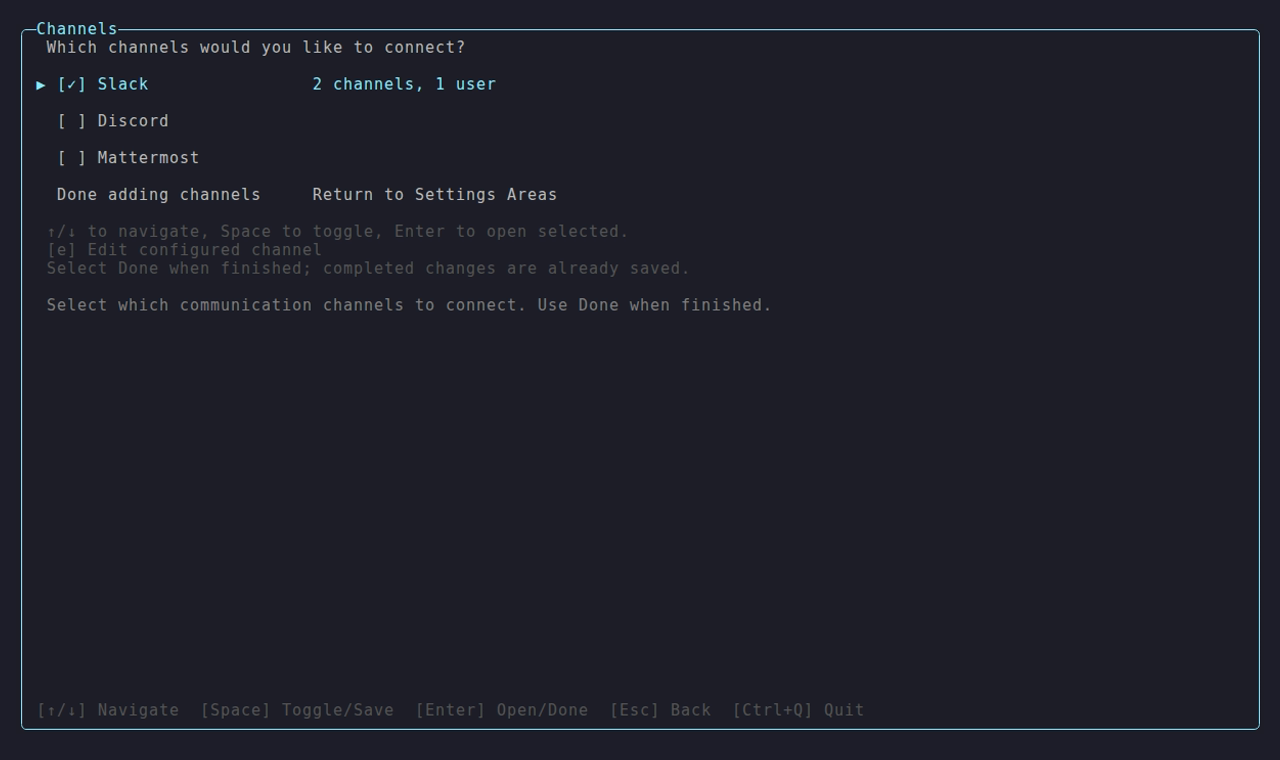
Space toggles an adapter, Enter opens it, and Done adding channels returns to the dashboard.
Inside an adapter, a Channels & Permissions screen sets each channel’s audience and whether it needs an @mention.
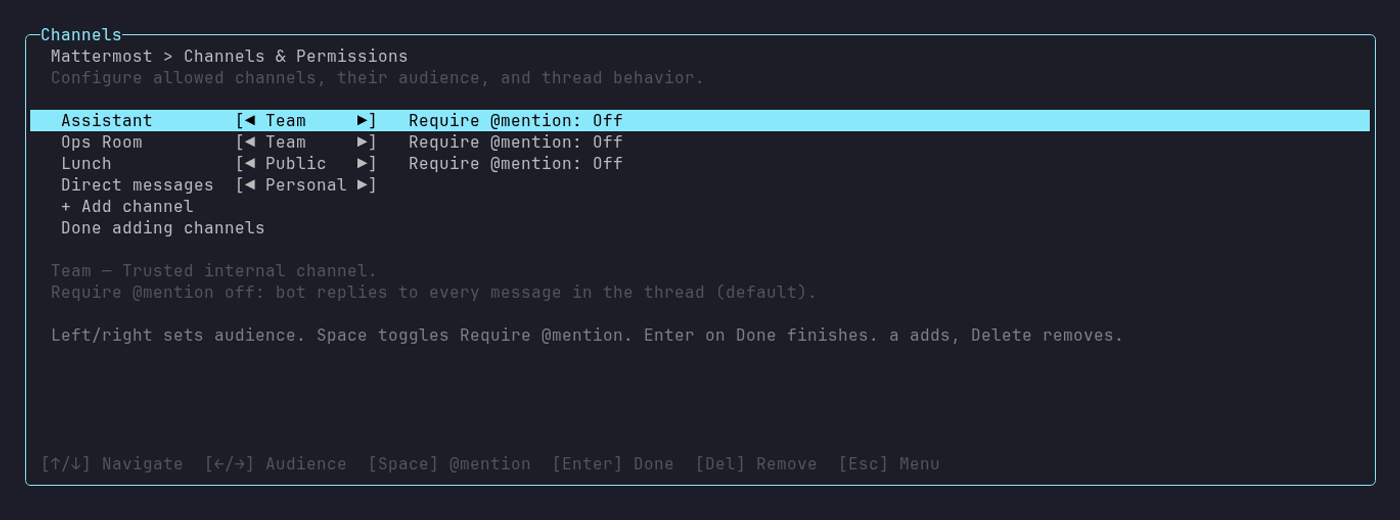
This one is Mattermost’s. Left and right change the audience, Space toggles Require @mention, and a adds a channel.
Channel entry resolves before it saves. You type a channel name or ID, and netclaw looks it up through the platform API and stores the canonical ID. The runtime matches incoming messages by ID.
An unresolved channel blocks the save:
Could not resolve #deploys to a channel the bot can see — fix or remove before saving (an unmatchable channel grants nothing).A failed lookup, such as a bad token or missing scope, blocks it the same way with Slack channel lookup failed: <reason>. Netclaw no longer saves unresolvable names as inert entries.
Saving the Slack adapter writes these keys to netclaw.json: Slack.Enabled, Slack.SocketMode, Slack.AllowDirectMessages, Slack.AllowedChannelIds, Slack.DefaultChannelId, Slack.AllowedUserIds, Slack.ChannelAudiences and Slack.MentionRequiredInThreadByChannel. The bot and app tokens go to secrets.json. Discord and Mattermost write the same shape under their own keys.
Token setup is in the per-platform guides: Slack, Discord and Mattermost.
Other areas
Section titled “Other areas”Search
Section titled “Search”Pick a backend: DuckDuckGo needs no setup but can hit bot detection, Brave needs an API key, and SearXNG needs your instance’s endpoint. The SearXNG endpoint gets a reachability probe before the save, which you can override.
The active backend is marked [x], and a check mark shows a backend that has saved setup. Search providers has the screen.
Inbound webhooks
Section titled “Inbound webhooks”An Enabled toggle (Webhooks.Enabled) and an execution timeout in seconds (Webhooks.ExecutionTimeoutSeconds, 300 by default). The screen also shows route counts. Create routes with netclaw webhooks.
The editor never creates routes, so a route list stays whatever netclaw webhooks made it. The screen is on Webhooks.
Skill sources
Section titled “Skill sources”Add a local folder (a directory picker, Ctrl+N creates a folder) or connect a skill server. Rescan all refreshes local status and remote skill counts.
Both kinds of source are manual adds, and Delete removes one. See Skills for the screen.
Browser automation
Section titled “Browser automation”An Enabled row that adds or removes the canonical browser MCP profile, and a Backend row you change with ← and →. The backends are Playwright and Chrome DevTools. An MCP permissions row opens the grant editor, because tool grants for the browser live in netclaw mcp permissions.
The screen lists missing prerequisites, such as Node.js with npx or the Playwright browser runtime, with the commands to install them.
Telemetry and alerting
Section titled “Telemetry and alerting”An OTLP toggle and endpoint (http://127.0.0.1:4317 by default), plus a list of outbound alert webhooks. Each webhook has a name, URL, an optional masked Authorization header and a format that netclaw detects from the URL.
With telemetry off, the endpoint field still shows the default and the webhook list is empty.
Security and access
Section titled “Security and access”Four sub-screens: Security Posture, Enabled Features, Audience Profiles and Exposure Mode. Posture and features are the same choices as init. Audience Profiles edit one audience at a time: tool groups, file scope, attachment scope, and a shortcut to MCP grants.
Exposure Mode picks how the daemon is reached.
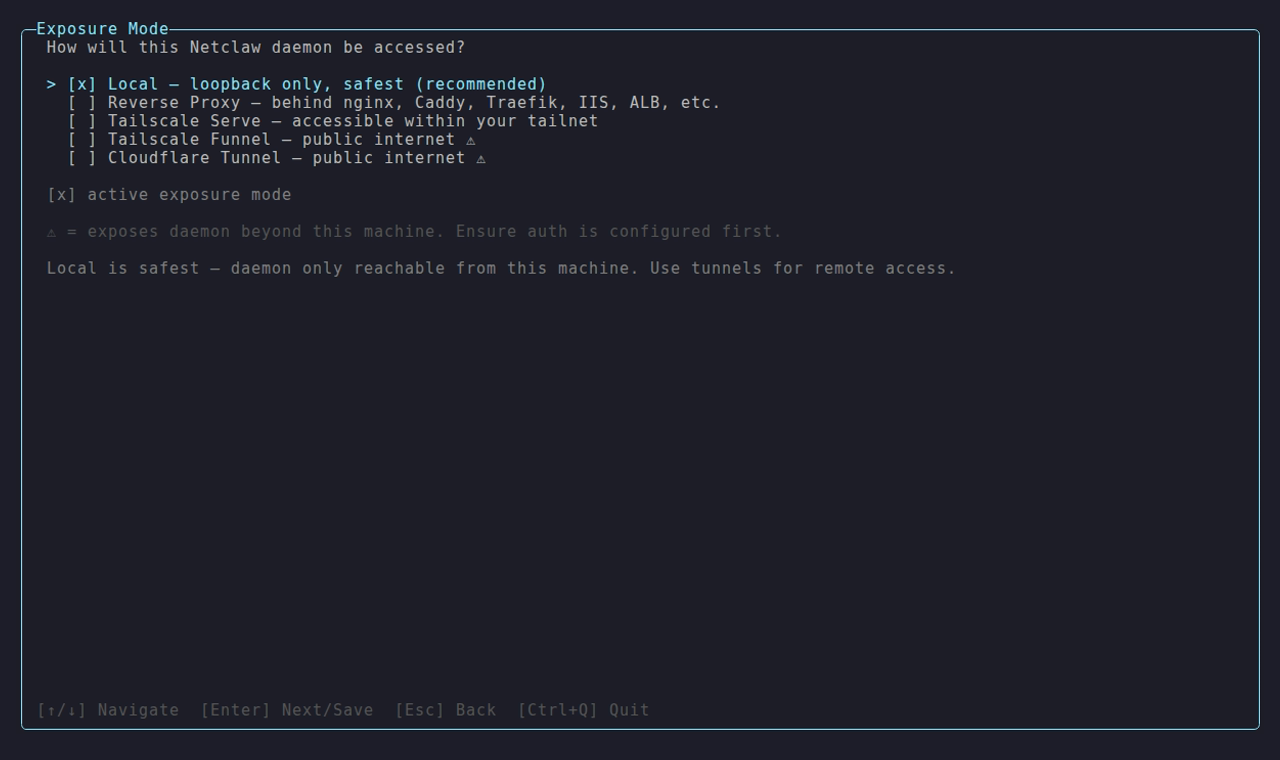
The choices are Local (loopback only, the safest), Reverse Proxy, Tailscale Serve, Tailscale Funnel and Cloudflare Tunnel. Funnel and Cloudflare expose the daemon to the internet, so configure authentication first. See Exposure modes.
Workspaces directory
Section titled “Workspaces directory”The root netclaw scans for projects, set through a directory picker.
On this picker Esc cancels and Ctrl+Q quits.
Data retention
Section titled “Data retention”How many days the daemon keeps its own log files, including the numbered segments a busy day rolls into (daemon-<date>.1.log, .2.log, and so on, after the daily file reaches 10 MiB). One row, Daemon and crash logs, showing keep 14 days (default), keep 30 days or keep forever.
Type digits to replace the number (the first digit starts a new value, letters are ignored), Backspace to edit, Enter to save and Esc to go back. 0 keeps the logs forever and the maximum is 36500. An out-of-range number is rejected with the allowed range and nothing is written. If an environment variable overrides the file, a warning says so. The newest three daemon logs and the newest three crash logs are always kept. Data retention covers what gets deleted.
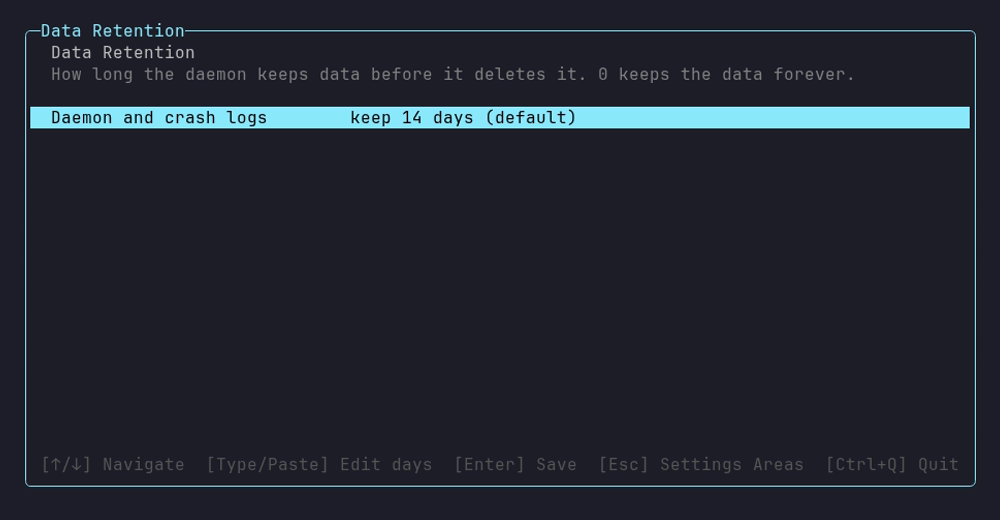
The one row at its default. The footer lists the keys: Enter saves and Esc goes back to the settings areas.
netclaw config retention
Section titled “netclaw config retention”Show or set the same value without the TUI. With no option it prints the current setting.
netclaw config retentionnetclaw config retention --logs-days 30Daemon and crash logs: keep 30 daysA running daemon applies the change automatically.| Option | Description | Default |
|---|---|---|
--logs-days <days> | Days to keep daemon and crash logs. 0 keeps them forever. | 14 |
Setting the value that’s already in effect prints the line and no “applies” message, because nothing was written. A value that isn’t a whole number from 0 to 36500, a missing value or an unknown option exits 1 and leaves the file alone:
$ netclaw config retention --logs-days 36501--logs-days: Days must be a whole number from 0 to 36500 (0 keeps the data forever).| Situation | Output | Exit |
|---|---|---|
No netclaw.json | No configuration found. Run netclaw init first. | 1 |
--logs-days with no number | --logs-days needs a number of days. | 1 |
| Unknown option | Unknown option '--foo'. Run netclaw config retention —help. | 1 |
NETCLAW_Retention__Logs__Days is set | The write succeeds, then warning: NETCLAW_Retention__Logs__Days is set and overrides netclaw.json for the daemon. on stderr | 0 |
Retention written as "Retention": { "Logs:Days": 5 } | Could not use netclaw.json: Retention:Logs:Days is set in a spelling this command cannot edit. Edit netclaw.json by hand. | 1 |
The command edits Retention.Logs.Days, and also reads the flat "Retention:Logs:Days" spelling if that’s what the file already uses. A stored value that isn’t an integer shows as the default with a warning, and the next write replaces it.
Related pages
Section titled “Related pages”netclaw init: first-run setup for provider, identity and posturenetclaw provider: the provider manager behind row 1netclaw model: the model manager behind row 2netclaw webhooks: create the routes that inbound webhooks servenetclaw doctor: validate the config you just saved- Data retention: what the Data Retention area deletes
Resources
Section titled “Resources”- Brave Search API: the managed backend in the Search area
- SearXNG documentation: the self-hosted backend and its endpoint requirements
- Playwright MCP: one of the two browser-automation backends
 Built by Petabridge