
Mattermost
netclaw connects to Mattermost over a WebSocket for events and the REST API for replies. You create a bot account on your server, give netclaw the bot’s access token, and it answers in threads under the same default-deny ACL as Slack and Discord. If you want the whole stack in containers, Run netclaw with Mattermost on Docker Compose sets up the server, the bot and netclaw with one sample.
Prerequisites
Section titled “Prerequisites”- netclaw installed and initialized (
netclaw init) - A Mattermost server the daemon can reach, with a user who has System Console access
- The server’s base URL as netclaw will reach it, such as
https://mm.example.comorhttp://mattermost:8065on a Compose network
Create a bot account
Section titled “Create a bot account”Mattermost bots authenticate with a personal access token, not OAuth. Two server settings are off by default and both must be on before you can create one.
1. Enable bot accounts and access tokens
Section titled “1. Enable bot accounts and access tokens”In the System Console, open Integrations > Bot Accounts and set Enable bot account creation to true. Then open Integrations > Integration Management and turn on Enable personal access tokens. Both map to ServiceSettings keys (EnableBotAccountCreation and EnableUserAccessTokens) if you’d rather set them in config.json or with MM_SERVICESETTINGS_* environment variables.
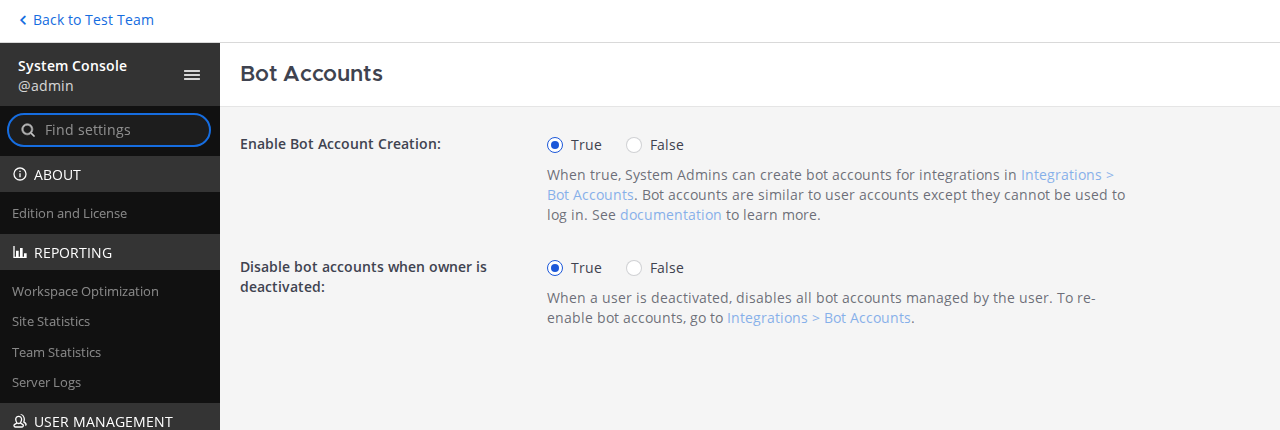
This server was configured through an environment variable, so the setting is locked and the console says so. On your server it’s a normal radio button, and skipping this toggle or the token one is the most common setup snag.
2. Create the bot and copy its token
Section titled “2. Create the bot and copy its token”Under Integrations > Bot Accounts, click Add Bot Account, give it a username such as netclaw and a display name, then click Create New Token. Mattermost shows the access token once, in a banner. Copy it then. That token, not the Token ID in the list, is the BotToken netclaw needs.
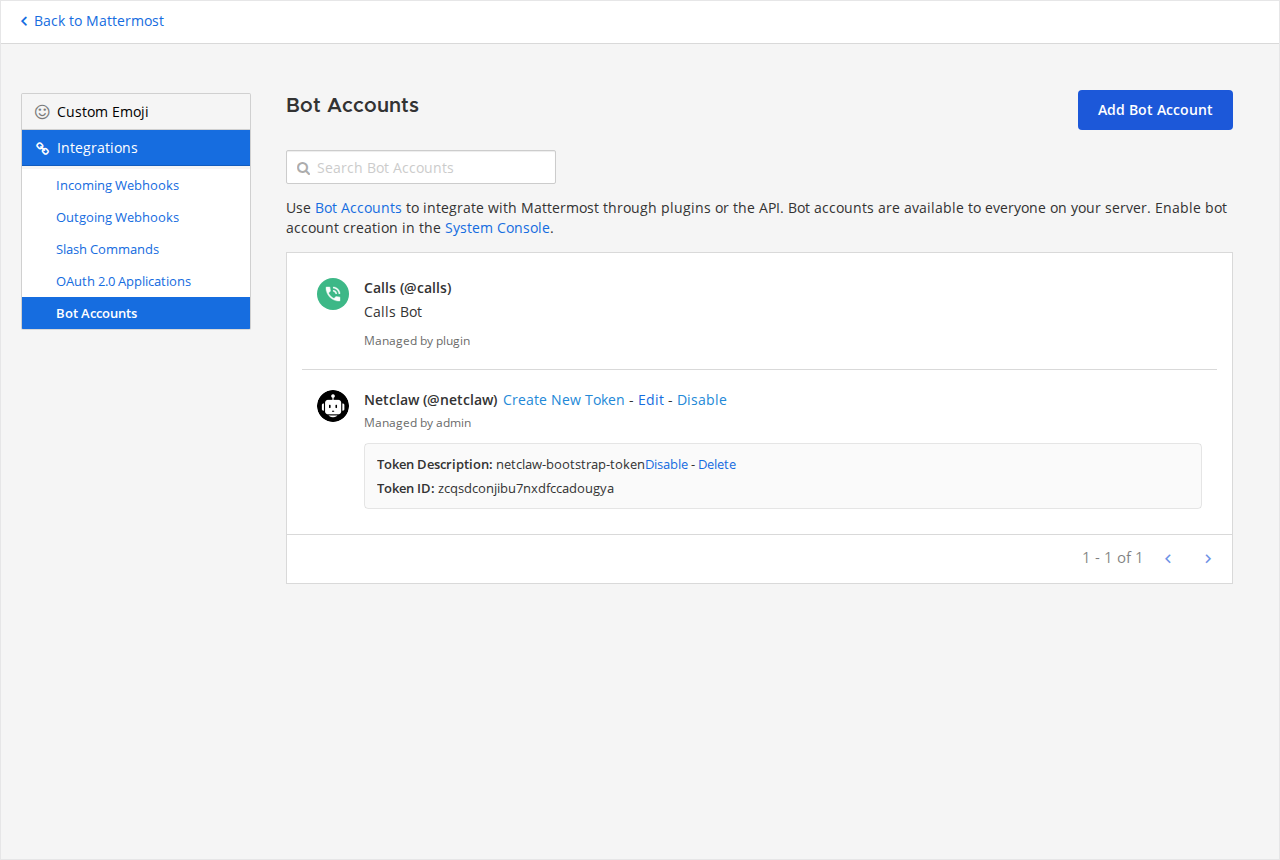
The list is what you see after the bot exists. The Create New Token link next to the bot issues a replacement later, and the Token ID in the row, masked here, is not the token netclaw needs.
The Compose sample provisions this for you, and the bot row ends up looking like this.

The token description is netclaw, and the sample keeps the token itself out of every file in the repository.
3. Add the bot to your team and channels
Section titled “3. Add the bot to your team and channels”A bot only sees channels it belongs to. Add it to the team, then invite it to each channel where it should answer with /invite @netclaw or the channel member menu.
Configure netclaw
Section titled “Configure netclaw”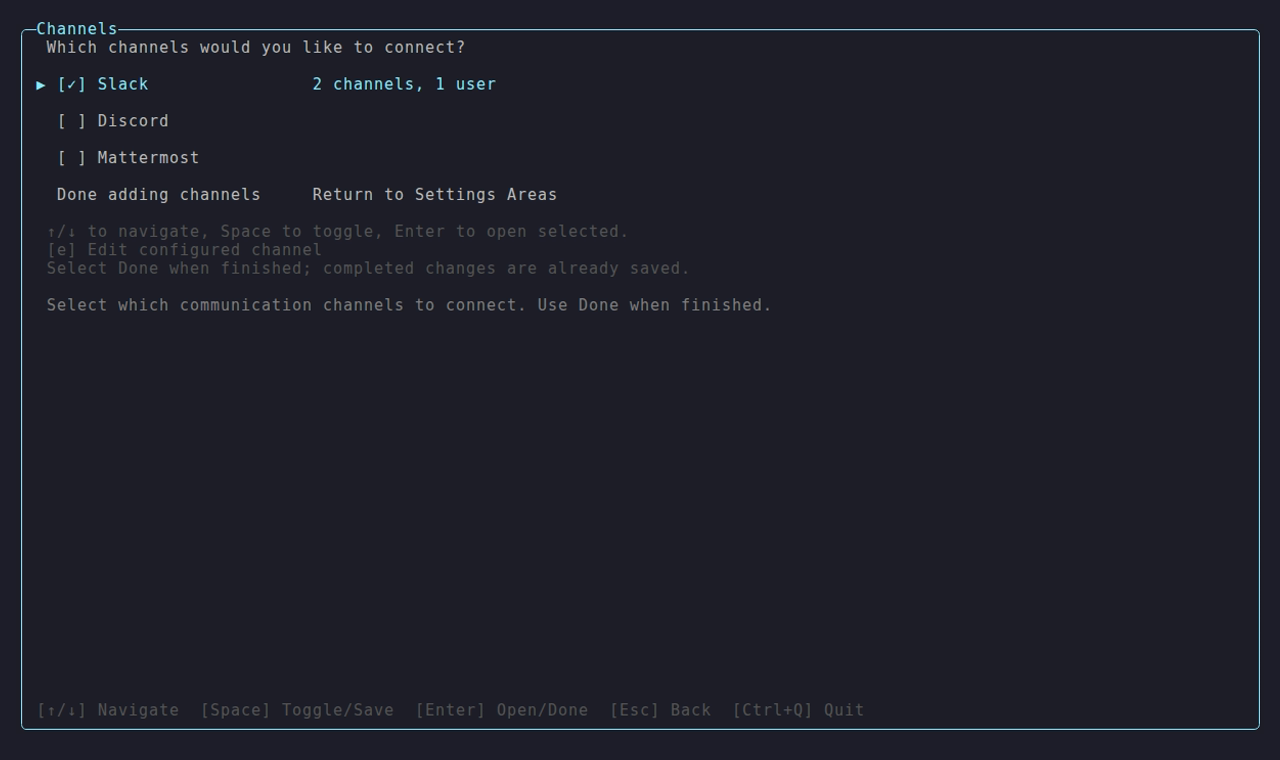
The Channels area lists Slack, Discord and Mattermost with a checkbox each. Toggle Mattermost on and press Enter to configure it.
Manual setup
Section titled “Manual setup”For Docker or scripted installs, store the token with netclaw secrets and describe the rest in config:
netclaw secrets set Mattermost.BotToken your-bot-tokenThe token lands in your shell history and the process list this way. In scripts, feed it over stdin instead, as the Compose guide does: netclaw secrets set Mattermost.BotToken "$(cat)" < .bot-token.
{ "Mattermost": { "Enabled": true, "ServerUrl": "https://mm.example.com", "AllowedChannelIds": ["abcdefghijklmnopqrstuvwxyz"], "AllowedUserIds": ["zyxwvutsrqponmlkjihgfedcba"] }}Every key also works as an environment variable with the NETCLAW_ prefix and __ between segments, with list entries indexed from zero:
NETCLAW_Mattermost__Enabled=trueNETCLAW_Mattermost__ServerUrl=http://mattermost:8065NETCLAW_Mattermost__AllowedChannelIds__0=abcdefghijklmnopqrstuvwxyzRestart behavior differs by source. Editing netclaw.json makes the daemon restart itself. A change to the vault or to an environment variable needs a restart you do yourself: systemctl --user restart netclaw, or docker restart <container> in Docker.
How channel IDs are stored
Section titled “How channel IDs are stored”Add channels one at a time in netclaw config → Channels. netclaw resolves each entry against the Mattermost REST API to a canonical channel ID before it adds it. AllowedChannelIds holds IDs, never display names. An entry that can’t be resolved is flagged and kept verbatim, and it matches no channel until it resolves. When you save, the first channel in the list also becomes DefaultChannelId.
All config fields
Section titled “All config fields”| Field | Type | Default | Description |
|---|---|---|---|
Enabled | bool | false | Turn on Mattermost |
ServerUrl | string | - | Base URL of your server. Required when enabled. |
BotToken | string | - | Bot access token. Vault only (netclaw secrets set Mattermost.BotToken). It isn’t a netclaw.json key, and the schema rejects it there. |
CallbackUrl | string | - | URL the Mattermost server can reach for approval buttons. Required for sub-agent approvals. Unset means text-reply approvals for the main agent only (see Tool approval). |
DefaultChannelId | string | - | A 26-character channel ID that’s allowed without being listed in AllowedChannelIds |
MentionOnly | bool | true | In channels, answer only when @-mentioned |
AllowDirectMessages | bool | false | Accept DMs |
MentionRequiredInDm | bool | false | Require an @-mention even in DMs |
MentionRequiredInThreadByChannel | object | {} | Channel ID to bool. true makes a thread reply in that channel need an @-mention. See Mention behavior. |
AllowedChannelIds | string[] | [] | Channel allow-list. Empty with no default denies every channel message. |
AllowedUserIds | string[] | [] | User allow-list. Empty accepts everyone in allowed channels. |
ChannelAudiences | object | {} | Per-channel audience overrides. Keys are channel IDs or "dm". Values are "personal", "team" or "public". |
The token lives in ~/.netclaw/config/secrets.json, encrypted at rest. Channel and user IDs are 26-character strings. You can read them with mmctl --local user list and mmctl --local channel search <name> --team <team> inside the server container, or from the REST API.
Access control
Section titled “Access control”Mattermost ACL is default-deny and works like Slack and Discord.
Channels
Section titled “Channels”The bot answers only in channels that pass the allow-list. DefaultChannelId allows one, AllowedChannelIds allows more, and if both are empty every channel message is denied. That’s the number one setup mistake.
{ "Mattermost": { "AllowedChannelIds": ["abcdefghijklmnopqrstuvwxyz", "zyxwvutsrqponmlkjihgfedcba"] }}AllowedUserIds restricts who gets answers. Empty means everyone in an allowed channel. Non-empty means only the listed users, and everyone else is dropped silently, in DMs too. Listed users are TrustedInternal in the security model, and everyone else is UntrustedExternal.
Direct messages
Section titled “Direct messages”DMs are off by default. Turn them on with "AllowDirectMessages": true. Users then write without a mention, because MentionRequiredInDm defaults to false. With AllowedUserIds empty, anyone on the server can DM the bot.
Audience overrides
Section titled “Audience overrides”Audience resolves per message: ChannelAudiences[channelId] first, then ChannelAudiences["dm"] for direct messages, then a fallback. The fallback is Team for a channel listed in AllowedChannelIds or a user listed in AllowedUserIds, and Public for everything else. A DM from someone who isn’t on the list is Public, and so is a channel allowed only through DefaultChannelId, unless you also list it in AllowedChannelIds or set ChannelAudiences for it.
{ "Mattermost": { "ChannelAudiences": { "abcdefghijklmnopqrstuvwxyz": "personal", "dm": "personal" } }}A channel-ID entry beats "dm", and an unrecognized value denies the message instead of falling back. Security model maps audiences to tools. For a channel you own, personal is what lets the agent request shell commands, still gated by approval.
Behavior in Mattermost
Section titled “Behavior in Mattermost”Threads and sessions
Section titled “Threads and sessions”Each thread is its own session, keyed by {channelId}/{rootPostId}, and the bot replies in-thread. The thread stays attached to its session until the session goes idle and is freed from memory, after Session.IdleTimeout (one hour by default). A later reply in the thread wakes it again. After a daemon restart, thread history is backfilled so conversations continue.
Mention behavior
Section titled “Mention behavior”MentionOnly: true makes the bot ignore channel messages that don’t @-mention it. netclaw strips the mention before the text reaches the model. Once a thread has an active session, replies in it don’t need a mention, unless you turn that rule on for the channel:
{ "Mattermost": { "MentionRequiredInThreadByChannel": { "abcdefghijklmnopqrstuvwxyz": true } }}With the rule on, an un-mentioned thread reply is ignored (ThreadMentionRequired in the log). The next message that does mention the bot makes netclaw re-read everything posted since its last reply, so it answers with full context. A channel with no entry behaves as false. The rule doesn’t apply to DMs.
You can also set it in netclaw config → Channels. On the channel list, Space toggles Require @mention for the selected channel. A channel you add there starts with the rule on if its audience is team or public, and off if it’s personal. Only true entries are saved.
Typing indicator
Section titled “Typing indicator”While a session works on your message, netclaw sends Mattermost’s native typing pulse to the thread every three seconds. It stops when the session goes idle, and it gives up after ten minutes so a stuck session can’t leave the thread typing forever. A failed pulse logs a warning and doesn’t affect the reply.
Tool approval
Section titled “Tool approval”When a tool call needs approval, how netclaw asks depends on CallbackUrl:
CallbackUrl | Prompt | How you answer |
|---|---|---|
| Unset | A text prompt listing options with letters | Reply with a letter in the thread. No inbound HTTP endpoint is opened. Approval requests from a sub-agent are refused. |
| Set | Buttons | Click. Each button carries a one-time token that expires after 12 hours. |
The choices are the same on every channel: Once, This chat, Always here, Always anywhere, Deny, and This repository when it applies. A command netclaw can’t parse cleanly gets only Once and Deny. How tool approvals work explains what each choice grants. Only the user whose request triggered the prompt can answer it. Anyone else gets a warning.
A prompt from a sub-agent always has buttons only, on every channel, with no lettered fallback. A typed letter doesn’t answer it. If two or more prompts are open for you and one is from a sub-agent, a letter answers none and the bot replies N approval prompts are open. Use the buttons on the prompt you mean.
The lettered prompt, from a real run:
:lock: Tool approval requiredTool: shell_executeAction: touch /tmp/approval-testPattern: touch
Reply with:A) OnceB) This chatC) Always hereD) Always anywhereE) Deny
If posting an approval prompt fails, netclaw reports the failure to the model as an unavailable prompt, not as your denial, and the call doesn’t run. A prompt that nothing can answer any more is redrawn without buttons and with the reason, such as This approval request was withdrawn because the task that asked for it was cancelled. Nothing ran. A click on a prompt that already has an answer gets That approval prompt already has an answer. This response changed nothing.
Buttons need a reachable callback
Section titled “Buttons need a reachable callback”The Mattermost server, not your browser, sends the click to CallbackUrl. The URL has to be reachable from the server’s network, and it has to reach the daemon’s /api/mattermost/actions path. The daemon serves that on its one listener at Daemon.Host:Daemon.Port. In the default local exposure mode that listener is loopback only, and local refuses any other bind. A Mattermost server on another host or in another container can’t reach it.
So you pick one of two setups:
- Leave
CallbackUrlunset and use text replies. This works for a single-host or Compose stack that doesn’t use sub-agents. Any approval request from a sub-agent is refused, the call doesn’t run, and the prompt is withdrawn ascould not show it in this channel. - Move the daemon to a non-local exposure mode or front the path with a forwarder, then set
CallbackUrlto the address the Mattermost server uses, for examplehttps://netclaw.example.com/api/mattermost/actions.
Mattermost also blocks integration requests to private and loopback addresses unless the target is in ServiceSettings.AllowedUntrustedInternalConnections (Mattermost docs, Environment > Developer). Add the daemon’s host there if your callback is a private address.
Reach the endpoint over TLS or a trusted network. The callback trusts the user ID in the payload as the clicker’s identity. The token store lives in memory and holds at most 10,000 unused tokens, oldest evicted first. Buttons posted before a daemon restart answer “no longer valid”, so ask the agent to re-issue the prompt. A sub-agent prompt for a run that hadn’t parked when the daemon restarted shows the withdrawal text instead. A parked run keeps its prompt, and a click after the restart resumes it.
Proactive messaging
Section titled “Proactive messaging”The model can start a conversation with send_channel_message, passing channel_key: mattermost and a destination from lookup_channel_user or lookup_channel_destination. It posts a new thread root and routes replies in that thread to a live session. ACL still applies, and DMing a user needs AllowDirectMessages: true.
Reminders
Section titled “Reminders”Reminders reach Mattermost two ways:
current_sessionposts back into the thread that set the reminderchanneldelivery withdelivery_transport: "mattermost"posts to a channel or a user’s DM
User IDs and channel IDs have the same shape, so channel delivery needs a prefix:
| Target | Delivers to |
|---|---|
@<userId> | That user’s DM |
channel:<channelId> | That channel |
A bare ID is rejected with a disambiguation error.
A current_session reminder ends when the session admits the fire, and netclaw doesn’t retry a failed post. If the reply post fails for good, the session logs an Error and raises a reminder.delivery.failed alert.
Verify it works
Section titled “Verify it works”Check the connector, then mention the bot in an allowed channel:
netclaw statusconnectors:- mattermost: healthy (enabled)If the bot replies in a thread, you’re set.
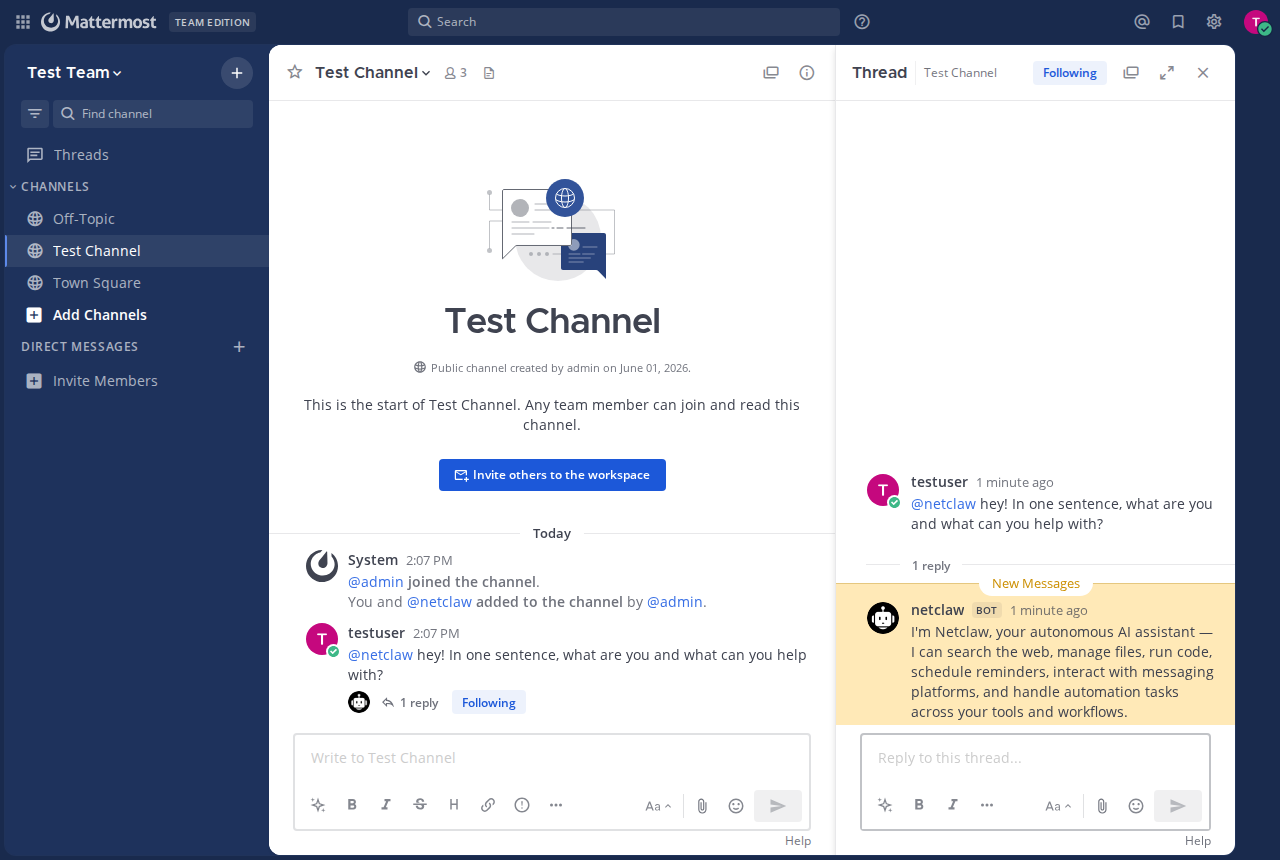
The reply lands in a thread under alice’s mention, which is also where follow-ups go.
netclaw status reports healthy, degraded, disconnected or disabled. A channel problem stays in the channel. The daemon and your other channels keep running.
Troubleshooting
Section titled “Troubleshooting”Channel troubleshooting is organized by symptom. The usual ones:
| Symptom | Likely cause |
|---|---|
disconnected, no bot token is configured | Store the token with netclaw secrets set, then restart. |
disconnected, rejected the bot token (HTTP 401) or rejected the request as unauthorized | The token is wrong or was revoked. Issue a new one and restart. |
disconnected, ServerUrl is not configured | Set Mattermost.ServerUrl. |
| Connected but silent | The channel or user isn’t in the allow-list, or the bot isn’t in the channel. |
Reconnect loop with outside a clean startup cycle | A startup race fixed in 0.26.0-beta.5. Upgrade. |
| Can’t create a bot or token | One of the two System Console toggles is still off. |
A bad token or an unreachable server is a fatal connect error: the channel stays offline until you fix the config and restart the daemon. Network blips retry on their own.
Related pages
Section titled “Related pages”- Run netclaw with Mattermost on Docker Compose - a tested, hardened stack
- Channel troubleshooting - fixes by symptom
- How tool approvals work - the approval choices
- Security model - audiences and approval gates
- Exposure modes - reaching the daemon from outside its host
- Slack and Discord - the other chat channels
Resources
Section titled “Resources”- Mattermost - the project, if you don’t already run a server
- Mattermost on GitHub - source code, issues and release notes
- Mattermost: bot accounts - creating and managing bots
- Mattermost: personal access tokens - enabling and issuing tokens
- Mattermost: integrations settings - the System Console toggles
- Mattermost: install with Docker - the official container deployment
- Mattermost API reference - the REST endpoints netclaw calls
 Built by Petabridge