
netclaw status
netclaw status asks the running daemon how it’s doing and prints overall health, the active model, each connector’s state, persistence and memory status, and whether an update is available. Run it when something feels off, or wire it into a health-check script.
netclaw status [options]It needs a running daemon. If it’s down, start it with netclaw daemon start (docker restart <container> in Docker), or run netclaw init, which starts it for you.
Options
Section titled “Options”| Flag | Description | Default |
|---|---|---|
--format <text|json> | Output format. --format=json also works. | text |
--json | Alias for --format json |
An unknown option or format prints [FAIL] status options: ... with the usage text and exits 1.
Output
Section titled “Output”netclaw statusoverall: healthyversion: 0.28.2 (commit 7419d84, built 2026-10-29T00:10:12Z)daemon: PID 32, uptime 1m 22s, endpoint http://127.0.0.1:5199persistence: Sqlitememory: sqlite (healthy)telemetry: disabledmodel: stub-model (provider: stub, context: 32,768 tokens) input: Text output: Textconnectors:- discord: disabled (disabled) Discord connector is disabled in configuration.- mattermost: disabled (disabled) Mattermost connector is disabled in configuration.- slack: disabled (disabled) Slack connector is disabled in configuration.- tui: healthy (enabled)
update: up-to-date (v0.28.2)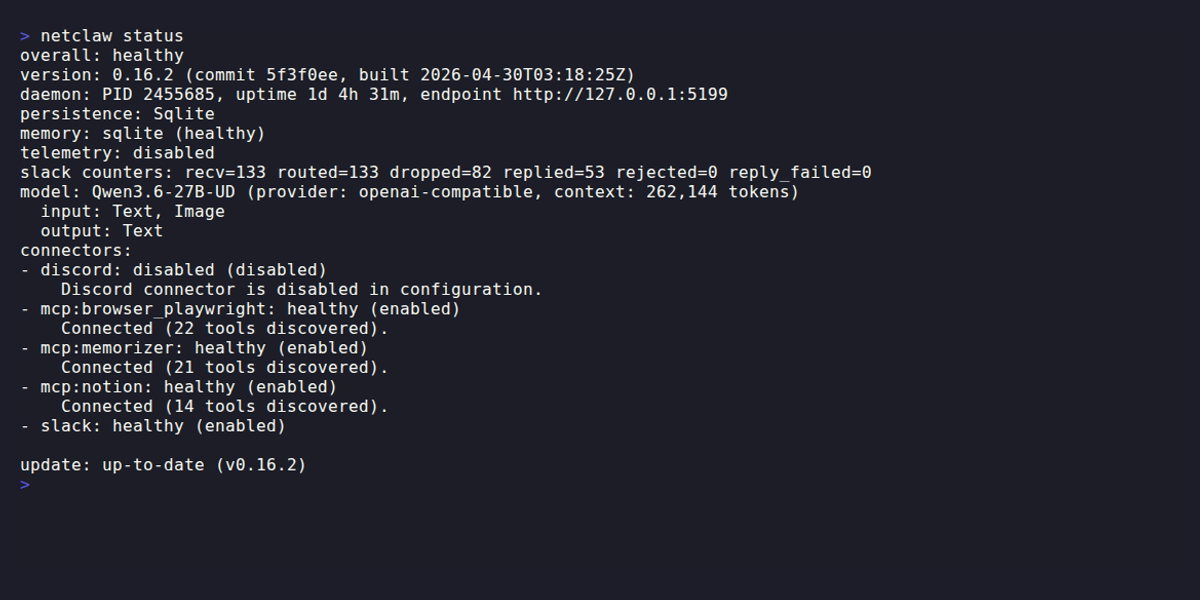
The connectors are Discord, Mattermost and Slack (all disabled in this capture), one MCP server and the TUI. A channel with traffic adds a <channel> counters line.
| Line | What it tells you |
|---|---|
overall | healthy or degraded |
config on disk not applied | Printed under overall only when the daemon refused the current netclaw.json. See below. |
version | Build version, commit and build time |
daemon | PID, uptime and the endpoint status queried |
persistence | The storage provider, such as Sqlite |
memory | Memory provider and its status: healthy, degraded or unavailable |
telemetry | enabled with the OTLP endpoint, or disabled |
<channel> counters | Per-channel message counts (recv, routed, dropped, replied, rejected, reply_failed). Only printed for channels with telemetry. |
model | Active model, the provider (the name you gave it in your config, such as lab), context window and input and output modalities |
connectors | One entry per connector with its status and enabled or disabled, plus a detail line when there is one |
update | up-to-date, UPDATE AVAILABLE with the command to run, or unknown |
What makes overall degraded
Section titled “What makes overall degraded”overall is degraded when any enabled connector is disconnected, degraded, auth-required or auth-failed. It’s also degraded when the daemon has no usable provider or model and is running the No-Op chat client, whatever the connectors say. In that case the model: line reads:
model: (none — No-Op chat client active) reason: <why> fix: run `netclaw doctor` for details; use `netclaw init` if no provider is configured.When the config on disk isn’t applied
Section titled “When the config on disk isn’t applied”The daemon applies a change to netclaw.json by itself, but it refuses a file that doesn’t validate and keeps running the previous configuration. When that happens status is degraded and exits 2:
overall: degradedconfig on disk not applied: Models:Roles:Main references unknown definition 'nope'. Defined: stub-stub-model. Fix the name, or run `netclaw model set main <provider> <model>`. The daemon is still running the previous configuration. No change from netclaw.json is applied until this is fixed.version: 0.28.2 (commit 7419d84, built 2026-10-29T00:10:12Z)...The model: line below it still shows the model the daemon is running, not the one in the file. Fix the file and the line goes away on its own. netclaw doctor names the same problem under Chat Client. In --json the reason is the configNotApplied string, null when nothing is wrong.
Connector statuses
Section titled “Connector statuses”Slack, Discord, Mattermost and the local tui connector report healthy, degraded, disconnected, disabled or unknown. MCP servers appear as mcp:<server-name> and can also report auth-required and auth-failed.
A provider whose OAuth sign-in was rejected on refresh appears as a connector named provider:<name> (Provider/<name> in the display name), enabled, with status auth-failed and the message The OAuth credentials need a new sign-in (<reason>). Run netclaw provider. That makes overall degraded and the exit code 2.
Disabled connectors are listed on purpose, so you can tell they’re off and not broken. Turn them on in netclaw config. If a connector is degraded or worse, run netclaw doctor and then check that connector’s settings.
Exit codes
Section titled “Exit codes”| Code | Meaning |
|---|---|
0 | Healthy |
2 | Degraded, including a netclaw.json the daemon refused to apply |
1 | The daemon is unreachable, answered with an error, or the options were wrong |
Exit 2 for degraded lets a script tell “running but unhappy” from “down”:
netclaw status > /dev/null 2>&1case $? in 0) echo "healthy" ;; 2) echo "degraded: check connectors and the model" ;; *) echo "down or unreachable" ;;esacJSON output
Section titled “JSON output”netclaw status --jsonThe JSON carries more than the text view: configNotApplied, reminders (scheduledCount, activeExecutions, failedCount), memory.embeddings, and an update object that the CLI fills in with available, state, currentVersion, latestVersion and releaseNotesUrl. The version block is called build, not version.
netclaw status --json | jq -r '.overall'netclaw status --json | jq '.build'netclaw status --json | jq -c '[.connectors[] | select(.enabled and .status != "healthy")]'netclaw status --json | jq '.memory.embeddings'{ "version": "0.28.2", "commitHash": "7419d84", "buildTimestamp": "2026-10-29T00:10:12Z" }That’s the output of the second command. The third prints [] when every enabled connector is healthy.
A file the CLI itself can’t parse (empty, cut off, a duplicate key) gets the same degraded report, preceded by two lines on stderr that --json leaves out of the output you pipe:
Couldn't read netclaw.json: A duplicate key 'configVersion' was found.The daemon address could not be read from the config; checking the default port.status then asks the default port, so it works against a local daemon. Other commands stop at the first line and exit 1. See Couldn't read netclaw.json.
When the daemon isn’t running
Section titled “When the daemon isn’t running”An unreachable daemon gives:
[FAIL] status: unable to reach daemon at http://127.0.0.1:5199: Connection refused (127.0.0.1:5199) fix: run `netclaw daemon start` and retry.A daemon that answers with an error status, such as 503 while starting, gives:
[FAIL] status: daemon returned 503 from http://127.0.0.1:5199 fix: run `netclaw daemon status` and `netclaw daemon start`.With no netclaw.json and no remote endpoint configured, status prints daemon not configured - please run netclaw init and exits 1. With --json it prints {"overall": "not-configured", "message": ...}.
| Command | What it checks | Needs the daemon |
|---|---|---|
netclaw daemon status | The PID file: is the process alive? | No |
netclaw status | A live health query: connectors, model, persistence | Yes |
Daemon endpoint
Section titled “Daemon endpoint”status queries http://127.0.0.1:5199/api/health/status unless something else is set. netclaw looks in this order and uses the first hit:
NETCLAW_DAEMON_ENDPOINT~/.netclaw/client/config.json, written bynetclaw pair- The
Daemonsection ofnetclaw.json - The default above
Related pages
Section titled “Related pages”netclaw doctor: offline diagnostics with--fixnetclaw stats: token use, session counts and memory metricsnetclaw config: enable and configure connectorsnetclaw chat: start a conversation- Health checks: the HTTP endpoints behind
status
Resources
Section titled “Resources”- jq manual: work with
--jsonoutput - OpenTelemetry Collector docs: if you send telemetry to an OTLP endpoint
 Built by Petabridge