
MCP servers
Netclaw connects to Model Context Protocol servers to give the model tools (browsing, Notion, memory stores, whatever the server exposes) and prompts. Server definitions live in the McpServers section of ~/.netclaw/config/netclaw.json. Credentials live in secrets.json.
At startup the daemon connects to every enabled server in parallel, discovers its tools and prompts, and enforces per-audience permissions on what each session can call. A server that fails to connect doesn’t stop the others.
netclaw mcp add and netclaw mcp permissions write this JSON for you, and editing the file directly works too. See netclaw mcp for the command reference and Connect an OAuth MCP server for sign-in.
Minimal config
Section titled “Minimal config”One stdio server with every default:
{ "McpServers": { "memorizer": { "Command": "uvx", "Arguments": ["memorizer-mcp"] } }}Transport defaults to "stdio" and Enabled to true. The server name (memorizer) is what appears as mcp:memorizer in netclaw status and in permission settings. The CLI resolves names without regard to case, so netclaw mcp add Memorizer while memorizer exists updates memorizer. If you edit the file by hand, don’t create two keys that differ only by case: the loader reads them as duplicates and every netclaw command prints Couldn't read netclaw.json until you remove one.
Fields
Section titled “Fields”Each entry under McpServers is keyed by server name. The block is closed: unknown fields fail the schema check in netclaw doctor.
| Field | Type | Default | Description |
|---|---|---|---|
Transport | string | "stdio" | "stdio", "sse" or "http" |
Command | string | none | Executable for stdio. Required for stdio. |
Arguments | string[] | none | Arguments passed to the stdio command |
Url | string | none | Endpoint for sse and http. Required for both. |
EnvironmentVariables | object | none | Environment overlay for the stdio process |
Headers | object | none | Extra HTTP headers for sse and http |
Enabled | bool | true | Disabled servers aren’t started |
GrantCategory | string | mcp:<name> | A label on the server’s tools. It has no effect on access. |
OAuthClientId | string | none | Pre-registered OAuth client ID, for servers without dynamic registration |
OAuthClientSecret | string | none | Client secret for a confidential OAuth client. Allowed only in secrets.json. |
OAuthScope | string | none | Space-separated OAuth scopes to request |
EnvironmentVariables, Headers and OAuthClientSecret hold credentials. Put them in secrets.json, where netclaw stores them encrypted. netclaw mcp add --env, --header and --client-secret do that split for you.
A server that sends an Authorization header (from Headers) opts out of netclaw’s OAuth handling. Netclaw won’t try to authorize it or refresh anything.
GrantCategory is carried on each tool as a label, but authorization never reads it. Control access with McpServersMode, AllowedMcpServers and McpServerToolGrants below. The old advice to group servers under one shared category doesn’t work.
Transports
Section titled “Transports”Launches a local process. The daemon starts it on startup and stops it on shutdown.
{ "McpServers": { "memorizer": { "Transport": "stdio", "Command": "uvx", "Arguments": ["memorizer-mcp"] } }}uvx runs Python-packaged MCP servers. Command must be on the daemon’s PATH. stdio servers can’t use OAuth.
Streamable HTTP, the current MCP transport. Use it for remote servers.
{ "McpServers": { "notion": { "Transport": "http", "Url": "https://mcp.notion.com/mcp" } }}If the server needs OAuth, run netclaw mcp auth notion after adding it. Add OAuthClientId (and the secret in secrets.json) only when the server doesn’t support dynamic client registration:
{ "McpServers": { "github": { "Transport": "http", "Url": "https://api.githubcopilot.com/mcp/", "OAuthClientId": "Iv1.example", "OAuthScope": "repo read:org" } }}The older Server-Sent Events transport, for servers that don’t offer streamable HTTP.
{ "McpServers": { "legacy": { "Transport": "sse", "Url": "https://mcp.example.com/sse", "Headers": { "X-Team": "platform" } } }}Tokens belong in secrets.json. Use netclaw mcp add --header "Authorization: Bearer ..." and it goes there for you.
Browser automation profiles
Section titled “Browser automation profiles”netclaw init can add one of two browser automation servers. Both are ordinary stdio entries you can edit.
| Server name | Package | Needs |
|---|---|---|
browser_playwright | @playwright/mcp@latest | Node.js and a Playwright browser |
browser_chrome_devtools | chrome-devtools-mcp@latest | Node.js and local Chrome |
{ "McpServers": { "browser_playwright": { "Transport": "stdio", "Command": "npx", "Arguments": [ "-y", "@playwright/mcp@latest", "--isolated", "--headless", "--image-responses", "omit", "--snapshot-mode", "none", "--browser", "chromium" ] } }}The --browser value comes from what netclaw init finds installed.
OAuth fields
Section titled “OAuth fields”OAuthClientId, OAuthClientSecret and OAuthScope apply to http and sse servers without an Authorization header. Without them, netclaw discovers the authorization server from the MCP URL and registers itself through dynamic client registration.
| You have | Set |
|---|---|
| A server with dynamic registration | Nothing |
| A pre-registered public client | OAuthClientId |
| A pre-registered confidential client | OAuthClientId in netclaw.json, OAuthClientSecret in secrets.json |
| Scopes beyond the provider’s defaults | OAuthScope |
A secret without a client ID is invalid. Tokens are stored in secrets.json under McpOAuthTokens.<name> and refreshed by the daemon. The full flow, including hosts with no browser, is in Connect an OAuth MCP server.
Redirect URI
Section titled “Redirect URI”Register this redirect URI (also called a callback URL) in the provider’s OAuth app settings:
http://127.0.0.1:<Daemon.Port>/api/mcp/oauth/callbackWith the default port, that’s http://127.0.0.1:5199/api/mcp/oauth/callback.
netclaw mcp auth prints the authorization URL, and its redirect_uri parameter is the exact value netclaw sends.
MCP prompts as skills
Section titled “MCP prompts as skills”Since 0.26.0, prompts that an MCP server publishes show up as skills named mcp__<server>__<prompt> (lowercased) with source mcp in netclaw skill list. The agent can load them like any other skill, and the prompt’s arguments become the skill’s arguments. They’re only visible to audiences that can reach the server, and a prompt name that another server already owns is rejected. A prompt skill never overrides a skill file with the same name. netclaw skill list needs the daemon running to show them.
GitHub MCP server
Section titled “GitHub MCP server”GitHub’s official remote MCP server (https://api.githubcopilot.com/mcp/) uses OAuth, but it doesn’t support dynamic client registration. You have two options.
Option 1: register your own GitHub App or OAuth App. GitHub recommends a GitHub App: you pick its exact permissions, and its tokens expire. Both app types need a client ID and a client secret.
-
On GitHub, go to Settings → Developer settings, then GitHub Apps → New GitHub App or OAuth Apps → New OAuth App.
-
Set the callback URL to the redirect URI:
http://127.0.0.1:5199/api/mcp/oauth/callbackwith the default port. The homepage URL can be anything. -
For a GitHub App, clear Webhook → Active (otherwise GitHub requires a webhook URL), choose the repository and organization permissions the agent needs, and install the app on the accounts or repositories it should reach. You don’t need a private key.
-
Register the app, then generate a client secret.
-
Save the client ID and secret with
netclaw mcp add. They go onadd, not onauth:Terminal window netclaw mcp add github https://api.githubcopilot.com/mcp/ --transport http \--client-id <client-id> --client-secret <client-secret>If
githubalready exists, this updates its connection settings and keeps its tool grants. The daemon restarts itself when the config changes, so give it a few seconds. -
Authorize in the browser:
Terminal window netclaw mcp auth github
With an OAuth App, add --scope to request fewer GitHub scopes than the server default (for example, --scope "repo read:org"). A GitHub App ignores scopes; its permissions come from the app settings.
Option 2: a personal access token. Skip OAuth and send the token as a header:
netclaw mcp add github https://api.githubcopilot.com/mcp/ --transport http \ --header "Authorization: Bearer <token>"The header goes to secrets.json. A fine-grained token lets you limit the server to specific repositories. Unlike OAuth, the token doesn’t refresh, so replace it before it expires.
Per-audience access control
Section titled “Per-audience access control”Netclaw gates MCP access per audience (Personal, Team, Public) in Tools.AudienceProfiles of netclaw.json:
| Audience | Default McpServersMode | Default behavior |
|---|---|---|
| Personal | "All" | Every server and tool allowed |
| Team | "Allowlist" | Servers must be listed in AllowedMcpServers |
| Public | "Allowlist" | Servers must be listed in AllowedMcpServers |
Each profile decides which servers are visible, which of their tools can run, and whether each tool runs on its own, asks first, or is blocked.
{ "Tools": { "AudienceProfiles": { "Personal": { "McpServersMode": "All", "ApprovalPolicy": { "DefaultMode": "Auto", "McpServerDefaults": { "memorizer": "Approval" }, "ToolOverrides": { "memorizer/delete_memory": "Deny" } } }, "Team": { "McpServersMode": "Allowlist", "AllowedMcpServers": ["memorizer"], "McpServerToolGrants": { "memorizer": ["search_memories"] }, "ApprovalPolicy": { "DefaultMode": "Approval" } } } }}McpServerToolGrants only applies to Allowlist audiences. Under "All" it’s ignored, so disable a single tool for Personal with a Deny entry in ToolOverrides, keyed server/tool. Leaving a server out of McpServerToolGrants exposes all of its tools to that audience, and an empty list exposes none. Keys in ToolOverrides and McpServerDefaults match without regard to case. Write an MCP tool as server/tool or server__tool. A key that contains a colon, or has no value, is ignored and the tool keeps the audience default. netclaw doctor reports the colon case as an error.
netclaw mcp add leaves Personal open (every tool, Auto) and closes Team and Public. They get an empty grant list for the server and Approval (Team) or Deny (Public) as its default approval mode. Use netclaw mcp permissions to manage grants, or netclaw mcp add --grant-all to skip the empty grant lists when you first add the server. netclaw mcp tools <server> --grant <tool> --audience <audience> grants tools and adds the server to that audience’s AllowedMcpServers in one step. Adding the same server again keeps its grants, defaults and enabled state, and netclaw mcp remove deletes them along with the server’s OAuth tokens and saved approvals. See MCP tool permissions for a walkthrough.
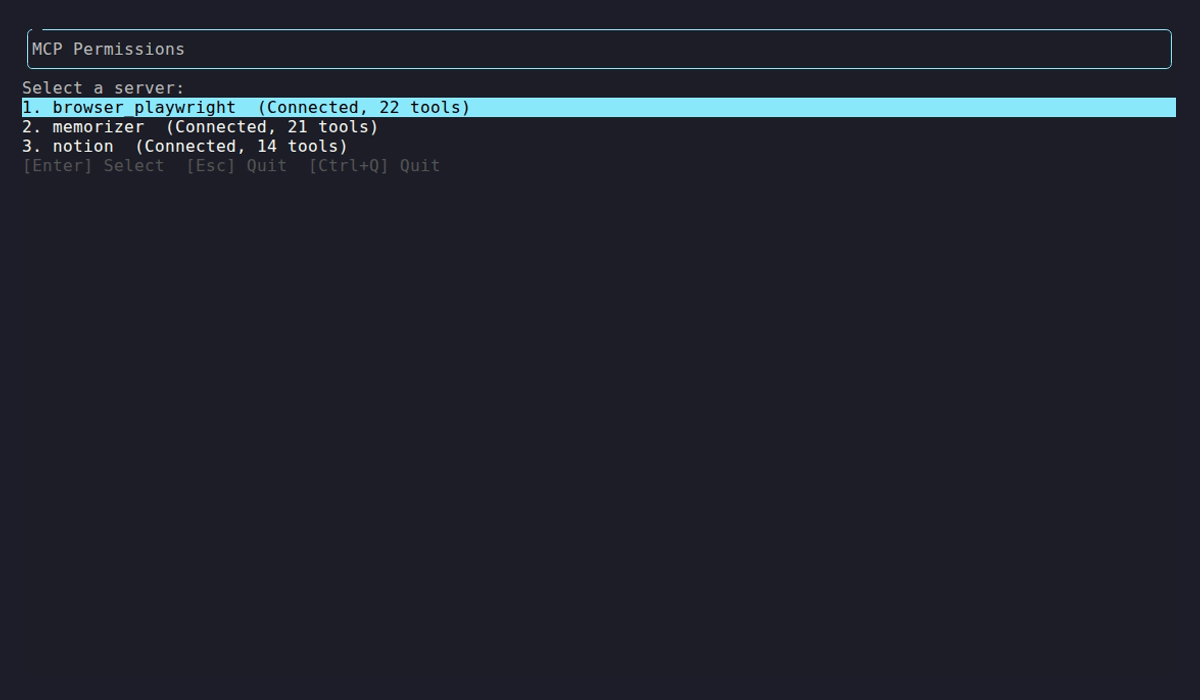
Each server gets a row with its connection state and discovered tool count, and selecting one opens its per-audience grants.
Server status
Section titled “Server status”netclaw mcp list and netclaw doctor report live status from the daemon:
| Status | Meaning | Action |
|---|---|---|
connected (N tools) | Connected, N tools discovered | None |
connected but not responding (N cached tools) | Connected, but catalog refreshes keep failing | Check the server, then netclaw doctor |
awaiting auth | OAuth sign-in needed | netclaw mcp auth <name> |
auth failed (...) | The server rejected the credentials | Re-run netclaw mcp auth <name>, or fix the header or secret |
unreachable - ... | Connection failed or timed out | netclaw doctor |
disabled | Enabled is false | netclaw mcp enable <name> |
status unavailable - restart daemon to load this config | The daemon hasn’t loaded a server you just added. It reloads on its own within seconds. | Run netclaw mcp list again. Restart only if it persists. |
netclaw status lists the same servers as mcp:<name> connectors.
Invalid config
Section titled “Invalid config”netclaw doctor checks each entry. A bad entry is reported and the rest of the servers still load.
| Condition | Result |
|---|---|
Transport isn’t stdio, sse or http | Config Schema and mcp-servers checks fail |
stdio with no Command | mcp-servers check fails: stdio transport requires 'Command' |
sse or http with no Url | mcp-servers check fails: <transport> transport requires 'Url', for example sse transport requires 'Url' |
OAuthClientSecret in netclaw.json | Config Schema check fails |
| An unknown field | Config Schema check fails |
We loaded a config with an unknown transport, a stdio entry with no command, an http entry with no URL and an unknown field, on 0.27.1 and again on a later build. The daemon started, netclaw doctor named each one, and netclaw status showed each as disconnected.
Environment variable overrides
Section titled “Environment variable overrides”Override any field with NETCLAW_ variables. Double underscores separate path segments, per the .NET configuration convention:
export NETCLAW_McpServers__notion__Enabled="true"Environment variables take priority over netclaw.json and secrets.json. They apply to the daemon only. netclaw mcp list and netclaw mcp get read the files, so a server you enable by environment variable still shows as disabled there while netclaw status shows it loaded. Env changes need a manual daemon restart.
Applying changes
Section titled “Applying changes”The daemon restarts itself, after draining sessions, when netclaw.json changes. Secrets changes (netclaw secrets set, --client-secret rotation) don’t trigger that. Restart the daemon yourself: docker restart <container>, systemctl --user restart netclaw, or netclaw daemon stop then netclaw daemon start.
netclaw mcp list # config plus live statusnetclaw status # MCP connector healthRelated pages
Section titled “Related pages”netclaw mcp- every MCP subcommand and flag- Connect an OAuth MCP server - sign in, confidential clients, headless hosts
- MCP tool permissions - grant tools per audience
- Secrets management - how
secrets.jsonis encrypted - Security model - audiences and what each can do
Resources
Section titled “Resources”- Model Context Protocol specification - the protocol netclaw implements
- MCP server registry - community-maintained list of MCP servers
- uv documentation - the package manager behind
uvx - .NET environment variable configuration - the double-underscore nesting convention
 Built by Petabridge