
netclaw provider
netclaw provider manages the LLM providers netclaw talks to. Run it bare for an interactive manager, or use subcommands to script provider setup. A provider is a named connection (a type, an endpoint and credentials). netclaw model then assigns models from it to roles.
If you haven’t run netclaw init yet, start there. It configures your first provider.
netclaw provider # interactive managernetclaw provider <subcommand> [options] # scriptableMost of the manager and every subcommand run without the daemon. The exception is the ChatGPT Subscription (browser) sign-in, which needs a running daemon (Could not reach the daemon. Is it running?) because the CLI reads the OAuth tokens through a local-control endpoint on it. A CLI and daemon on different versions fail with The daemon does not support the local-control provider OAuth read. Update the daemon and CLI to the same Netclaw version. The device-code sign-in and provider add --auth oauth-device run in the CLI alone. The daemon restarts itself when netclaw.json changes. A credential you change in secrets.json needs a manual restart: netclaw daemon stop then netclaw daemon start, or docker restart <container>.
Provider manager
Section titled “Provider manager”netclaw provider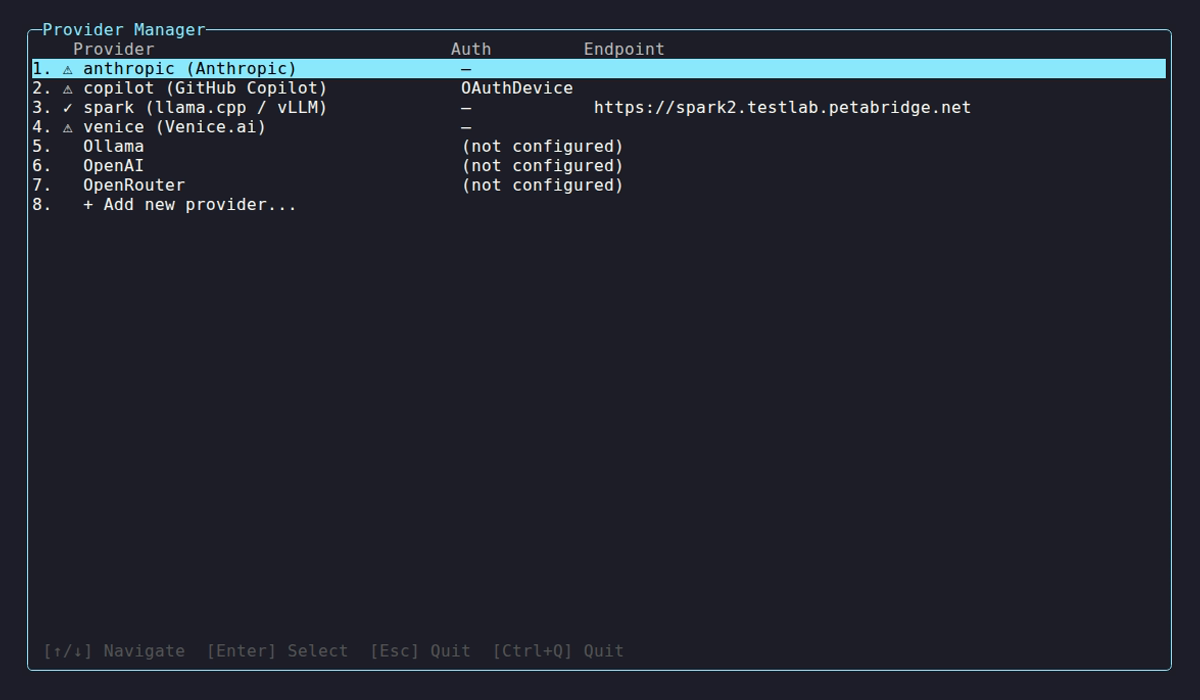
The my-deepseek row carries the warning because its key is a placeholder, and the Provider column stops at 40 characters, so the long OpenAI-compatible label for lab-llama is cut with an ellipsis. Auth shows a dash for providers that need no credential.
On launch the manager probes every configured provider and shows its health. Providers you haven’t configured appear as (not configured) rows, and + Add new provider… starts the add flow.
| Indicator | Meaning |
|---|---|
✓ | Healthy, models discovered |
⚠ | Unreachable or authentication failed |
… | Probe in progress |
Select a provider to see its type, auth method, endpoint, status and model count:
Provider: lab-llama Type: OpenAI-compatible (llama.cpp / vLLM / DwarfStar ds4) Auth: - Endpoint: http://llm.example.internal:8080 Status: ✓ Healthy Models: 1 discovered| Key | Where | Action |
|---|---|---|
↑ / ↓ | List | Move |
Enter | List | Open details, or start the add flow on a sentinel row |
Delete | List | Remove the highlighted provider |
K | Details | Update the API key |
N | Details | Rename the provider |
R | Details | Remove the provider |
V | Details | Re-validate the connection |
C / O | Device-code sign-in screen | Copy the code, open the verification URL in a browser. On the browser sign-in screen, C copies the URL when the browser didn’t open. |
Esc | Details and add flow | Go back. Does nothing on the list. |
Ctrl+Q | Anywhere | Quit |
The add flow asks for the endpoint next. Here it is for an OpenAI-compatible server, with the default shown as a placeholder.
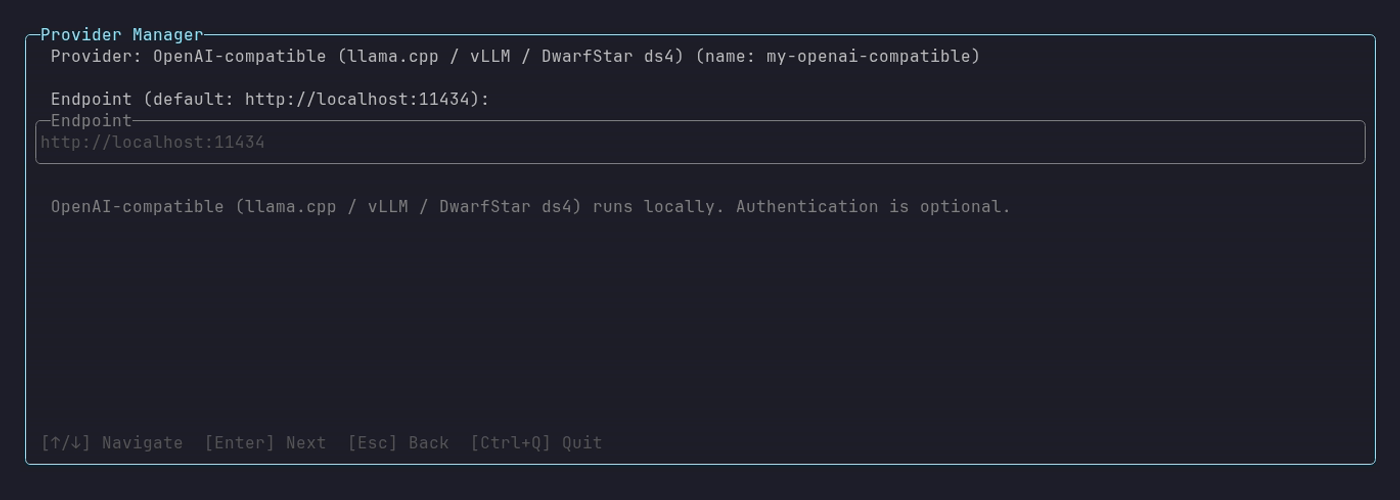
The hint under the field says authentication is optional for this type. Type the server address with or without a /v1 suffix. Both work, and the manager stores what you typed.
The connectivity check during an add gives up after 45 seconds, then reports how many models it found. Individual requests time out after 10 seconds for hosted providers and 30 seconds for self-hosted ones.
OpenAI offers two ChatGPT sign-ins as well as an API key: ChatGPT Subscription (recommended), which uses a device code, and ChatGPT Subscription (browser).
Subcommands
Section titled “Subcommands”provider list
Section titled “provider list”netclaw provider listName Provider Auth Endpointlab-llama OpenAI-compatible (llama.cpp / vLLM / DwarfStar ds4) None http://llm.example.internal:8080my-ds DeepSeek ApiKey https://api.deepseek.com/v1list reads config only. It doesn’t probe, so open the manager to see live health. With nothing configured it prints No providers configured. and a pointer to provider add.
provider add
Section titled “provider add”netclaw provider add <name> <type> [options]| Flag | Description | Default |
|---|---|---|
--api-key <key> | API key for the provider | Prompted, for providers that only take a key |
--endpoint <url> | Endpoint URL | The type’s default (see types) |
--auth <method> | api-key or oauth-device | Inferred from the type |
--github-host <url> | GitHub Enterprise auth host (github-copilot only) | https://github.com |
--github-api-base <url> | GitHub Enterprise API base (github-copilot only) | https://api.github.com |
How the credential is chosen:
- Key-only providers (Anthropic, DeepSeek, OpenRouter, Venice.ai) prompt for the key when you leave out
--api-key. - Self-hosted providers (Ollama, OpenAI-compatible) need no key. Pass
--api-keyto send a Bearer token to a gateway. openaiwith neither--api-keynor--authstarts the OAuth device flow and waits for you to approve the code it prints. Pass--api-keyto use a key.github-copilotonly supports--auth oauth-device.
An unknown type lists the valid ones:
Error: Unknown provider type 'nosuchtype'.Known types: anthropic, deepseek, github-copilot, ollama, openai, openai-compatible, openrouter, veniceaiType and endpoint land in ~/.netclaw/config/netclaw.json. Credentials are encrypted in secrets.json. For an OAuth sign-in, the access and refresh tokens are encrypted, but Providers.<name>.OAuthTokenExpiry is stored there as plain text because it’s a date, not a secret. It never goes in netclaw.json, so a token refresh doesn’t restart the daemon. If an older OAuthTokenExpiry is still in netclaw.json, netclaw doctor --fix moves it.
An endpoint must be a full http:// or https:// URL. A bare host is rejected before anything is written:
Error: Endpoint 'llm.example.internal:8080' is not an absolute http or https URL. Use a form like http://localhost:8080.Provider names match without regard to case. netclaw provider add Stub ... when stub exists updates stub, and remove, rename and model set accept any spelling too.
provider rename
Section titled “provider rename”netclaw provider rename <old-name> <new-name>Renamed provider 'lab-ollama' to 'lab-a100'.Rename changes the key under Providers and repoints every model definition that used the old name, so model roles keep working. If any were repointed, it adds Reassigned model role(s): .... An unknown name prints Error: Provider '<name>' not found. and exits 1.
provider remove
Section titled “provider remove”netclaw provider remove <name>Removed provider 'lab-a100'An unknown name prints Provider '<name>' not found. and exits 1.
provider remove refuses a provider that a model role still uses:
Error: Cannot remove provider 'lab-a100' ... referenced by model role(s): MainRun `netclaw model set` to reassign these roles first, or `netclaw model clear` for optional roles.It exits 1 and changes nothing. Reassign the role with netclaw model set, or drop an optional one with netclaw model clear, then remove the provider. If the Models section itself can’t be resolved (a role names a definition that doesn’t exist), remove stops with Cannot remove provider ... the Models section in netclaw.json cannot be resolved and tells you to repair it first. The Provider Manager’s R and Delete keys apply the same check and show Referenced by model role(s): ....
Provider types
Section titled “Provider types”Pick Anthropic or OpenAI for hosted models, Ollama for local inference, OpenAI-compatible for llama.cpp or vLLM, or OpenRouter for many vendors behind one key.
| Type | Display name | Default endpoint | Auth |
|---|---|---|---|
anthropic | Anthropic | https://api.anthropic.com | API key |
deepseek | DeepSeek | https://api.deepseek.com/v1 | API key |
github-copilot | GitHub Copilot | https://api.githubcopilot.com | OAuth device flow |
ollama | Ollama | http://localhost:11434 | None |
openai | OpenAI | https://api.openai.com | OAuth (device or browser) or API key |
openai-compatible | OpenAI-compatible (llama.cpp / vLLM / DwarfStar ds4) | http://localhost:11434 | None, optional key |
openrouter | OpenRouter | https://openrouter.ai/api/v1 | API key |
veniceai | Venice.ai | https://api.venice.ai/api/v1 | API key |
openai-compatible has no thinking dialect by default, so netclaw model set ... --thinking fails until you set Providers:<name>:VendorOptions:ThinkingDialect or model set detects llama.cpp. See Output limit and thinking level.
For the self-hosted types, give the server address. http://llm.example.internal:8080 and http://llm.example.internal:8080/v1 both work (endpoint rules). See Managed providers for hosted-provider setup, including GitHub Copilot on GitHub Enterprise, and Self-hosted providers for llama.cpp and vLLM.
Examples
Section titled “Examples”# Ollama on a GPU boxnetclaw provider add my-ollama ollama --endpoint http://my-gpu-server:11434
# Anthropic with a keynetclaw provider add my-anthropic anthropic --api-key sk-ant-...
# OpenAI through your ChatGPT subscriptionnetclaw provider add my-openai openai --auth oauth-device
# DeepSeeknetclaw provider add my-deepseek deepseek --api-key sk-...
# OpenRouternetclaw provider add my-openrouter openrouter --api-key sk-or-...
# llama.cpp or vLLMnetclaw provider add my-llama openai-compatible --endpoint http://llm.example.internal:8080
# GitHub Copilot on GitHub Enterprisenetclaw provider add copilot-ghe github-copilot --auth oauth-device \ --github-host https://github.example.com \ --github-api-base https://github.example.com/api/v3
# Give a provider a better name, then drop one you don't usenetclaw provider rename my-ollama lab-a100netclaw provider remove my-openrouterAfter adding a provider, assign it to a role with netclaw model set.
Override API keys with environment variables
Section titled “Override API keys with environment variables”Set an environment variable instead of writing the key to disk:
export NETCLAW_Providers__my-anthropic__ApiKey="sk-ant-..."Double underscores separate path segments, and the NETCLAW_ prefix is required. Restart the daemon after you change one.
Exit codes
Section titled “Exit codes”0 on success. 1 for missing arguments, an unknown type, an unknown provider, a provider a model role still uses, or a failed OAuth flow.
Related pages
Section titled “Related pages”netclaw init: set up your first providernetclaw model: assign provider models to rolesnetclaw doctor: validate provider configurationnetclaw status: see the provider and model the daemon is usingnetclaw secrets: manage encrypted credentials
Resources
Section titled “Resources”- Anthropic API keys: create and manage Anthropic keys
- OpenAI API keys: create and manage OpenAI keys
- DeepSeek API keys: create and manage DeepSeek keys
- OpenRouter keys: create and manage OpenRouter keys
- Ollama: install and run local models
- llama.cpp server docs: run an OpenAI-compatible server
 Built by Petabridge