
netclaw chat
Talk to your agent. netclaw chat opens a terminal UI for a conversation, and netclaw chat -p sends one prompt and exits, which is the version you script.
Both need a running daemon. If it’s down, start it with netclaw daemon start (docker restart <container> in Docker), or run netclaw init, which starts it for you. The CLI is a thin SignalR client that only renders. Inference, tool execution and session state all live in the daemon.
netclaw chat [options] [prompt]Options
Section titled “Options”| Flag | Alias | Description | Default |
|---|---|---|---|
--resume <id> | -r | Resume (or create) a session by ID or name. --resume=<id> also works. | New session |
--onboarding | Start the guided identity interview. Interactive only: not with -p or --resume. | Off | |
--prompt | -p | Headless mode: send one prompt, print the response, exit | Interactive TUI |
--json | Print one JSON envelope instead of prefixed lines (headless only) | Plain text | |
--help | -h | Print help |
The prompt is the first argument that isn’t a flag, and it’s only used with -p. netclaw chat "hello" without -p opens the TUI and ignores the text. With -p and no prompt, you get netclaw: chat -p requires a prompt argument. and the usage text, and the exit code is 1.
Interactive TUI
Section titled “Interactive TUI”netclaw chatThree panels: the scrollable chat history, an input box that grows from 3 to 8 rows and remembers your last 100 messages, and a status bar.
| Key | Action |
|---|---|
Enter | Send the message |
Ctrl+Enter | Insert a newline |
PgUp / PgDn / mouse wheel | Scroll the history |
Ctrl+Q | Quit. This is the only key that quits. |
Esc | Deny a pending approval prompt. Does nothing when idle, and never quits. |
↑ / ↓ | Pick an option in an approval prompt |
Ctrl+O | Expand or collapse the full body of a pending approval prompt |
The TUI refuses a message over 512 KB: the text goes back into the input box, an [error] line appears and the status bar shows Message is too large to send (<n> KB; limit 512 KB).
You can’t cancel a running turn. Pressing Esc while the agent is generating shows “Cancel generation is not supported yet.” in the status bar, and the turn keeps going. Quit with Ctrl+Q if you need to leave. The session stays alive in the daemon.
Quitting
Section titled “Quitting”Text you submitted counts as delivered once the daemon has journaled it, and it keeps running after you leave. So Enter followed by Ctrl+Q is safe. The client waits up to two seconds for the daemon to confirm admission, never for the model’s reply, then exits. A chat you never typed in creates no session.
If the daemon doesn’t confirm in time, the terminal is restored first and then netclaw prints what it couldn’t vouch for:
netclaw: 1 unsent; 0 rejected; 0 delivery unconfirmed. Check session (not created) before you resend.Unsent text never left the client, rejected text was refused by the daemon, and unconfirmed text was sent but nobody confirmed it arrived. netclaw doesn’t resend on its own, because that could run a prompt twice. Look at the named session in netclaw sessions, and only resend if the text isn’t there. The guarantee needs a CLI and a daemon that both support text admission, so upgrade them together. A newer CLI talking to an older daemon fails with unsupported text admission version 0 and sends nothing.
Status bar
Section titled “Status bar”[Enter] Send [Ctrl+Enter] Newline [PgUp/PgDn/Wheel] Scroll [Ctrl+Q] Quit | Ready | stub-modelThe sections are key hints, connection state, the active model and, after the first turn, usage such as in=10890 out=56 (8 % ctx): input tokens, output tokens and the share of the model’s context window in use. The hints shorten on narrow terminals. The bar is green when Ready or Connected, yellow while Connecting or Generating, and red when Disconnected or Failed.
Identity interview
Section titled “Identity interview”netclaw chat --onboardingOpens a new chat whose first turn starts the identity interview that netclaw init offers at the end of setup, built from the name and communication style already in netclaw.json. Use it to redo the interview later. It rejects -p, --resume and --onboarding=<value>. If the daemon is down, the error message repeats the command so you can run it once the daemon is up.
Slash commands
Section titled “Slash commands”Start a message with / to run a skill as a command, such as /run-reminder <id>. An unknown command returns the list of available ones without calling the model. See Slash commands.
Tool approval
Section titled “Tool approval”When a tool call needs your approval, the input box turns into a selection list. The history shows what’s being asked:
System: Approval required for shell_execute npm run build Patterns: npm run build Options: Once, This chat, Always here, This repository, Always anywhere, DenyThat’s the six-option form, from a chat working inside a Git repository. Outside one, This repository drops out and you get five.
| Option | Effect |
|---|---|
| Once | Allow this call only |
| This chat | Allow it for the rest of this session |
| Always here | Save a grant to tool-approvals.json for the folder the command’s paths point at, and everything under it (what it covers) |
| Always anywhere | Save a grant for this command in any folder. This is the broadest option, so use it sparingly. |
| This repository | Save a grant for one Git repository and its worktrees. Shown only when the call runs inside a repo. |
| Always allow this tool | Save a grant for an MCP tool |
| Deny | Block the call |
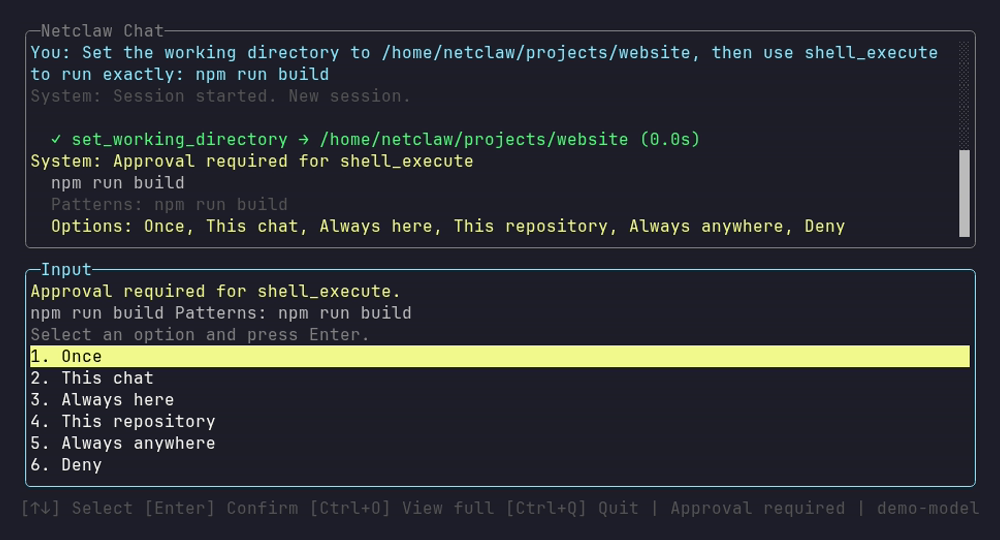
The history above the input box says what’s being asked, and the status bar reads “Approval required” until you answer.
Use ↑ and ↓ to pick and Enter to confirm. Netclaw shows only the options that apply to the call, so a command it can’t parse offers just Once and Deny. Esc denies. Ctrl+O expands a long command so you can read all of it before you answer.
Approval prompts never time out. A pending prompt waits for you, and a later answer still resumes the call. A background sub-agent can raise prompts in the same list. They outlive the parent turn, and the status bar stays on “Approval required” until you answer or the session withdraws the prompt, for example because the child was cancelled, or because the daemon restarted before the child had parked. A child that had already parked keeps its prompt through a restart, and one click resumes it. Only a key press answers one. Typed text doesn’t. For how grants are matched and revoked, see How tool approvals work. To get fewer prompts, see Reduce or turn off approval prompts.
Reconnection
Section titled “Reconnection”If the daemon drops, the status bar turns red and the TUI retries after 1, 2, 5 and then 10 seconds. Text you type while it’s down queues up and sends when the connection returns. Text that was already on its way when the connection dropped isn’t sent a second time. It shows up in the quit report as unconfirmed.
Resume a session
Section titled “Resume a session”netclaw chat --resume daily-standupThe session’s recent messages replay as grayed-out history, between --- Previous conversation --- and --- End of history ---. Pass a daemon-assigned ID from netclaw sessions, or your own name. If the name doesn’t exist yet, netclaw creates the session. You can also resume from the sessions browser, which opens the same view.
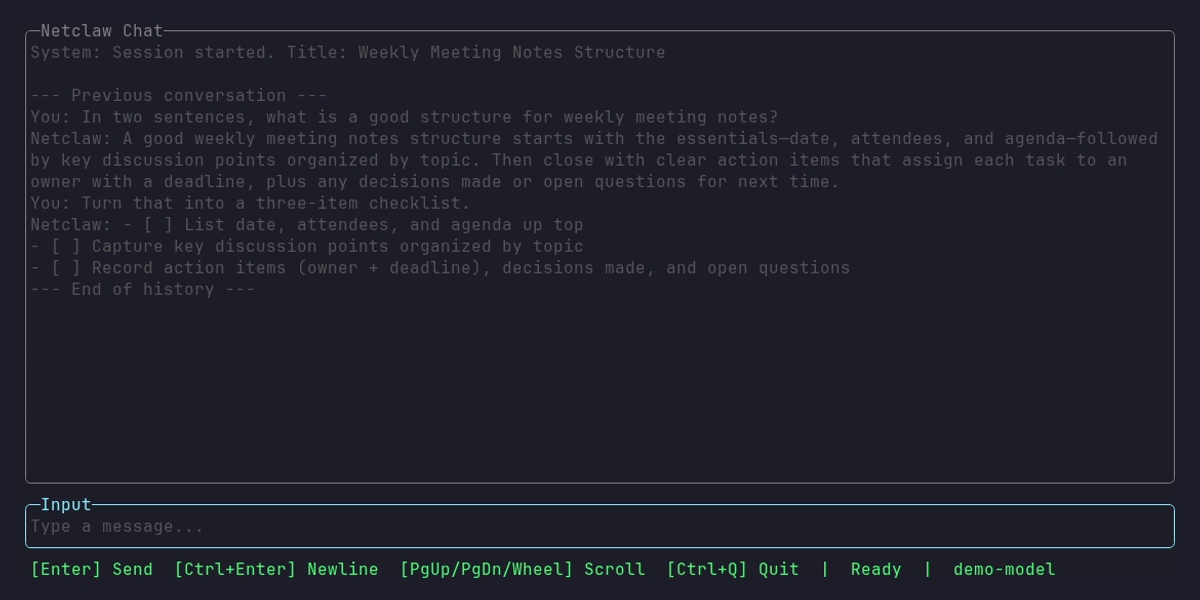
The history is context only, and the input box below it is ready for your next message.
Headless mode
Section titled “Headless mode”netclaw chat -p "summarize today's alerts"Headless mode sends one prompt, streams the response to stdout and exits when the turn ends, tool calls included. If the agent started a sub-agent with spawn_agent and it is still running, the run stays open. See Sub-agents and open runs. A message over 512 KB is refused before a session is created: [headless:error] Message is too large to send (<n> KB; limit 512 KB). and exit 1. Scripting headless sessions has patterns built on it.
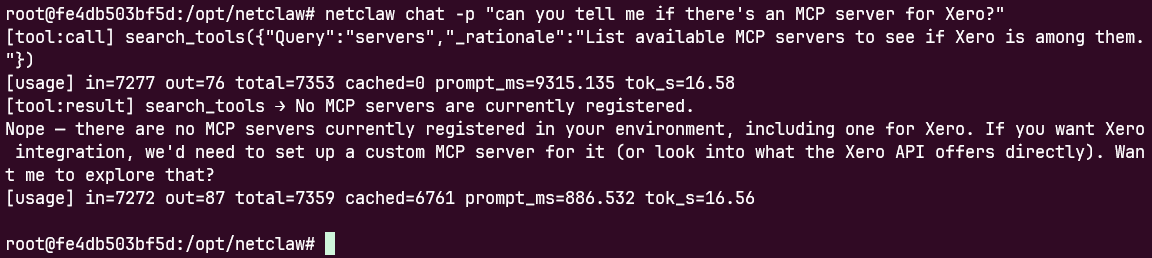
The prefixed lines show the tool call, its result and token usage as they happen, and the unprefixed line is the answer.
Output format
Section titled “Output format”| Prefix | Meaning |
|---|---|
| none | Streamed assistant text |
[tool:call] name(args) | A tool call |
[tool:result] name → result | A tool result |
[usage] in=N out=N total=N cached=N prompt_ms=N tok_s=N | Token usage and timing |
[file] fileName → filePath | A file the agent produced |
[subagent:start] name (N tools) | A subagent started |
[subagent:done] name (outcome, Xs) | A subagent finished. The outcome is lower-case, and a reason=... can follow the time. |
[compaction] N → M messages (keep=K, context=X/Y tokens) | The daemon summarized older messages to free context |
[subagent:waiting] N open: <runId>,... | The turn ended but N sub-agent runs are still open. The run waits for the turn that delivers their result. |
[approval:waiting] tool: text | A sub-agent asked for an approval that nobody can answer in this run |
[approval:closed] reason | That prompt was withdrawn |
The last three print only in text mode. Errors in the turn go to stderr as [error] message, with line breaks turned into spaces, and a failed turn adds a [turn:failed] line (see When the turn fails). Failing to reach the daemon prints [headless:error], the connection error and [turn:failed] category=infra kind=ChannelFailure, and exits 1:
[headless:error] Connection refused (127.0.0.1:5199)[turn:failed] category=infra kind=ChannelFailureStartup and connection failures are also appended to ~/.netclaw/logs/headless-errors.log. Thinking tokens go to the logs, not stdout.
Sub-agents and open runs
Section titled “Sub-agents and open runs”spawn_agent returns accepted in the first turn, and the child’s result arrives in a later turn of the same session. chat -p doesn’t stop at the end of the first turn. It ends on the first completed turn that reports no open child run. Here’s a prompt that asks for a sub-agent, in text mode:
$ netclaw chat -p "Use the spawn_agent tool with the arithmetic-worker agent to compute 19*21. Wait for its result, then tell me the number."...[subagent:start] arithmetic-worker (25 tools)[tool:result] spawn_agent → {"run_id":"35d48023de5d44b8aefe9e2a6c807164","state":"accepted",...}[subagent:done] arithmetic-worker (completed, 8.1s)...[subagent:waiting] 1 open: 35d48023de5d44b8aefe9e2a6c807164[tool:call] file_read({"Path":".../subagents/35d48023de5d44b8aefe9e2a6c807164/result.md",...})[tool:result] file_read → # Child result ... Result: 399 ...**399**$ echo $?0Turn 1 ended with the child still open, so the CLI printed [subagent:waiting] and kept going. Turn 2 read the child’s result.md and answered, and the run exited 0 with stderr empty. The child’s text reaches stdout only because the model read that file. The notice turn itself names result.md and carries no child output.
With --json the same run printed one envelope with two entries in turnResponses, and response held the second turn’s text: The subagent reported **391**.
There is no timer. A run lasts as long as its children do, so wrap scripts in timeout. If the run is cut short while children are open (a failed turn, a signal, a lost connection), stderr adds [headless:open-runs] session=<id> runs=<runId>,.... The CLI doesn’t cancel the children. Resume the session with netclaw chat --resume <id> to collect their results. The CLI and the daemon must be the same version. An older CLI against a current daemon exits after turn 1 and never sees the child’s result, so upgrade them together.
When the turn fails
Section titled “When the turn fails”A turn can fail after the daemon accepted it: the provider is unreachable, the request times out or the context overflows. chat -p then exits 1 and stderr ends with one [turn:failed] line:
$ netclaw chat -p "hi"[error] LLM provider transport error: Connection refused (llm.example.internal:8080). Check provider configuration and connectivity.[turn:failed] category=infra kind=ProviderFailure$ echo $?1kind names the last error: ModelBehavior, ProviderFailure, StreamFailure, Timeout, ToolFailure, InputCompatibility or Unknown. The CLI adds ChannelFailure (the daemon is unreachable or the connection dropped) and Cancelled (SIGINT or SIGTERM). category is model only for ModelBehavior, where the model broke a rule the runtime enforces, such as returning repeated empty replies. Every other kind is infra, so a harness never scores a provider outage as a model failure.
Stdout can still hold the text the model streamed before the failure, so don’t treat non-empty output as success. With --json, the same failure adds errorCategory and errorKind to the envelope, and stderr carries the same two lines:
{"sessionId":"signalr/dc6eccdb721345a59876b82268ab41a2","response":"","turnResponses":[{"turnNumber":1,"text":""}],"totalMs":7409.3,"errorCategory":"infra","errorKind":"ProviderFailure"}A run that ends on ChannelFailure or Cancelled prints no envelope. A turn that finishes, or that the daemon skips, exits 0. A tool call denied for lack of approval doesn’t fail the turn either: see Approvals in headless mode.
JSON output
Section titled “JSON output”netclaw chat -p --resume demo-notes --json "What is the codename?"{"sessionId":"demo-notes","response":"The codename is **heron**.","turnResponses":[{"turnNumber":1,"text":"The codename is **heron**.","usage":{"inputTokens":10964,"outputTokens":9,"totalTokens":10973,"cachedInputTokens":10409,"promptMs":2020.523,"predictedPerSecond":14.11}}],"usage":{"inputTokens":10964,"outputTokens":9,"totalTokens":10973,"cachedInputTokens":10409,"promptMs":2020.523,"predictedPerSecond":14.11},"ttftMs":19174.9,"totalMs":19533.3}The prefixed lines are suppressed, so you get one object. turnResponses is always there, with one entry per completed turn (turnNumber, text, toolCalls, usage). A run with a sub-agent has two or more. The top-level fields summarize all of them:
| Field | Value |
|---|---|
response | Text of the last turn only |
toolCalls | Calls from every turn, with callId, toolName and argumentsJson. Left out when there are none. |
usage | Token counts summed over turns. promptMs and predictedPerSecond come from the last turn that reported usage. |
ttftMs | Client-side time to first token, when present |
totalMs | The full round trip |
errorCategory, errorKind | Only on a failed turn |
Null fields are left out.
Named sessions
Section titled “Named sessions”The same --resume ID means the same conversation, with history carried forward:
netclaw chat -p --resume deploy-check "I'm about to deploy v2.3 to production"netclaw chat -p --resume deploy-check "run the pre-deploy checklist"Approvals in headless mode
Section titled “Approvals in headless mode”Nobody can answer a prompt in a headless run, so a call that needs approval is denied and the model sees:
Tool access denied: shell_execute needs approval, and nobody can answer a prompt in an unattended run. Save an "Always" grant for this call in a chat with the same audience (for example with /run-reminder), then run it again.Commands that never prompt still run. The fix is a saved grant. Run the same call once in an interactive netclaw chat and answer Always here, This repository or Always anywhere. For a reminder, use netclaw reminder run. See Run reminders, webhooks and scripts unattended.
When netclaw isn’t set up
Section titled “When netclaw isn’t set up”With no netclaw.json, both modes print daemon not configured - please run netclaw init and exit 1. With --json the output is:
{ "overall": "not-configured", "message": "daemon not configured - please run netclaw init"}Exit codes
Section titled “Exit codes”| Code | Meaning |
|---|---|
0 | The turn finished |
1 | Bad options, netclaw isn’t configured, the daemon couldn’t be reached, the turn failed, or the run was interrupted (SIGINT, SIGTERM, a lost connection, a daemon restart that deactivated the session, or a prompt over 512 KB) |
124 | An outside timeout ended the run. The CLI itself has no timer, and stderr usually also holds [turn:failed] category=infra kind=Cancelled. |
Check for 124 before you read stderr. A short network drop after the prompt was sent fails the run with exit 1, and the daemon may still be running the prompt. Look at the session with netclaw chat --resume <id> before you resend.
Examples
Section titled “Examples”Pipe the response into another tool:
netclaw chat -p --json "list all open incidents" | jq -r '.response'Run a multi-turn script on one session:
SESSION="weekly-review-$(date +%Y%m%d)"netclaw chat -p --resume "$SESSION" "pull this week's metrics from grafana"netclaw chat -p --resume "$SESSION" "compare against last week and flag anomalies"netclaw chat -p --resume "$SESSION" --json "write a summary for the team" | jq -r '.response' > report.mdRelated pages
Section titled “Related pages”netclaw sessions: browse and resume previous chats- Slash commands: commands you type inside a chat
netclaw config: connect channels, search and exposure, whichinitdoesn’t covernetclaw status: check the daemon before a chat if connections fail- How tool approvals work: what the prompt options mean
Resources
Section titled “Resources”- SignalR documentation: the real-time protocol between the CLI and the daemon
- jq manual: filter
--jsonoutput in scripts
 Built by Petabridge