
Slash commands
A slash command is a chat message that starts with / and names a skill. netclaw loads that skill’s instructions for the turn instead of treating the text as a normal prompt. Skills are the only slash-command mechanism. netclaw has no built-in session commands, so /new, /clear and /compact don’t exist (see Commands that don’t exist).
Built-in commands
Section titled “Built-in commands”Nine system skills ship inside the daemon. A fresh install lists exactly these when you send an unknown command:
| Command | What it does |
|---|---|
/run-reminder <reminder id> | Runs a reminder’s exact prompt in this chat so you can answer its approval prompts and save grants for the unattended run. See below. |
/agent-coordination | Loads the guide for splitting a substantial task into scoped child agents and reviewing their artifacts. |
/netclaw-memory | Loads the memory guide: how recall works, the memory classes, and which memory tool to use. |
/netclaw-operations | Loads the operations guide: scheduling, reminders, background jobs, diagnostics, MCP tools, identity updates and daemon health. |
/netclaw-projects | Loads the guide for creating, finding and working in project workspaces. |
/search-citation | Loads the citation rules for answers built from web_search and web_fetch. |
/skill-authoring | Loads the guide for writing skills and using the skill_manage tool. |
/subagent-authoring | Loads the guide for defining subagents under ~/.netclaw/agents. |
/web-content-retrieval | Loads the guide for when web_fetch works and when you need browser automation. |
Every skill you add becomes a command too (see Your own skills as commands), so your list can be longer.
Where they work
Section titled “Where they work”| Where | How to send a command | How it was checked |
|---|---|---|
netclaw chat (TUI) | Type /name | Ran an unknown command and saw the command list |
netclaw chat -p (headless) | Pass "/name" as the prompt | Same, with and without --json |
| Mattermost | Reply inside an existing thread, starting with the bot mention: @netclaw /run-reminder nightly | Ran against Mattermost 11.7 with the 0.27.1 image |
| Slack, Discord | Start the message with the bot mention: @netclaw /run-reminder nightly | Source only |
netclaw looks for the / at the very start of the message text, after it removes its own mention and surrounding whitespace. The Slack, Discord and Mattermost connectors all strip the mention before the text reaches the session, so the mention-prefixed form is the one to use in a channel.
On Mattermost there’s one exception. The mention is only stripped for replies inside a thread that already has a session. The first message of a new thread reaches the session exactly as you posted it, so a top-level @netclaw /run-reminder nightly goes to the model as ordinary text. Send any message to the bot first, then reply in that thread with the command.
A bare /run-reminder nightly doesn’t get through the Mattermost clients. Mattermost treats a leading / as one of its own slash commands and answers Command with a trigger of 'run-reminder' not found. To send a message beginning with "/", try adding an empty space at the beginning of the message. A leading space does post the message, but netclaw only trims it in a thread reply, so the mention-prefixed form is simpler. A direct message that bypasses the client, such as one posted through the REST API, does reach netclaw as a bare /nope and gets the unknown-command reply.
Slack and Discord weren’t run for this page, and the first-message behavior above may apply there too. Slack’s own slash commands also start with /, so use the mention-prefixed form there rather than a bare slash.
How a command runs
Section titled “How a command runs”- The name is case-insensitive.
/Run-Reminderand/run-remindermatch the same skill. - Everything after the first space is the argument. It becomes your message for that turn, and the skill’s body (for
/run-reminder, the reminder’s prompt) is passed to the model along with it. With no argument, the model is told which command you invoked and to follow the skill’s instructions. - A skill that sets
metadata.subagentruns in that subagent instead of the main session. The subagent must exist and be user-facing, or the command is rejected with an explanation. - A slash command that waits in the input queue behind a turn or an approval runs on the same command path with the same checks, and gets one acknowledgement. A command netclaw doesn’t recognize ends the turn before the model runs. It costs no tokens and replies with the list of available commands:
netclaw chat -p "/nope"Unknown command: /nope
Available commands: /agent-coordination /netclaw-memory /netclaw-operations /netclaw-projects /run-reminder <reminder id> /search-citation /skill-authoring /subagent-authoring /web-content-retrievalIn the chat TUI the same reply looks like this.
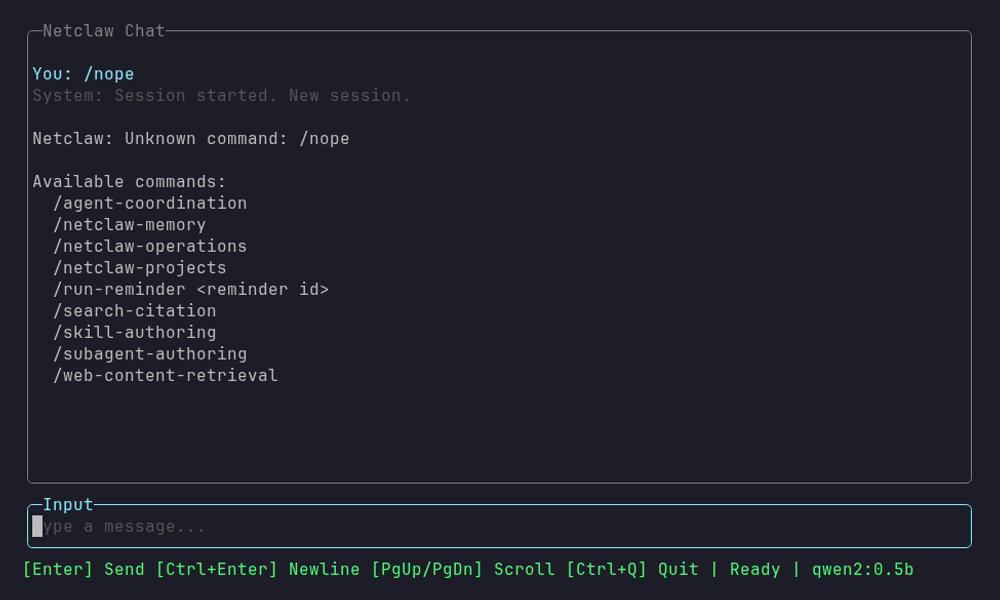
The status bar still reads Ready, because no model call happened.
That reply is the closest thing netclaw has to /help. A command with an argument-hint shows the hint after its name.
Test a reminder with /run-reminder
Section titled “Test a reminder with /run-reminder”A scheduled reminder runs unattended, so any tool call that needs approval is denied unless you saved a grant for it earlier. /run-reminder <id> runs the reminder’s real prompt in a chat where you’re present. Each “Always” answer saves a grant the scheduled run reads.
netclaw reminder run nightly-cleanupThat opens a chat whose first message is /run-reminder nightly-cleanup. In Slack, Discord or Mattermost, send the command yourself as described in Where they work.
- The test does the real work. A cleanup reminder deletes files and a channel reminder posts to the channel. The skill makes the model ask you to confirm first.
- Answer prompts with Always here, This repository or Always anywhere. Once and This chat answers don’t carry over to a scheduled run, and the skill tells you which steps will still be denied.
- A one-shot that already ended can’t be tested: the command returns an “ended” error instead of running it. Test a one-shot before its fire time. A reminder also reaches only the child runs of the session where it fires, so a test in another chat doesn’t prove the scheduled run can start one.
- Run it in a chat with the reminder’s audience. The CLI chat is Personal, narrowed to your deployment posture, so on a Personal host
netclaw reminder runonly tests Personal reminders (netclaw#2330).
See netclaw reminder, How tool approvals work and Run reminders, webhooks and scripts unattended.
Your own skills as commands
Section titled “Your own skills as commands”Any skill that loads without errors is a slash command. Its name is the command, and its argument-hint frontmatter shows in the list. Two frontmatter keys change that:
| Key | Effect |
|---|---|
invocable: false | Hides the skill from slash commands. |
disable-model-invocation: true | Hides the skill from the model’s index but keeps /name working. |
Skills from local folders, external sources and skill servers all work this way. See Skills for the frontmatter reference and netclaw skill for listing what’s loaded.
Commands that don’t exist
Section titled “Commands that don’t exist”People coming from other agent tools try these first. Each one lands in the unknown-command reply above.
| Command | What to do instead |
|---|---|
/new | Start a fresh session. In the terminal, quit and run netclaw chat, or press N in netclaw sessions. In Slack, start a new thread, because each thread is its own session. |
/clear | Start a fresh session as above. netclaw has no command that wipes a session’s history in place. |
/compact | Do nothing. netclaw compacts a session on its own when the context nears the model’s limit. Headless runs print a [compaction] line when it happens. See Sessions. |
/model | Run netclaw model set. It changes the model for the daemon, not for one session. |
/help | Send any unknown command to get the list. |
Related pages
Section titled “Related pages”- Skills: the frontmatter that makes a skill a command
netclaw chat: the terminal chat where commands runnetclaw reminder:reminder runand the rest of reminder management- How tool approvals work: the prompts you answer during a test run
netclaw skill: list and inspect the skills behind your commands
Resources
Section titled “Resources”- Agent Skills specification: the skill file format netclaw’s skills follow
- Slack slash commands: Slack’s own slash-command mechanism
- Mattermost slash commands: Mattermost’s own slash-command mechanism
 Built by Petabridge