
netclaw skill
netclaw skill shows what skills the agent has loaded, pulls updates from skill servers, checks a skill file before you rely on it, and manages the external directories netclaw reads. list and sync talk to the running daemon. Every other subcommand reads and writes files and works without it.
For what skills are and how netclaw uses them, see Skills overview.
netclaw skill [subcommand] [options]With no subcommand, netclaw skill runs list.
Subcommands
Section titled “Subcommands”| Subcommand | Needs daemon | Description |
|---|---|---|
list | Yes | List every skill the daemon has loaded (default) |
sync | Yes | Run a skill server sync pass now |
show <name> | No | Show one skill’s details and full content |
validate <path> | No | Check a SKILL.md or flat .md file |
remove <name> | No | Delete a native skill |
issues | No | Show skills with structural problems or shadowed by a higher tier |
search <query> | No | Find skills by name, display name or description |
source list | No | List external skill sources |
source add <name> --path <dir> | No | Add a directory as a source |
source add <name> --well-known <alias> | No | Add a well-known source (claude-code or open-code) |
source remove <name> | No | Remove a source from config |
source enable <name> | No | Enable a source |
source disable <name> | No | Disable a source without removing it |
The offline subcommands scan the native directory (~/.netclaw/skills/) and your external sources. They don’t see skills synced from a skill server or MCP prompt skills, so use list to see everything.
Skill classifications
Section titled “Skill classifications”The SOURCE column in list and search takes one of these values:
| Source | Where it comes from | Mutable |
|---|---|---|
system | ~/.netclaw/skills/.system/, restored from the daemon binary on every start | No |
native | ~/.netclaw/skills/, including skills synced from a skill server | Yes for your own skills |
external | A directory configured with skill source | At the source |
mcp | A prompt from a connected MCP server, list only | No |
Skills synced from a skill server live in ~/.netclaw/skills/.server-feeds/<feed>/, so list labels them native. They aren’t yours to edit. skill_manage refuses them, and the next sync restores any file you change. skill source doesn’t manage them either. Add servers in netclaw config or SkillFeeds in netclaw.json. See Skill feeds.
Examples
Section titled “Examples”List loaded skills
Section titled “List loaded skills”netclaw skill listNAME SOURCE VERSION STATUS------------------------------------------------------------------------flat-note native - okhello-greeter native 1.0.0 okincident-summary native 1.1.0 okk8s-log-triage native 0.2.0 okagent-coordination system 1.5.3 oknetclaw-memory system 1.14.3 oknetclaw-operations system 2.144.0 oknetclaw-projects system 1.4.0 okrun-reminder system 1.0.2 oksearch-citation system 1.1.4 okskill-authoring system 1.12.0 oksubagent-authoring system 1.6.2 okweb-content-retrieval system 1.0.0 ok
13 skill(s)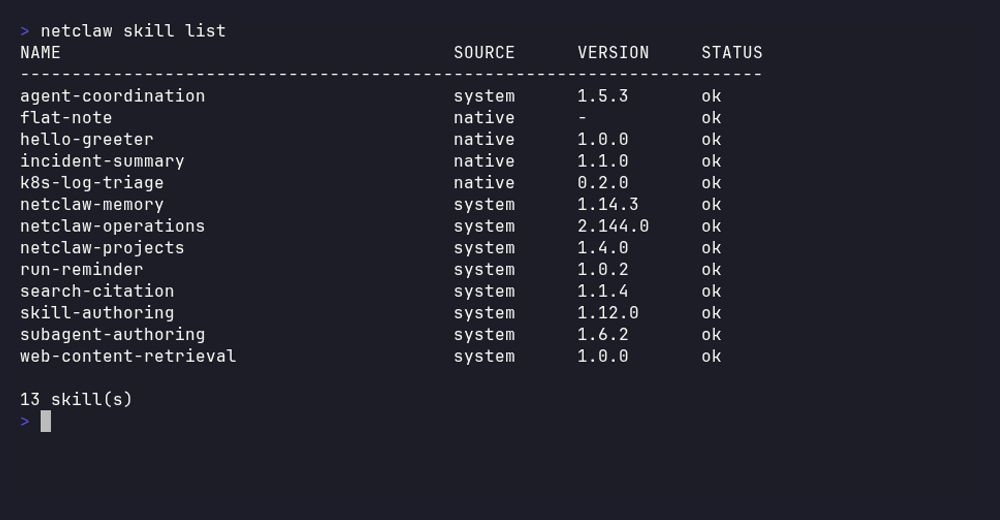
The four native rows are two local skills and two from a skill-server feed, and the nine system skills ship with netclaw. MCP prompt skills join the same table when a server provides them.
list reads the daemon’s live registry, which is the only view that includes MCP prompt skills. It lists accepted skills only, so STATUS is always ok. Use netclaw skill issues for rejected ones. If the daemon isn’t reachable, list prints Daemon unavailable: ... and exits 1. There’s no fallback to a disk scan. Start it with netclaw daemon start, or docker restart <container> in Docker.
Sync feeds now
Section titled “Sync feeds now”netclaw skill syncWaiting for the daemon's skill sync pass. Press Ctrl+C to stop this wait.Skill sync pass a304191e2ce04fc28782ad22f8385c2dcorp-skills: ok changed=0 unchanged=2 rejected=0 failed=0 sidecar=completeInventory: ok accepted=13 rejected=0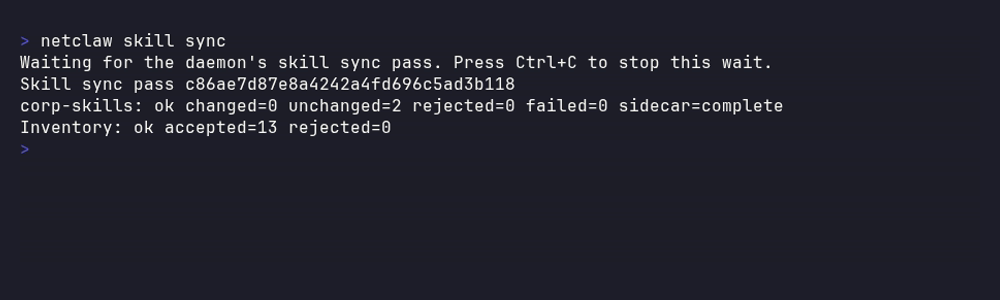
The feed line counts what changed on this pass, and the inventory line is the daemon’s total after the refresh.
sync starts a pass for every enabled skill feed right away instead of waiting for SkillFeeds.SyncIntervalMinutes. If a pass is already running, it waits for that one. It takes no flags and saves no config. Ctrl+C stops the wait, not the pass.
It exits 1 when a feed reports failed or rejected above zero, when the inventory refresh fails, or when the daemon is unreachable. Each feed’s sidecar= value (complete, absent, failed, not-run) reports the subagent pass. See Skill feeds for what each means.
Show a skill
Section titled “Show a skill”netclaw skill show hello-greeterName: hello-greeterDisplay: Hello GreeterSource: nativeVersion: 1.0.0Category: -License: -Path: /home/netclaw/.netclaw/skills/hello-greeter/SKILL.mdFlat file: FalseResources: references/tone.md, scripts/stamp.shDescription: Greet the user by name and mention today's weekday.
--- content ---(full SKILL.md follows)Resources: appears when the skill has supporting files. show finds skills by name in the native and external directories, so a feed skill answers [FAIL] skill 'name' not found.
Validate a skill file
Section titled “Validate a skill file”netclaw skill validate ./my-skill/SKILL.md[OK] Valid skill file. Name: my-skill Description: Does something useful. Version: 1.0.0 License: -A bad file says what’s wrong and exits 1:
[FAIL] MissingDescription: Skill frontmatter must include a non-empty description.validate applies the native rules: the frontmatter name must match the directory (or file) name, and symlinks aren’t followed. A skill that loads fine from an external source can still fail here for either reason.
Once a skill validates, put it in ~/.netclaw/skills/ as name/SKILL.md or name.md. The daemon rescans when files change, so list shows it without a restart.
Check for problems
Section titled “Check for problems”netclaw skill issuesNAME KIND MESSAGE------------------------------------------------------------------broken-skill MissingDescription Skill frontmatter must include a non-empty description.
1 issue(s)issues is an offline structural scan of the native and external directories. It reports bad frontmatter, name mismatches, symlinks and skills shadowed by a higher tier. A copy shadowed by a system skill shows as DuplicateName. It doesn’t report skill server rejections. Those go to the daemon log and the counts in skill sync.
Search skills
Section titled “Search skills”netclaw skill search greeterNAME SOURCE VERSION DESCRIPTION----------------------------------------------------------hello-greeter native 1.0.0 Greet the user by name and mention today's weekday.
1 match(es)Remove a skill
Section titled “Remove a skill”netclaw skill remove my-old-skillremove deletes native skills only. A system skill fails with cannot remove system skill, and an external skill fails with cannot remove external skill. Delete the files at the source. Removal is permanent, because native skills have no history.
Manage external sources
Section titled “Manage external sources”skill source manages local directories. It edits netclaw.json, and the running daemon restarts itself to pick up the change. See External skills for the config shape and the plugin scope of the claude-code alias.
netclaw skill source listnetclaw skill source add my-claude --well-known claude-codenetclaw skill source add team-skills --path /opt/company/skillsnetclaw skill source disable team-skillsnetclaw skill source enable team-skillsnetclaw skill source remove team-skills| Alias | Reads |
|---|---|
claude-code | ~/.claude/skills/, ~/.claude/commands/, and ~/.claude/plugins/marketplaces/*/skills/ |
open-code | ~/.open-code/skills/ |
--path fails with [FAIL] directory not found if the directory doesn’t exist. Names have to be unique. --well-known sources get AllowSymlinks: true, and --path sources don’t. remove deletes the config entry and leaves your skill files alone. With no sources configured, source list prints any well-known directories it finds on disk and the command to add them.
With no action, netclaw skill source lists your sources. An unknown action prints the usage text.
Frontmatter
Section titled “Frontmatter”The SKILL.md format, including the invocable key and its default, is in Skills overview. Unknown keys are ignored without a warning. A skill with user-invocable: false stays a / command, because the key is invocable.
Related pages
Section titled “Related pages”- Skills overview: tiers, precedence, formats and trust
- Skill feeds: configure skill servers and read the sync output
- External skills: local directories and the Claude Code alias
netclaw config: the Skill Sources screennetclaw stats:stats skillsshows which skills the agent loads
Resources
Section titled “Resources”- AgentSkills.io: the
SKILL.mdformat specification - Cloudflare Agent Skills Discovery RFC: the discovery protocol behind skill feeds
- netclaw skill-server: the self-hosted skill registry
 Built by Petabridge