
CLI overview
The netclaw CLI controls your agent: setup, configuration, diagnostics, chat and daemon lifecycle. Pick a command from the map below, or run netclaw <command> --help for the built-in help.
netclaw <command> [options]Chat, sessions, status and stats are thin clients. The daemon (netclawd, the background process that owns sessions, connectors and model routing) does the work, so those commands fail when it isn’t running. status, stats and sessions print [FAIL] ... unable to reach daemon. chat -p prints [headless:error] Connection refused (127.0.0.1:5199) and [turn:failed] category=infra kind=ChannelFailure on stderr and exits 1. The Daemon column says which commands need it.
Command map
Section titled “Command map”Chat and sessions
Section titled “Chat and sessions”| Command | What it does | Daemon | TUI |
|---|---|---|---|
chat | Interactive terminal chat | Required | Yes |
chat --onboarding | Interactive chat that starts the guided identity interview | Required | Yes |
chat -p <text> | One headless prompt, then exit. Takes --resume and --json. | Required | No |
sessions | Browse and resume recent sessions | Required | Yes |
sessions --once | List sessions without the TUI. --json implies it. | Required | No |
Setup and diagnostics
Section titled “Setup and diagnostics”| Command | What it does | Daemon | TUI |
|---|---|---|---|
init | First-run wizard: provider, identity, posture, health check | No (starts it) | Yes |
config | Settings dashboard for everything init doesn’t cover. config retention sets how long logs are kept. | No | Yes |
doctor | 24 configuration and connectivity checks, with --fix | Optional | No |
status | Daemon health, model, connectors | Required | No |
stats | Token, session, memory and skill usage | Required | With --tui |
update | Check for and install updates | No | No |
version, --version, -V | Print version, commit and build time | No | No |
Providers, models and tools
Section titled “Providers, models and tools”| Command | What it does | Daemon | TUI |
|---|---|---|---|
provider | Add, rename and remove LLM providers | No | Bare provider |
model | Assign models to the Main, Fallback and Compaction roles | No | Bare model |
mcp | MCP server profiles and tool permissions | Optional | mcp tools, mcp permissions |
approvals | List and revoke saved grants | No | Bare approvals |
secrets | Store encrypted credentials with secrets set | No | No |
skill | List, inspect and sync skills and skill sources | list and sync need it | No |
webhooks | Manage inbound webhook routes | set and delete need it | No |
reminder | Manage scheduled reminders | Required | ui or tui |
memory | Provision the embedding model and backfill memory embeddings | No | No |
Daemon and devices
Section titled “Daemon and devices”| Command | What it does |
|---|---|
daemon start, stop, status | Start the daemon in the background, stop it, or show its process state |
daemon install, uninstall | Install or remove the systemd user unit (Linux). See systemd. |
daemon pair | Print a pairing code on the host machine |
daemon devices | List paired devices. daemon devices revoke <name> removes one. |
pair <endpoint> | Pair this machine with a remote daemon, using the code from daemon pair |
There is no daemon restart. The daemon restarts itself when netclaw.json changes. After a change to secrets.json or an environment variable, run netclaw daemon stop and then netclaw daemon start, or docker restart <container> in a container.
If you just ran netclaw init, run netclaw config next. Channels, search, network exposure, webhooks and skill sources live there, not in init.
First run
Section titled “First run”netclaw init # provider, identity, posture, health check. Opens chat when it passes.netclaw config # channels, search, exposure, skill sourcesnetclaw doctor # check everything is wired upnetclaw status # confirm the daemon is healthyOnce you’re running, First conversation walks through your first chat.
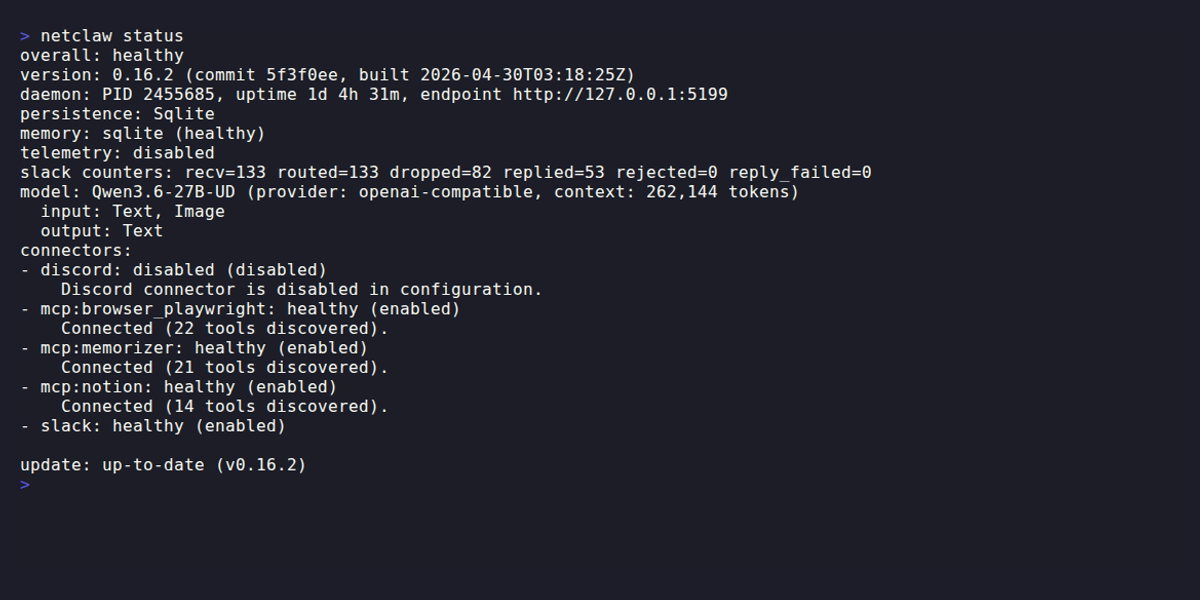
netclaw status is the quickest check that the daemon, model and connectors are healthy.
Global flags
Section titled “Global flags”| Flag | Effect |
|---|---|
--help, -h, help | Print the command list. Also works after a command, as in netclaw doctor --help. |
--version, -V, version | Print the version. |
There are no other global flags. Run bare netclaw and it prints the help and exits 2.
--help works after every command, including netclaw mcp add --help, and exits 0. That includes netclaw daemon --help, and a bare netclaw daemon prints the same usage and exits 0. An unknown subcommand such as netclaw daemon restart prints the usage and exits 1.
$ netclaw --versionnetclaw 0.28.2 (commit 7419d84, built 2026-10-29T00:09:05Z)Output formats
Section titled “Output formats”| Command | Flag | Shape |
|---|---|---|
status | --json or --format json | camelCase object |
stats, stats skills | --json or --format json | camelCase object |
doctor | --format json | camelCase object with exitCode, checks and fix |
sessions | --json | PascalCase array. Includes SessionId. |
chat -p | --json | One camelCase envelope with sessionId, response, turnResponses and usage. A failed turn adds errorCategory and errorKind. The exit code is still the primary signal. |
approvals list, webhooks list | --json | See each command’s page |
The sessions output is PascalCase and the others are camelCase. Check the key names before you write a jq filter.
Exit codes
Section titled “Exit codes”| Code | Meaning |
|---|---|
0 | Success |
1 | The command failed: bad options, validation errors, unreachable daemon or a runtime failure |
2 | Bare netclaw or an unknown command (netclaw: 'bogus' is not a netclaw command. See 'netclaw --help'.). doctor also uses 2 for warnings only, and status uses it for a degraded daemon. |
Each command’s page lists the codes scripts should care about.
Where config and data live
Section titled “Where config and data live”Everything lives under ~/.netclaw, or $NETCLAW_HOME if you set it. See Data directory layout for the full tree.
| File | Purpose |
|---|---|
~/.netclaw/config/netclaw.json | Main configuration |
~/.netclaw/config/secrets.json | Encrypted credentials, written by netclaw secrets set and the provider commands |
~/.netclaw/client/config.json | The daemon endpoint a paired client uses |
NETCLAW_* environment variables | Highest priority, overrides both files |
The CLI and the daemon layer configuration in that order: netclaw.json, then secrets.json, then NETCLAW_* variables.
Environment variables
Section titled “Environment variables”| Variable | Effect |
|---|---|
NETCLAW_HOME | Base directory instead of ~/.netclaw |
NETCLAW_DAEMON_ENDPOINT | Daemon URL for chat, sessions, status and stats. Wins over client/config.json and the Daemon section of netclaw.json. The default is http://127.0.0.1:5199. |
NETCLAW_DAEMON_PATH | Where netclaw daemon start finds the netclawd binary |
NETCLAW_<Section>__<Key> | Override any config key. Double underscores separate path segments, as in NETCLAW_Providers__my-anthropic__ApiKey. |
CHROME_PATH, NETCLAW_PLAYWRIGHT_BROWSER | Where browser-automation detection looks for a browser |
Background update check
Section titled “Background update check”Commands that don’t open a full-screen UI check for a new release in the background and print a one-line notice if one exists. init, update, secrets, daemon, chat (including chat -p) and sessions never run the check. Run netclaw update --check to check by hand.
Related pages
Section titled “Related pages”- Quickstart: get netclaw running from scratch
- Installation: platform-specific install instructions
- Data directory layout: what lives under
~/.netclaw - Slash commands: commands you type inside a chat
- Docker deployment: run the CLI against a containerized daemon
Resources
Section titled “Resources”- .NET tools documentation: background on the .NET toolchain netclaw is built on
- systemd user services: reference for
daemon installanddaemon uninstallon Linux - Model Context Protocol specification: the protocol behind
netclaw mcp
 Built by Petabridge