
Self-Hosted Providers
Self-hosted providers run inference on your own hardware. No API keys, no data leaving your network. netclaw has two provider types for this: native Ollama integration, and an OpenAI-compatible mode for any server exposing /v1/chat/completions, such as llama.cpp, vLLM, Lemonade, or DwarfStar (ds4).
Config goes in ~/.netclaw/config/netclaw.json. Self-hosted providers need no credentials unless you run an authenticated endpoint. NETCLAW_ environment variables override file config. netclaw init and netclaw provider set this up interactively, and this page covers doing it by hand. For cloud providers, see Managed providers.
Before you begin
Section titled “Before you begin”- Ollama or another inference server running and reachable from the daemon host, with a model loaded
- netclaw installed (the daemon doesn’t need to be running to edit config)
- For Docker, the container must reach the server:
localhostinside the container is the container
Provider summary
Section titled “Provider summary”| Type | Display name | Default endpoint | Auth | Use case |
|---|---|---|---|---|
ollama | Ollama | http://localhost:11434 | None | Ollama servers |
openai-compatible | llama.cpp / vLLM / DwarfStar ds4 | http://localhost:11434 | Optional Bearer token | Anything exposing /v1/chat/completions |
Configuration schema
Section titled “Configuration schema”| Field | Type | Default | Description |
|---|---|---|---|
Type | string | "ollama" | ollama or openai-compatible |
Endpoint | string | varies by type | Base URL of the inference server |
AuthMethod | enum | None | Set ApiKey for openai-compatible to send the key as a Bearer token |
ApiKey | string? | null | Bearer token, kept in secrets.json |
VendorOptions | object | {} | ThinkingDialect for openai-compatible (ChatTemplateKwargs, ReasoningEffort, DeepSeek or None), DisableThinking (boolean) for ollama |
Ollama
Section titled “Ollama”netclaw discovers models through /api/tags and reads each model’s capabilities from /api/show. Pull a model first, because netclaw can’t pick one that isn’t there:
ollama pull qwen3:30b{ "Providers": { "local": { "Type": "ollama", "Endpoint": "http://localhost:11434" } }, "Models": { "Definitions": { "local-qwen": { "Provider": "local", "ModelId": "qwen3:30b" } }, "Roles": { "Main": "local-qwen" } }}For a remote Ollama, change the endpoint to http://192.168.1.50:11434 and make sure Ollama listens on a non-loopback address.
netclaw reads the context window from {arch}.context_length and vision support from {arch}.vision.block_count in the model metadata.
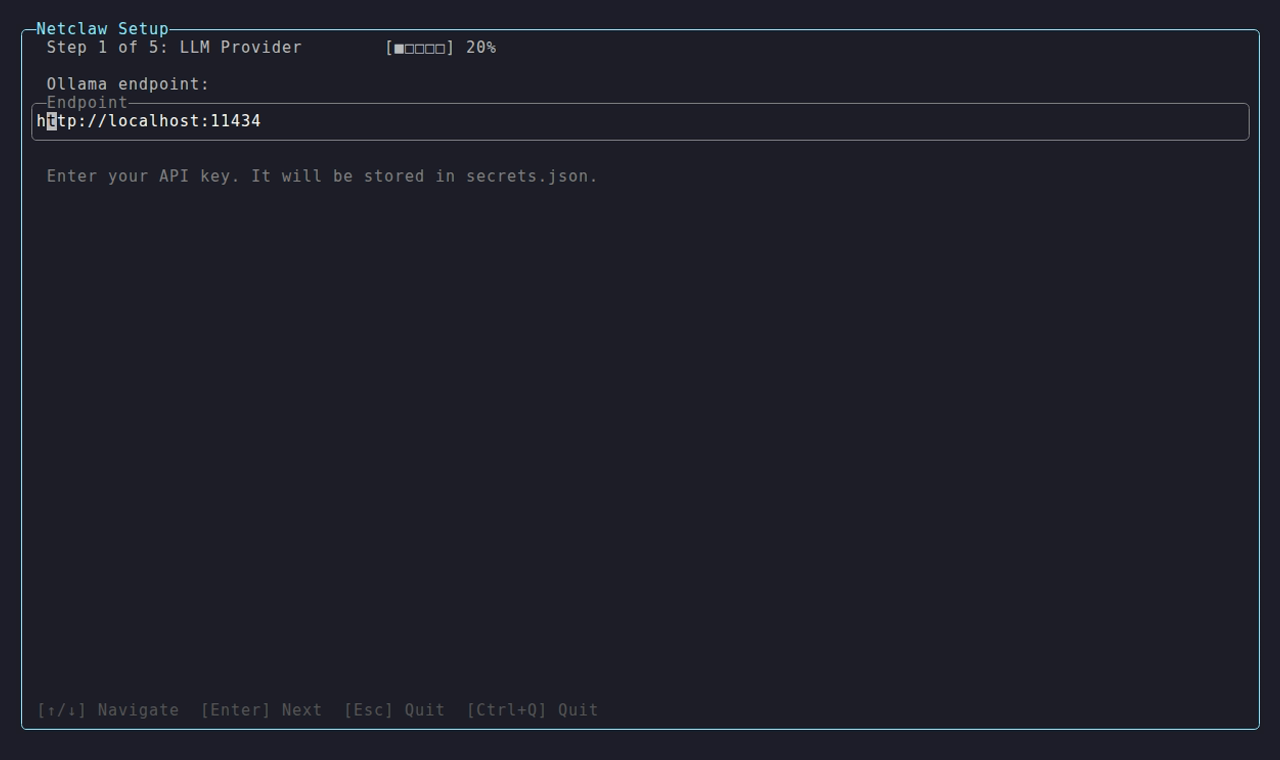
The wizard pre-fills the local Ollama address, then discovers the models you’ve pulled.
OpenAI-compatible (llama.cpp, vLLM, Lemonade)
Section titled “OpenAI-compatible (llama.cpp, vLLM, Lemonade)”Use this for any server with a /v1/chat/completions endpoint. netclaw lists models through /v1/models and streams completions with tool calling.
{ "Providers": { "llama-server": { "Type": "openai-compatible", "Endpoint": "http://llm.example.internal:8080" } }, "Models": { "Definitions": { "llama": { "Provider": "llama-server", "ModelId": "my-model" } }, "Roles": { "Main": "llama" } }}Or from the CLI, then assign a role:
netclaw provider add llama-server openai-compatible --endpoint http://llm.example.internal:8080netclaw model discover llama-servernetclaw model set main llama-server my-modelThe netclaw default endpoint for openai-compatible is http://localhost:11434 (Ollama’s port), but llama-server listens on 8080. Always set Endpoint explicitly.
Endpoint URL
Section titled “Endpoint URL”Give the server’s address. http://llm.example.internal:8080 and http://llm.example.internal:8080/v1 both work, with or without a trailing slash, and netclaw stores what you type. It adds /v1 to the request paths only when the address doesn’t already end in it, so netclaw model discover, the health probe, and chat all ask /v1/models and /v1/chat/completions.
If your gateway serves the API under a prefix, include it: http://gateway.example.internal/openai/v1 requests /openai/v1/models, and http://gateway.example.internal/llm requests /llm/v1/models. The llama.cpp /props lookup is the exception. It always goes to the host root, so a prefixed proxy hides it (llama.cpp troubleshooting). Only a lowercase /v1 suffix is recognized.
The one address that fails is a server that doesn’t answer /v1/models at all. Then discovery reports The openai-compatible models API was not found at http://llm.example.internal:8080/v1/models and chat returns LLM provider error (404).
With authentication
Section titled “With authentication”Some deployments protect the API with a Bearer token. Add the provider with a key and netclaw stores it in secrets.json:
netclaw provider add vllm-cluster openai-compatible --endpoint https://inference.internal:8443 --api-key your-token-hereThe key is only sent when the provider’s AuthMethod is ApiKey. Setting a bare ApiKey in secrets.json also works for an existing provider, because netclaw infers ApiKey when a key is present and no method is set. Since 0.27.0 a dummy key is never needed for servers without auth: leave it out.
llama.cpp server
Section titled “llama.cpp server”Start llama-server, then point netclaw at it:
llama-server -m ./models/qwen3-30b-q4_k_m.gguf --port 8080 --ctx-size 32768 --jinjanetclaw provider add llama-local openai-compatible --endpoint http://localhost:8080--jinja is on by default in current llama.cpp builds and required on older ones. Reasoning models and tool calling depend on the server’s chat template, so if replies show raw <tool_call> XML or the model loops, see llama.cpp troubleshooting. vLLM users: vLLM quirks.
--ctx-size is what the server actually allocates. netclaw reads it from /props, so you normally don’t repeat it in ContextWindow.
Capability detection
Section titled “Capability detection”For openai-compatible, netclaw works out the context window and modalities from what the server exposes:
| Backend | Recognized by | Context window | Input modalities |
|---|---|---|---|
| llama.cpp | /props answers, or meta.n_ctx on the model entry | /props n_ctx, else meta.n_ctx | /props modalities.vision |
| vLLM | owned_by: "vllm", or max_model_len with no /props | max_model_len | Not reported: falls to the Hugging Face lookup, which only works when the served name is a Hugging Face ID |
| ds4 | owned_by: "ds4.c" | context_length | Text only |
| Anything else | (generic) | Not reported | Not reported |
Where the server reports nothing, netclaw uses 32,768 tokens and text-only input unless you override them on the definition. The daemon log records which backend it detected (OpenAI-compatible backend detected as llama.cpp). To set a value yourself:
netclaw model set main llama-server my-model --context-window 65536 --input-modalities "Text, Image"Models covers precedence and the symptoms of a wrong value.
Thinking levels
Section titled “Thinking levels”To set a thinking level on a model, netclaw needs to know how your server takes one. For llama.cpp it reads /props: a chat template with supports_reasoning_effort offers off, low, medium and high, and one with an enable_thinking switch or a <think> template offers only off. When netclaw model set or netclaw provider add detects llama.cpp (owned_by: "llamacpp" or meta on /v1/models), it saves VendorOptions:ThinkingDialect as ReasoningEffort for you. Router-mode llama.cpp isn’t detected. For vLLM, SGLang, ds4 or a proxy, set the dialect by hand in netclaw.json as shown in Output limit and thinking level. Ollama reports its levels in /api/show (low, medium, high, or just on and off).
A self-hosted server gets an output limit of 32000 only when the context window is known, from ContextWindow or the probe. Otherwise netclaw sends no limit and the server’s own default applies.
netclaw also extracts tool calls a model writes as text (Qwen’s XML-style <tool_call> format, for one) when the server doesn’t turn them into structured tool calls.
Cloud gateways
Section titled “Cloud gateways”Azure AI Foundry, OVHcloud, and other hosted OpenAI-style gateways need extra care: netclaw sends a llama.cpp extension field that strict gateways reject with HTTP 400. See OpenAI-compatible cloud endpoints.
Multiple providers
Section titled “Multiple providers”Mix types freely. Ollama as Main with a llama.cpp instance as Fallback:
{ "Providers": { "ollama-local": { "Type": "ollama", "Endpoint": "http://localhost:11434" }, "llama-gpu": { "Type": "openai-compatible", "Endpoint": "http://localhost:8080" } }, "Models": { "Definitions": { "main": { "Provider": "ollama-local", "ModelId": "qwen3:30b" }, "fallback": { "Provider": "llama-gpu", "ModelId": "qwen3:14b" } }, "Roles": { "Main": "main", "Fallback": "fallback" } }}Models explains what triggers the switch.
Environment variable overrides
Section titled “Environment variable overrides”Everything above can come from the environment:
docker run -d --name netclaw \ -v netclaw-home:/home/netclaw/.netclaw \ -e NETCLAW_Providers__local-gpu__Type=openai-compatible \ -e NETCLAW_Providers__local-gpu__Endpoint=http://llm.example.internal:8080 \ -e NETCLAW_Models__Definitions__local-qwen__Provider=local-gpu \ -e NETCLAW_Models__Definitions__local-qwen__ModelId=my-model \ -e NETCLAW_Models__Definitions__local-qwen__ContextWindow=65536 \ -e NETCLAW_Models__Roles__Main=local-qwen \ -e NETCLAW_Security__DeploymentPosture=Personal \ ghcr.io/netclaw-dev/netclaw:0.28.2The daemon comes up with the override applied (context: 65,536 tokens in netclaw status). Three catches. A shell can’t export a variable name containing a hyphen, so export NETCLAW_Models__Definitions__local-qwen__Provider=... fails with not a valid identifier. docker run -e, Compose environment:, and systemd accept hyphens, and in a plain shell you use local_qwen. And the CLI refuses chat and status with daemon not configured until netclaw.json exists, so create one: docker exec -u netclaw netclaw sh -c 'echo "{}" > /home/netclaw/.netclaw/config/netclaw.json'. netclaw model discover and netclaw model list read netclaw.json only, so they don’t see providers that exist only in the environment. Environment changes need a manual restart.
Variables follow the .NET configuration convention: double underscores separate path segments.
Health checks
Section titled “Health checks”netclaw probes /api/tags for Ollama and /v1/models for openai-compatible, from the Provider Manager, netclaw provider add, and netclaw model discover. Self-hosted probes time out after 30 seconds. netclaw doctor doesn’t probe providers. It checks the config and credentials.
| Symptom | Cause | Fix |
|---|---|---|
Connection failed: Name or service not known (host:port) | Bad hostname, or localhost inside a container | Fix the endpoint. From Docker use the host’s address or a shared network name |
Connection refused | Server not running, wrong port | Start it (ollama serve, llama-server) and check the port |
The openai-compatible models API was not found at <url>/v1/models | The server doesn’t answer GET /v1/models at that address, or a proxy prefix is missing from the endpoint (see Endpoint URL) | Open the URL in the message with curl. Fix the endpoint until it answers |
| Probe times out | Server overloaded, or wrong port | Check the endpoint and server logs |
401 | Server needs a token | netclaw provider add ... --api-key or press K in netclaw provider |
Chat works but the model name in netclaw status is wrong | ModelId isn’t checked: llama.cpp serves its one loaded model whatever name you send | Use the ID /v1/models reports |
Chat against an unreachable server fails after retries with LLM provider transport error: Name or service not known (host:port). Check provider configuration and connectivity.
Applying changes
Section titled “Applying changes”The daemon restarts itself after a valid edit to netclaw.json. After changing NETCLAW_* variables or secrets.json, restart it yourself: netclaw daemon stop then netclaw daemon start on a host, systemctl --user restart netclaw under systemd, docker restart <container> in a container.
Provider Manager
Section titled “Provider Manager”Run netclaw provider to open the Provider Manager.
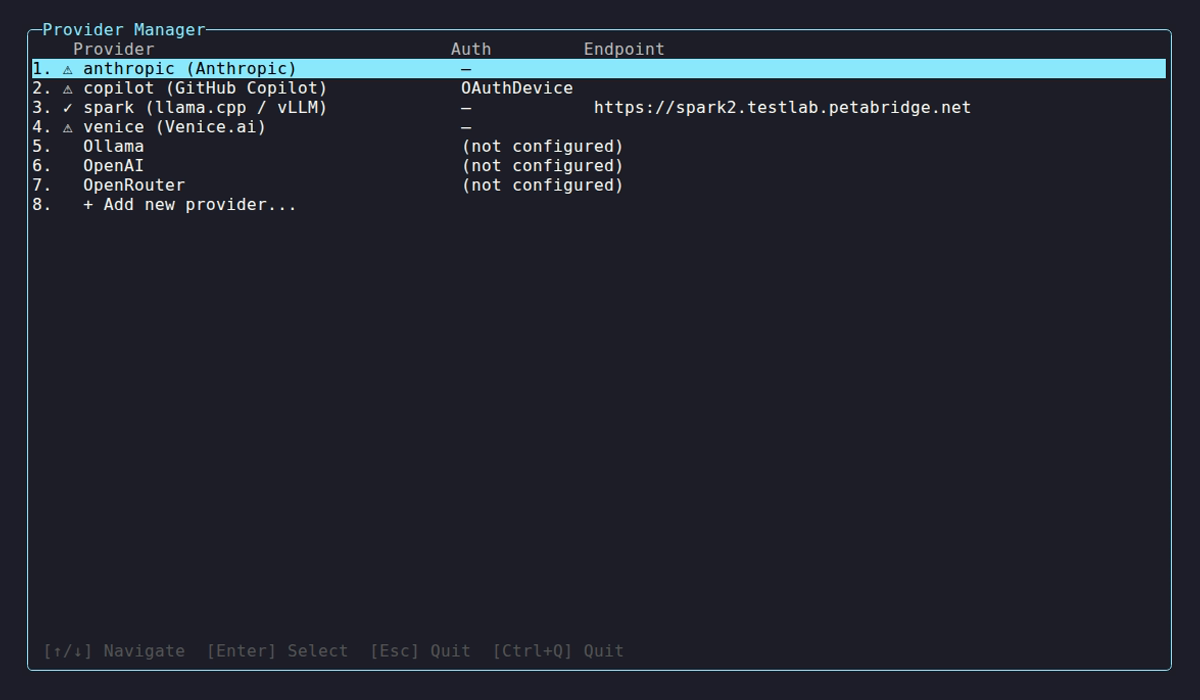
Both self-hosted rows, lab-llama and my-ollama, show the check mark. The warning on my-deepseek is a hosted provider with a placeholder key.
Self-hosted entries show ✓ when the server answers with models and ⚠ when it’s down or returns an error. Select a provider to update its key, rename it, remove it, or re-validate.
Limitations
Section titled “Limitations”- Tool calling quality varies by model, and small models struggle with complex tool schemas. See Choosing a model.
- Slow hardware hits netclaw’s time limits: raise them as described in Slow models and timeouts.
- A reply that hits the output limit fails the turn with
The model reply was truncatedinstead of posting partial text. A lowMaxOutputTokens, or a small context window that clamps the limit, causes it. - A server that implements only part of the OpenAI API can fail in ways netclaw can’t recover from. If a request returns HTTP 400, the response body in the logs names the field.
Related pages
Section titled “Related pages”netclaw provider- manage providers from the CLI or TUInetclaw model- assign models to Main, Fallback, and Compaction- Models - roles, context window, failover, timeouts
- llama.cpp troubleshooting - chat templates, quantization, looping and silent models
- Managed providers - cloud providers when you want someone else to run the GPUs
Resources
Section titled “Resources”- Ollama - install and run local models
- Ollama API reference - tags and show endpoints
- llama.cpp server docs - flags, endpoints, and slots
- vLLM OpenAI-compatible server - serving and tool-calling options
- .NET environment variable configuration - the double-underscore convention
 Built by Petabridge