
netclaw update
netclaw update downloads the newest release on your channel, verifies it, swaps the netclaw and netclawd binaries, and restarts the daemon if it was running. Run it on a host install. In Docker you pull a new image instead.
netclaw update [options]Options
Section titled “Options”| Flag | Description | Default |
|---|---|---|
--check | Report whether an update exists and install nothing | Off |
--force | Skip the Proceed with update? [y/N] prompt | Off |
--channel <name> | Switch the release channel, stable or beta, and save it to netclaw.json. With --check it previews the channel and saves nothing. | stable |
An unknown channel or flag prints the usage text and exits 1. --channel with no value prints --channel requires a value: stable or beta.
Examples
Section titled “Examples”Check, then install
Section titled “Check, then install”netclaw update --checknetclaw updateUpdate available: v0.28.0 → v0.28.2Release notes: https://github.com/netclaw-dev/netclaw/releases/tag/0.28.2
netclaw (linux-x64) - 70.2 MB netclawd (linux-x64) - 74.7 MB
Proceed with update? [y/N]: yDownloading netclaw... verified.Downloading netclawd... verified.Stopping daemon... done.Installing... done.Restarting daemon... done.
Updated to v0.28.2.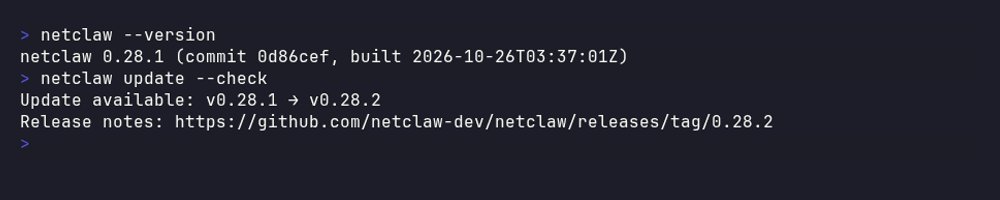
The check alone, from a 0.28.1 install. It reports and changes nothing.
Add --force for scripts. When the daemon is already current, the command prints Netclaw is up to date (v0.28.2). and exits 0.
Move to the beta channel
Section titled “Move to the beta channel”netclaw update --channel betaThis saves Daemon.UpdateChannel to netclaw.json, then installs the newest build on that channel. Later checks follow it. --channel stable switches back. Beta resolves to the newest of the latest prerelease and the latest stable, so a stable release that supersedes a beta is still offered.
What it changes
Section titled “What it changes”| Touched | Not touched |
|---|---|
The netclaw and netclawd binaries, in the directory of the running CLI (~/.netclaw/bin by default) | ~/.netclaw data, netclaw.json and secrets.json |
Daemon.UpdateChannel in netclaw.json, only when you pass --channel without --check | The systemd unit file and daemon.env. The unit keeps the same ExecStart path, which is why updates work in place. |
The command keeps the daemon’s owner, using the same rule as netclaw daemon stop and start. When the systemd user unit is running this home’s daemon, it stops and starts the daemon with systemctl --user. A daemon you started by hand, or one that belongs to a different NETCLAW_HOME, goes through netclaw daemon stop and start, which first prove the PID serves this home (see Home check). On Linux that proof reads /proc/<pid>/environ. On macOS and Windows a daemon that doesn’t answer with its home can’t be proven. A 0.27.1 daemon is one, so stop it by hand before you update from 0.27.1. A daemon that wasn’t running stays stopped.
It verifies the release manifest’s signature and each archive’s SHA-256 before it touches a binary. If the signature check fails, the command stops and says the manifest may have been tampered with. If swapping a binary fails, the previous binary is restored. After a successful update the old binaries are deleted, so there’s nothing to roll back to. To go back, install an older release.
The new daemon migrates netclaw.db forward when it starts, and the older one can’t read everything the newer one writes. Take a backup first, and read Upgrade netclaw for what changes between versions.
Pin or go back to a version
Section titled “Pin or go back to a version”netclaw update always installs the newest release on the channel. It has no --version flag. To pin an exact version or install an older one, run the install script with NETCLAW_VERSION. It replaces the binaries and leaves your data alone:
systemctl --user stop netclawcurl -sSL https://releases.netclaw.dev/install.sh | NETCLAW_VERSION=0.28.0 bashsystemctl --user start netclawGoing back past 0.27.0 isn’t a supported path. See Downgrading.
When the daemon says an update exists
Section titled “When the daemon says an update exists”The daemon checks at startup and every 24 hours. It logs a warning, raises an update.available alert, and shows the state in netclaw status. It never downloads or installs anything. Most other netclaw commands also print a one-line Update available notice to stderr. netclaw doctor reports it as a warning.
Docker
Section titled “Docker”The image sets Daemon.DisableSelfUpdate=true, so installing is refused:
Update available: v0.28.0 → v0.28.2Release notes: https://github.com/netclaw-dev/netclaw/releases/tag/0.28.2
Self-update is disabled (Daemon.DisableSelfUpdate=true).Pull a newer container image to upgrade.
The command exits 1. --check still works. Change the image tag, as described in Run netclaw in Docker.
Troubleshooting
Section titled “Troubleshooting”Could not check for updates
Section titled “Could not check for updates”Cause: The release feed at releases.netclaw.dev isn’t reachable from this machine, or it didn’t answer in time. A timeout reads Timed out after <n>s fetching manifest from <url> (or manifest signature).
Fix: Check outbound HTTPS and any proxy. The daemon and the CLI both need it. The daemon’s own check logs a warning (Netclaw update check failed) and keeps running.
Update aborted. Stop the daemon manually, fix service state, and retry.
Section titled “Update aborted. Stop the daemon manually, fix service state, and retry.”Cause: The daemon couldn’t be stopped, for example because systemd reported an error, or because netclaw daemon stop refused with Nothing was stopped. PID <n> is not shown to serve <home>. The binaries weren’t replaced.
Fix: Run systemctl --user status netclaw or netclaw daemon status, stop the daemon yourself, and run the update again.
Could not determine whether systemd owns the daemon lifecycle
Section titled “Could not determine whether systemd owns the daemon lifecycle”Cause: The systemd unit is installed but your shell has no user session bus (no XDG_RUNTIME_DIR), so the update can’t tell whether the unit would restart the daemon behind its back. It stops before touching a binary.
Fix: Run the update from a login session, or export XDG_RUNTIME_DIR=/run/user/$(id -u).
Update installed, but daemon restart failed
Section titled “Update installed, but daemon restart failed”Cause: The new binaries are in place but the daemon didn’t come back up.
Fix: Start it with systemctl --user start netclaw or netclaw daemon start, and read the newest file in logs/ for the reason. A config the new version rejects is the usual cause.
Related pages
Section titled “Related pages”- Upgrade netclaw - back up, upgrade, verify and roll back, with what changed in each release
- Back up, restore and move netclaw - what to copy before you update
- Installation - the install script and its options
netclaw daemon- start, stop and install the daemon- systemd service - how a systemd-managed daemon is restarted
Resources
Section titled “Resources”- netclaw releases on GitHub - release notes for every version
- systemctl reference -
--userservice control
 Built by Petabridge