
Run reminders, webhooks and scripts unattended
Reminders, webhook handlers and netclaw chat -p scripts run with nobody watching, so they can only use tools that don’t need a prompt. A call that would prompt is denied. The fix happens before the run: pre-approve what it needs by saving an “Always” grant, or by setting a tool to Auto.
This guide is for anyone whose scheduled or scripted run did nothing, or whose reminder shows denied runs. For how approvals work in general, see How tool approvals work. For interactive chats, see Reduce or turn off approval prompts.
What do you want to do?
Section titled “What do you want to do?”| I want | Do this |
|---|---|
| A reminder to run shell commands or write files | Test it once in a chat with netclaw reminder run <id> and answer each prompt with an “Always” option |
| To approve a known command before anything runs | Save a grant with netclaw approvals trust-verb "<command>" |
| A headless script to run shell with no prompts at all | Set shell_execute to Auto for the Personal audience |
| A webhook handler to run a command | Save a grant, the same way, for the route’s audience |
| A Team or Public run to read files outside its session folder | Add a read root |
| To find out why a run did nothing | Search the daemon log for approval_required_unattended |
What an unattended run can do
Section titled “What an unattended run can do”An unattended run uses the same policy as a chat with the same audience. The same file reach, hard-deny rules, protected paths, saved grants and approval modes apply. One thing differs. A call that would show a prompt in a chat is denied, because nobody can answer.
So an unattended run can use a tool when:
- Its approval mode is
Auto. That’s the default for most tools, but not forshell_executeon Personal, which defaults toApproval. - A saved “Always” grant covers the call.
- It’s a read-only command from the reviewed-safe list, such as
ls,catorgit status, and the audience can read the paths involved.
Everything else is denied. The agent sees this as the tool result:
Tool access denied: shell_execute needs approval, and nobody can answer a prompt in an unattended run. Save an "Always" grant for this call in a chat with the same audience (for example with /run-reminder), then run it again.For a reminder, the session log shows it. A run of disk-note writes ~/.netclaw/sessions/reminder_disk-note_<fire time>-<hash>/logs/session.log:
[2026-10-07T15:24:00.475+00:00] User: Use shell_execute to run exactly: touch /tmp/disk-note.txt. Then reply with one line saying whether it worked.[2026-10-07T15:24:20.245+00:00] Tool call: shell_execute (call=NvHd...) args={"Command":"touch /tmp/disk-note.txt", ...}[2026-10-07T15:24:20.247+00:00] Tool result: shell_execute (call=NvHd...) → Tool access denied: shell_execute needs approval, and nobody can answer a prompt in an unattended run. ...[2026-10-07T15:24:38.429+00:00] Assistant: It didn't work. The `touch /tmp/disk-note.txt` command was denied because shell_execute requires interactive approval, which isn't available in this unattended reminder run. ...The daemon log records the decision as a warning, with the session that made the call:
$ grep approval_required_unattended ~/.netclaw/logs/daemon-*.log15:24:20.246 [WRN] Netclaw.Actors.Tools.DispatchingToolExecutor: Tool authorization evaluated: shell_execute outcome=Denied reason=approval_required_unattended authorizationAttemptId=auth-86c8... sessionId=reminder/disk-note/1791386640000 callId=NvHd...$ netclaw reminder history disk-notefired_at status duration_ms session_id-------------------------------------------------------------------------------2026-10-14 04:12:00Z denied 26690 reminder/disk-note/1791951120000Approval isn’t the only way a call fails unattended. A hard-deny rule, a protected path, or a tool the audience doesn’t have, such as shell on Team or Public, fails the same way in a chat. No grant changes those. See Troubleshooting.
Pre-approve by testing the reminder
Section titled “Pre-approve by testing the reminder”A reminder can’t prompt, but you can. /run-reminder <id> runs the reminder’s exact prompt in a chat. The run_reminder tool and netclaw reminder run do the work behind it. You answer each approval prompt there, and every “Always” answer is saved as a grant that the scheduled run reads. “Once” and “This chat” answers don’t carry over, because each scheduled run is a new session.
The steps are real. A reminder that deletes files deletes them during the test, and one that posts to a channel posts there. The test doesn’t add to the reminder’s history or move its schedule.
-
Create the reminder. This one is a stand-in for any reminder that runs a shell command:
Terminal window netclaw reminder create disk-note cron "*/6 * * * *" \"Use shell_execute to run exactly: touch /tmp/disk-note.txt. Then reply with one line saying whether it worked." \--name "Disk note"Reminder 'Disk note' scheduled. Runs every 6 minute(s). Next execution: Wednesday, October 7 at 4:00 PM Coordinated Universal Time (2026-10-07 16:00:00Z). Delivery: none (silent execution). ID: disk-noteUntil you pre-approve it, every fire is denied the way shown above.
-
Open a chat that runs it:
Terminal window netclaw reminder run disk-noteThis starts a normal chat with
/run-reminder disk-noteas the first message. In a Slack, Discord or Mattermost channel, type/run-reminder disk-noteyourself. The agent loads therun-reminderskill and warns that the test does the real work. Reply yes. It then calls therun_remindertool, which returns the reminder’s exact prompt, and carries it out. -
Answer the approval prompt when the call that was denied comes up:
Approval required for shell_execute.touch /tmp/disk-note.txt Patterns: touchSelect an option and press Enter.1. Once2. This chat3. Always here4. Always anywhere5. Deny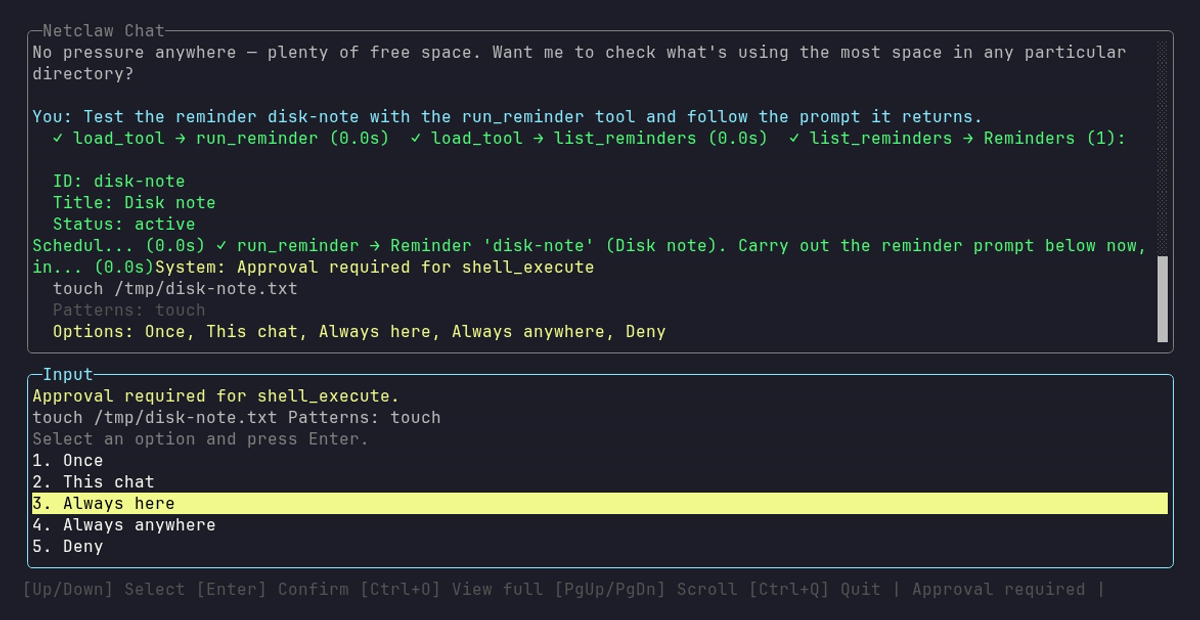
The prompt shows five options because a command outside a Git repository can’t offer This repository.
Choose Always here or Always anywhere. A shell call inside a single Git repository also offers This repository, and non-shell tools and shallow folders don’t offer Always here. After an approved call, the tool result gets a line that names the choice, such as
[approval: always in this folder]. The line is how you tell a grant that carries over (always in this folder,always in this repo,always anywhere) from one that doesn’t (once,this chat only). -
Check what got saved:
Terminal window netclaw approvals listpersonal / shell_executeBash token-prefix "touch" in /tmp added just nowAlways here saved
/tmpbecausedisk-note.txtlooks like a file and sits directly under/tmp, so the scheduled run’stouch /tmp/disk-note.txtis covered. The saved folder comes from the path the command names, so a command on a different folder or an extensionless name needs its own grant (see what Always here covers). A dated file such as/srv/reports/2026-10-07.txtis fine, because the saved folder is/srv/reports. Pick Always anywhere when each run names an extensionless path or a new folder. It covers the command on any path. -
Let the schedule run it. The next fire succeeds:
$ netclaw reminder status disk-note...Recent history (newest first):2026-10-07 16:00:00Z okThe earlier runs showed
denied, so check the result itself. The file exists, and the session log shows the call went through:[2026-10-07T16:00:22.497+00:00] Tool call: shell_execute (call=SOEo...) args={"Command":"touch /tmp/disk-note.txt", ...}[2026-10-07T16:00:22.501+00:00] Tool result: shell_execute (call=SOEo...) → Exit code: 0
A grant matches the command and the folder you approved. If the model picks a different command on a later run, that call is denied again, and a test run is how you find out. Run the test again after you change the prompt.
A chat tests only reminders with its own audience. A CLI chat is Personal, narrowed to your deployment posture, so on a Personal host it can’t test a Team reminder. Run /run-reminder <id> in a Team channel instead. See Audience scoping.
Pre-approve ahead of time
Section titled “Pre-approve ahead of time”If you already know which command the run needs, save a grant for it without running anything:
netclaw approvals trust-verb cpTrusted 'Bash token-prefix "cp" anywhere' for personal / shell_execute.The grant takes effect on the next check, with no restart. The phrase is the program and its subcommand words only. Arguments, flags, redirects and assignments are rejected:
$ netclaw approvals trust-verb "rm -rf"Error: The shell phrase must have no argument, flag, assignment, redirect, or control effect.| Phrase | Covers | Doesn’t cover |
|---|---|---|
git pull | git pull, git pull origin main | git push |
cp | cp with any operands, in any folder | Other programs |
gh | gh --help | gh auth logout, because auth logout are command words |
A one-word phrase approves that program with any operands in every folder, so cp can overwrite any file the audience can write. Prefer a phrase with a subcommand (git pull), or let a test run save a grant for one folder. trust-verb always saves an “anywhere” grant.
| Flag | Meaning | Default |
|---|---|---|
--audience <personal|team|public> | Which audience’s grants to add to | personal |
--tool <name> | Tool the grant is for. For a non-shell tool the grant matches exactly | shell_execute |
--shell <bash|powershell> | Shell the phrase is for, shell_execute only | - |
netclaw approvals list shows what’s saved. To remove one, copy its label:
netclaw approvals revoke 'Bash token-prefix "cp" anywhere'See netclaw approvals for the rest.
Set Auto for specific tools
Section titled “Set Auto for specific tools”When a tool should never prompt for an audience, set it to Auto. This is the right call for a headless script on your own machine that you trust to run shell commands, and the wrong one for an internet-facing webhook. Auto skips the prompt for every call to that tool, including calls the model improvises.
{ "Tools": { "AudienceProfiles": { "Personal": { "ApprovalPolicy": { "ToolOverrides": { "shell_execute": "Auto" } } } } }}The daemon restarts itself when netclaw.json changes. With that set, a headless run that was denied before goes through:
$ netclaw chat -p "Use shell_execute to run exactly: mv /tmp/disk-note.txt /tmp/disk-note.bak"[tool:call] shell_execute({"Command":"mv /tmp/disk-note.txt /tmp/disk-note.bak", ...})[tool:result] shell_execute → Exit code: 0Done. `/tmp/disk-note.txt` has been moved to `/tmp/disk-note.bak`."DefaultMode": "Auto" on its own doesn’t unlock shell on Personal, because shell stays on Approval unless the tool has its own entry. Resolution order is ToolOverrides[exact tool], then McpServerDefaults[server], then DefaultMode. The hard-deny rules, protected paths and file reach still apply under Auto, so rm -rf / stays blocked. netclaw doctor warns when Personal shell is on Auto, so you see it the next time you check.
For MCP tools, see MCP tool permissions.
File access
Section titled “File access”An unattended run gets the file reach of its audience, the same as a chat. A run denied access to a file never reaches the approval question.
| Audience | Reads | Writes |
|---|---|---|
| Personal | Any path, except protected ones (secrets.json, keys/, webhook route files, credential locations) | Any path. netclaw’s own config files and credential locations stay protected |
| Team | Its session folder, plus the GlobalReadRoots folders | Its session folder |
| Public | Its session folder only | Its session folder |
Personal reads reach at least as far as writes. File tools and shell commands are also denied on credential locations such as ~/.ssh, ~/.aws, ~/.gnupg, ~/.kube, ~/.azure, ~/.config/gh, ~/.config/gcloud, ~/.docker/config.json, ~/.netrc and ~/.git-credentials. No approval, override or Auto lifts that:
Error: Access denied: '<path>' is protected (Netclaw secrets, keys or control-plane state, or a credential location ...) and cannot be read by agent tools, even with approval. ...A reminder’s session folder is ~/.netclaw/sessions/reminder_<id>_<fire time>-<hash>/. A Team reminder that reads a file outside its roots gets this, with the roots it does have:
Tool result: file_read → Error: Team trust context may only access files inside the current session directory or configured roots: /home/netclaw/.netclaw/sessions/reminder_team-read_1791389220000-8b429cf910398865/workspace, /home/netclaw/.netclaw/sessions/reminder_team-read_1791389220000-8b429cf910398865, /home/netclaw/.netclaw/skills, /home/netclaw/.netclaw/identity, /home/netclaw/.netclaw/workspaces.To let Team sessions read another folder, add it to GlobalReadRoots. The three defaults are {skills_dir}, {identity_dir} and {workspaces_dir}, and a list you configure replaces the defaults, so keep them:
{ "Tools": { "AudienceProfiles": { "GlobalReadRoots": [ "{skills_dir}", "{identity_dir}", "{workspaces_dir}", "/srv/shared-docs" ] } }}The same Team reminder then reads /srv/shared-docs/notes.txt on its next fire:
Tool call: file_read args={"Path":"/srv/shared-docs/notes.txt", ...}Tool result: file_read → release checklist: ship on ThursdayGlobalReadRoots is read-only and doesn’t apply to Public. To change where an audience can write, set Tools.AudienceProfiles.<audience>.WriteFiles to { "Mode": "Roots", "Roots": [...] }. The same shape under ReadFiles sets the audience’s own read roots. Mode is None, Roots or All. Those lists replace defaults too.
Sub-agents in an unattended run
Section titled “Sub-agents in an unattended run”spawn_agent returns a run ID at once and the child runs in the background. Its result arrives as a notice in a later parent turn, and the parent reads result.md with file_read. An unattended parent has no approval bridge, so a gated tool inside the child is denied with approval_required_unattended and the child gets that as a tool result. An open child consent request holds that session’s reminder fires and refuses a further spawn_agent. The turn that handles the approval notice can only handle that notice. It can’t ask for approval itself.
When a person interrupts
Section titled “When a person interrupts”During a reminder, background job, webhook or approval-notice turn, a message from the operator or a trusted person ends the turn after its current tool batch. The model gets a fixed stop note (The automated turn above stopped unfinished because a person sent a message. ...). A reminder records success and doesn’t run its remaining steps. Child runs the turn started keep running. A message from an admitted UntrustedExternal person waits instead. The daemon log shows turn_person_input_end_at_tool_batch.
Audience scoping
Section titled “Audience scoping”A run’s audience decides its tools, file reach and which grants apply.
| Run | Audience |
|---|---|
| Reminder | The reminder’s audience field. A reminder from netclaw reminder create is Personal. One the agent creates inherits the audience of the chat it came from |
| Webhook | The route’s audience, Public unless you set it |
netclaw chat -p | Personal |
Saved grants are stored per audience in ~/.netclaw/config/tool-approvals.json, and a run reads only its own audience’s grants. The Team entry below is there to show the layout. Team has no shell, so Team grants matter for tools set to Approval, such as MCP tools:
$ netclaw approvals listpersonal / shell_execute  Bash token-prefix "touch" in /tmp   added 13 minutes ago
team / shell_execute  Bash token-prefix "git pull" anywhere   added just now
So a grant you saved in a Personal chat doesn’t apply to a Team reminder. That’s also why /run-reminder only works in a chat with the reminder’s own audience. A Personal chat would pass calls that the Team run denies, so the test would pass falsely. The tool refuses instead:
Error: Reminder 'standup' runs with the team audience, but this chat has the personal audience. A test here would have wider permissions than the scheduled run. Run this in a team chat to test it with its real permissions.A reminder created before the 0.28 upgrade can carry the Personal audience under a narrower posture, such as Team posture with Slack DMs. run_reminder refuses it and a chat with the narrower audience doesn’t list it. Create it again from a chat.
A reminder above the chat’s audience reads as not found. Test a Team reminder in a Team channel. On a Personal host a CLI chat is Personal, so netclaw reminder run can’t test Team reminders there, and a bot that only serves a lower audience may have no chat where some of its reminders can be tested. In that case use trust-verb --audience team and check the result in the session log.
Webhooks
Section titled “Webhooks”A webhook session runs unattended with the route’s audience, so the same rules apply. Webhooks have no /run-reminder equivalent. Save grants with trust-verb, or run the same command in a chat of the same audience and answer with an “Always” option.
This route runs a copy command. Turn on Webhooks.Enabled first (see Webhook configuration). Webhook shell calls only work for the personal audience, since Team and Public have no shell:
netclaw webhooks set copy-hook \ --prompt "Use shell_execute to run exactly: cp /etc/hostname /tmp/webhook-copy.txt. Then reply with one line saying whether it worked." \ --secret-file ./hook-secret.txt \ --audience personalSend it a signed delivery (the netclaw webhooks page shows how to sign one). The sender gets a 202 right away:
{"status":"accepted","route":"copy-hook","eventType":null,"deliveryId":null,"sessionId":"webhook/copy-hook/1791388909166-d91b2ceca74047b9b2fea4a1c74a8be2"}The session then runs, and its log is under ~/.netclaw/sessions/webhook_copy-hook_<time>-<hash>/logs/session.log. Without a grant the call is denied, and the daemon log names the webhook session:
16:02:05.897 [WRN] Netclaw.Actors.Tools.DispatchingToolExecutor: Tool authorization evaluated: shell_execute outcome=Denied reason=approval_required_unattended authorizationAttemptId=auth-e031... sessionId=webhook/copy-hook/1791388909166-d91b... callId=6Vof...Save the grant and send the delivery again:
netclaw approvals trust-verb cp[2026-10-07T16:03:18.449+00:00] Tool call: shell_execute args={"Command":"cp /etc/hostname /tmp/webhook-copy.txt", ...}[2026-10-07T16:03:18.454+00:00] Tool result: shell_execute → Exit code: 0[2026-10-07T16:03:31.415+00:00] Assistant: It worked. `/etc/hostname` was copied to `/tmp/webhook-copy.txt`.The 202 only means netclaw accepted the delivery. Whether the handler succeeded is in the session log. A grant you saved from a reminder test or an earlier chat covers a webhook when the audience, command and folder match. Everything else in Audience scoping and File access applies to webhook sessions as it does to reminders.
Scripts
Section titled “Scripts”netclaw chat -p sessions run as the Personal audience, narrowed to your deployment posture, and they can’t answer prompts. A gated call comes back as a denial in the output, and the exit code is still 0 because the turn completed. The exit code is 1 only when the turn itself fails, for example when the provider is unreachable. If the reply starts a sub-agent, -p stays open and prints [subagent:waiting] N open: <run ids> until the run reports no open child, so wrap the call in timeout:
$ netclaw chat -p "Use shell_execute to run exactly: touch /tmp/unattended-demo.txt"[tool:call] shell_execute({"Command":"touch /tmp/unattended-demo.txt", ...})[usage] in=10483 out=53 total=10536 cached=0 prompt_ms=13368.097 tok_s=23.26[tool:result] shell_execute → Tool access denied: shell_execute needs approval, and nobody can answer a prompt in an unattended run. Save an "Always" grant for this call in a chat with the same audience (for example with /run-reminder), then run it again.The command was denied, so it didn't run. ...To catch it in a script, search plain output for nobody can answer a prompt. With --json the tool results aren’t included, so a denied call looks like any other.
Fix it with any of the routes above, before the script runs:
netclaw approvals trust-verb "<command>"for a command the script runs on purpose.- An “Always” answer in a chat. A
netclaw chatsession is Personal too, so its grants cover the script. shell_executeonAutofor a script you trust, as in Set Auto for specific tools.
Scripting headless sessions covers the rest of -p, including JSON output, multi-turn sessions and the Docker environment-variable trap.
Troubleshooting
Section titled “Troubleshooting”Reminder shows denied and nothing happened
Section titled “Reminder shows denied and nothing happened”Symptom: netclaw reminder history shows denied runs, and the file wasn’t written or the command didn’t run.
Cause: The agent called a tool that needs approval, and nobody could answer. The denial doesn’t fail a recurring reminder or count toward auto-disable, so it keeps firing and being denied. A denied one-shot ends as failed and deletes itself. Read the denial and the prompt with netclaw reminder status <id> within 12 days. reminder.tool_denied raises one alert per distinct denial until the next ok run.
Fix: The Recent history in netclaw reminder status names the denied tool, and grep approval_required_unattended ~/.netclaw/logs/daemon-*.log finds the session. Test the reminder or save a grant.
I approved it in a chat and the scheduled run is still denied
Section titled “I approved it in a chat and the scheduled run is still denied”Symptom: The test run went through, and the scheduled run hits approval_required_unattended.
Cause: The answer was Once or This chat, which don’t carry over. Or the grant covers a different command or folder than the scheduled run uses. A model can choose other commands on a later run.
Fix: Run netclaw approvals list and compare the phrase and folder with the denied call in the session log. Look for [approval: once] or [approval: this chat only] in the test’s tool results. Run the test again and choose Always here or Always anywhere. If each run names an extensionless path or a new folder, Always anywhere is the one that keeps matching.
Reminder ‘x’ not found in a chat
Section titled “Reminder ‘x’ not found in a chat”Symptom: run_reminder or list_reminders says the reminder doesn’t exist, and netclaw reminder list shows it.
Cause: The reminder’s audience is above the chat’s, so it reads as not found. The agent also lists only enabled reminders unless it asks for all of them.
Fix: Use a chat with the reminder’s audience, and enable the reminder. See Audience scoping.
Reminder ‘x’ runs with the team audience, but this chat has the personal audience
Section titled “Reminder ‘x’ runs with the team audience, but this chat has the personal audience”Symptom: run_reminder refuses.
Cause: A test must run with the reminder’s own permissions.
Fix: Run /run-reminder x in a Team channel. On a Personal host netclaw reminder run can’t test it, because the CLI chat is Personal there.
tool_not_allowed_for_audience_profile
Section titled “tool_not_allowed_for_audience_profile”Symptom: The tool result says Tool access denied: tool_not_allowed_for_audience_profile.
Cause: The audience doesn’t have the tool. Team and Public have no shell_execute, and Public has no reminder or web tools.
Fix: No grant changes it. Use a Personal reminder or route, or change the tool list for the audience. A configured AllowedTools list replaces the default, so write the whole list.
Team or Public run can’t read a file
Section titled “Team or Public run can’t read a file”Symptom: Error: Team trust context may only access files inside the current session directory or configured roots.
Fix: Add the folder to GlobalReadRoots. See File access.
Webhook returned 202 and nothing happened
Section titled “Webhook returned 202 and nothing happened”Symptom: The sender shows success, and the handler’s work is missing.
Cause: Either the delivery was filtered, or the session ran and a tool call was denied. A filtered delivery says "status":"ignored" in the body.
Fix: Read the response body, then the webhook’s session log. For a denial, save a grant.
A run did nothing and reported no error
Section titled “A run did nothing and reported no error”Symptom: A reminder or chat -p run ends with exit 0 and little or no output.
Cause: The loop guard. After two equal rounds, the next identical call is refused and the model gets a nudge (repeats 1 to 4), a stronger one at repeat 5, and at repeat 6 the turn ends quietly with the model’s text. There’s no error for the person. A second counter tracks failed calls with no success between them: a nudge at 4, a stronger one at 6, and the turn ends at 8. A success in the batch resets it.
Fix: Read the session log for the repeated call and fix what it kept failing on, usually a denial or a missing file. See Why a turn ended with no error.
Every call is denied with approval_store_unavailable
Section titled “Every call is denied with approval_store_unavailable”Symptom: Calls that need a grant fail with approval_store_unavailable.
Cause: tool-approvals.json is malformed, partial or from a newer version, and netclaw marked the store unavailable instead of changing it.
Fix: Repair or restore ~/.netclaw/config/tool-approvals.json, and use netclaw approvals to manage it afterward. Don’t edit it by hand.
Related pages
Section titled “Related pages”- How tool approvals work - outcomes, modes and grant scopes
- Reduce or turn off approval prompts - the interactive side of the same settings
- Reminders - schedules, delivery and audience scoping
- Webhooks - routes, verification and audiences
netclaw approvals- list, add and revoke saved grants- Scripting headless sessions -
netclaw chat -ppatterns
Resources
Section titled “Resources”- Cron expression syntax (Wikipedia) - the schedule format reminders use
- curl manual - sending a signed test request to a webhook route
openssl dgst- computing an HMAC signature for a test delivery
 Built by Petabridge